
Blaupunkt Skagen 400 DAB Manual
PDF manual · 236 Pages
English



Quick check
Incorrect answer, please try again.
Chat with your Blaupunkt Skagen 400 DAB manual using AI
Get instant AI answers from your Blaupunkt Skagen 400 DAB manual
Ask anything about the Blaupunkt Skagen 400 DAB. Answers come from this manual, with the pages they are based on.
Ask a Question
Do you recommend Skagen 400 DAB?
Yes NoFrequently Asked Questions
Yes. It supports DAB and DAB+ digital radio as well as conventional FM and AM reception. DAB service scanning can update the station list, and service linking may switch to another DAB channel or FM frequency when supported.
Is this answer helpful?
Yes. Compatible Bluetooth devices using A2DP and AVRCP can stream music to the receiver. You can control basic playback, including track changes and play/pause, from the unit.
Is this answer helpful?
Up to five Bluetooth devices can be paired. However, only one device can be connected at a time, so the active connection must be disconnected before another paired device is used.
Is this answer helpful?
Yes. The unit includes hands-free calling with an integrated microphone and support for an external microphone. It can answer and reject calls, dial manually, use transferred phonebook entries, and launch a connected phone's voice assistant.
Is this answer helpful?
USB storage media using FAT16, FAT32, or exFAT are supported. Compatible audio formats include MP2, MP3, WMA, FLAC, AAC, and WAC. Playback can vary with individual media, encoding software, and device compatibility.
Is this answer helpful?
No. The product range includes versions with and without a CD drive. CD-equipped versions support standard 12 cm audio and data CDs, while versions without the drive use the EQ button on the front panel.
Is this answer helpful?
Advantages and Disadvantages
Advantages

- DAB/DAB+, FM, and AM reception provide broad radio listening options with station presets and scanning.
- USB, Bluetooth, iPod/iPhone, AUX, and optional CD playback support multiple music sources.
- Hands-free calling, phonebook access, voice-dial shortcut, and configurable steering-wheel control improve convenience.
Disadvantages

- DAB reception depends on antenna quality and local signal coverage; weak signals can interrupt playback.
- Only one Bluetooth device can be connected at a time, even though up to five devices can be paired.
- CD playback is available only on versions fitted with a CD drive, and media compatibility is not guaranteed for every format.
Product Specification
Type
Digital receiver, single-DIN
Display
LCD
Navigation
No
TMC
No
Maps
No
Tuner
FM, AM, DAB, DAB+
Media
USB storage
Audio formats
AAC, FLAC, MP3, WAV, WMA
Power
4 x 24 W RMS, 4 x 50 W peak
Connections
4 x preamp output (4 V), 1 x AUX input (rear), 1 x USB (front), Bluetooth 5.0
Theft protection
Detachable control panel
Special features
Hands-free calling, remote control
Product Description
Blaupunkt Skagen 400 DAB - Read, Download & Print Free
The Blaupunkt Skagen 400 DAB is a versatile in-car audio system designed for drivers who want modern radio reception, flexible music playback, and practical calling features in a familiar DIN-format installation. With DAB/DAB+ digital radio alongside FM and AM reception, it gives commuters and road-trip listeners a broad choice of stations and clear digital sound where coverage is available.
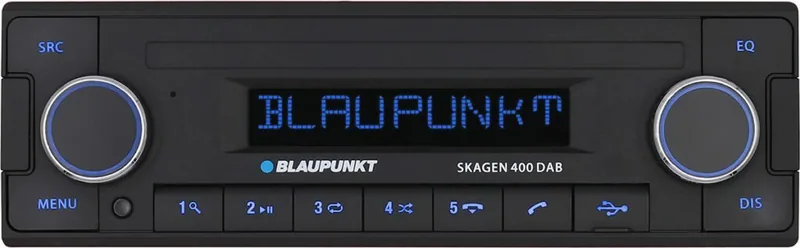
Its front-panel layout combines an LC display, dedicated source and menu buttons, station presets, phone controls, and two rotary knobs. The left control handles power, mute, and volume, while the right control manages station searches, track changes, browsing, fast-forwarding, and menu navigation. This arrangement makes everyday adjustments quick while keeping attention on the road.
Radio and Entertainment Options
The Skagen 400 DAB supports DAB/DAB+, FM, and AM radio, with options for station scanning, presets, programme type search, traffic announcements, and alternative-frequency support. DAB service scanning helps refresh the available station list, while service linking can continue a programme through another DAB channel or FM frequency when reception changes.
Music can be played from USB storage, Bluetooth devices, compatible Apple iPod and iPhone models, and a rear AUX input. Supported USB formats include common audio types such as MP3, WMA, FLAC, WAV, AAC, and MP2. Depending on the version, a CD drive may also be included for playback of standard 12 cm audio and data CDs. Track browsing, repeat, shuffle, pause, and scan functions provide useful control across supported sources.
Bluetooth Calling and Sound Control
Bluetooth connectivity lets the receiver pair with up to five devices, one at a time. It supports wireless music playback from compatible A2DP and AVRCP devices and includes hands-free calling through the integrated or supplied external microphone. Drivers can answer calls, access transferred phonebook entries, dial numbers manually, save frequently used contacts, or activate their phone's voice assistant.
Audio adjustments include bass, treble, balance, fader, loudness, preset EQ profiles, and configurable subwoofer output settings. Display brightness, scrolling, menu language, button color, clock format, startup volume, and scan duration can also be customized. Compatible analogue steering-wheel controls can be assigned through the SWC setup for a more integrated driving experience.
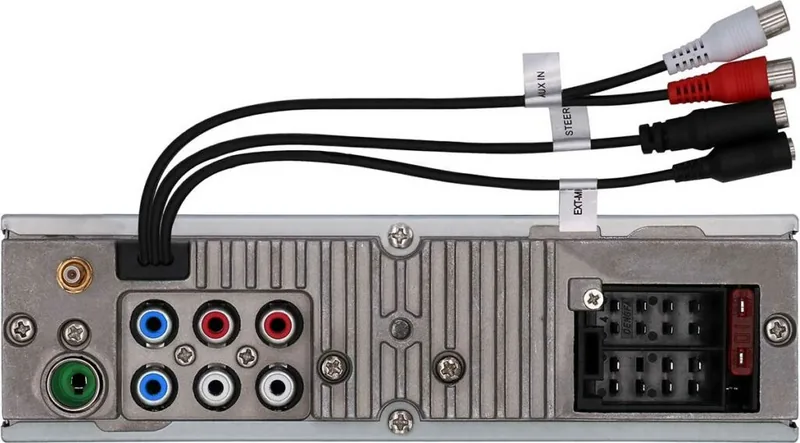
Note: Professional installation is recommended. Correct 12 V, ignition, antenna, and vehicle-specific adapter connections are important for reliable operation and battery protection.
Note: Bluetooth, phonebook access, media control, and Apple-device functions can vary by connected device and app.
Search for 67,706 Manuals online


Type-in Brand or Model
Lars N.
6 months ago
How good is the radio reception, especially with the included DAB antenna?
Manual.ly
6 months ago
Order processing and delivery are reported to be excellent. However, one user found the radio reception to be below average despite using a DAB antenna. Reception can depend on local signal coverage and antenna placement; positioning the antenna near a window and away from electronic devices may help.