
Blaupunkt Milano 200 BT Manual
PDF manual · 182 Pages
English



Quick check
Incorrect answer, please try again.
Chat with your Blaupunkt Milano 200 BT manual using AI
Get instant AI answers from your Blaupunkt Milano 200 BT manual
Ask anything about the Blaupunkt Milano 200 BT. Answers come from this manual, with the pages they are based on.
Ask a Question
Do you recommend Milano 200 BT?
Yes No
AspernaturQui91
7 months ago
Does this radio provide enough power for standard aftermarket speakers like JBL?
Frequently Asked Questions
Press the MENU button to access the user menu, select BLUETOOTH, and choose the pairing option. On your phone, search for 'Blaupunkt Milano' and confirm the connection code. Once paired, the radio will automatically connect when the phone is in range.
Is this answer helpful?
No, receiving DAB signals requires a dedicated DAB antenna. This can be a separate roof-mounted antenna or a combined DAB/AM/FM unit. Without it, the radio will only receive analog FM and AM broadcasts.
Is this answer helpful?
The unit supports MP3, WMA, FLAC, and AAC files stored on FAT16 or FAT32 formatted USB drives. Ensure the drive is formatted correctly before inserting it to avoid reading errors.
Is this answer helpful?
Yes, if the ignition is off but the radio remains powered, it will automatically shut down after one hour to prevent draining the vehicle battery.
Is this answer helpful?
Go to the TUNER menu, select FM TUNER, and enable TRAF ON. When active, the radio will automatically switch to traffic reports even if you are listening to music or another source.
Is this answer helpful?
It fits standard DIN slots, but you may need a specific adapter cable for your vehicle's wiring harness. Check with an authorized dealer to ensure proper fitment for your car model.
Is this answer helpful?
Advantages and Disadvantages
Advantages

- Seamless Bluetooth connectivity for hands-free calls and music streaming
- Support for DAB digital radio provides superior audio quality
- Versatile media playback via USB, AUX, and optional CD drive
- Travelstore feature automatically saves strong local stations
- Intuitive rotary control simplifies menu navigation
Disadvantages

- Requires separate DAB antenna for digital radio reception
- Some advanced features depend on specific regional settings
- CD model has larger dimensions than non-CD versions
- No built-in amplifier output for external subwoofers
- Straight AUX plugs may pose injury risks during accidents
Product Specification
Type
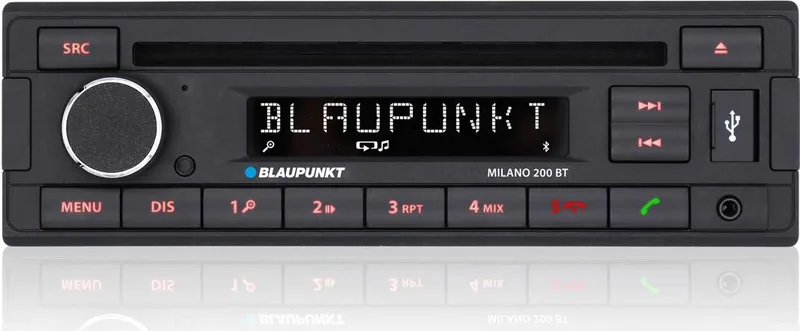
CD Receiver, 1-DIN
Display
7-Segment
Navigation
No
Tuner
FM, MW, LW
Media
CD (CD-R/RW), DVD (DVD-R/RW), USB Storage
Audio Formats
MP3, WMA
Power
4x 20W RMS, 4x 40W Peak
Connections
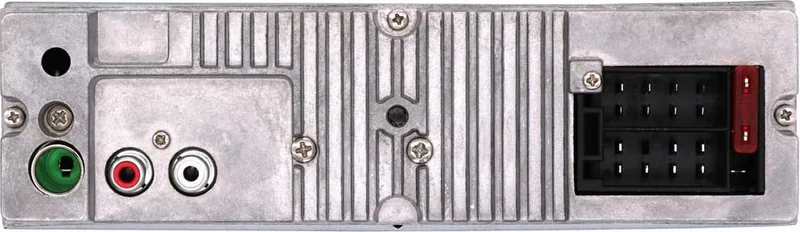
4x Preamp Output, 1x AUX In (Front), 1x USB 2.0 (Front), Bluetooth
Features
Hands-free Kit
Product Description
Experience Superior Sound with the Blaupunkt Milano 200 BT
The Blaupunkt Milano 200 BT stands as a testament to modern automotive audio engineering, blending classic reliability with contemporary connectivity. Designed for drivers who demand clarity and convenience, this unit serves as the central hub for your in-car entertainment system. Whether you are commuting through city traffic or embarking on a long highway journey, the Milano 200 BT ensures that your music, podcasts, and navigation updates remain crisp and accessible.
At the heart of this device lies its versatile connectivity options. The integrated Bluetooth functionality transforms your smartphone into a powerful tool for hands-free communication and wireless music streaming. With support for A2DP profiles, users can stream high-quality audio directly from their devices without the clutter of cables. The built-in microphone allows for clear voice calls, while features like phonebook synchronization and speed dialing ensure that staying connected is effortless and safe.
Audio flexibility is another key strength of the Blaupunkt Milano 200 BT. Beyond standard FM/AM radio reception enhanced by RDS technology for real-time traffic updates, the unit supports digital DAB broadcasting for superior sound quality where available. For physical media enthusiasts, models equipped with CD players offer compatibility with various formats including MP3 and WMA discs. Additionally, the front USB port and AUX-IN jack provide seamless integration for external storage drives and portable music players, allowing you to play your favorite tracks from almost any source.
User experience is prioritized through an intuitive control layout. The rotary volume knob doubles as a power switch and menu navigator, simplifying operation even while driving. The display offers customizable brightness settings to reduce glare at night, and multiple screen modes allow drivers to view station names, track titles, or time information instantly. Advanced features like the Travelstore function automatically scan and save the strongest local stations, ensuring you never miss your favorite channels again.
Important Notes for Installation
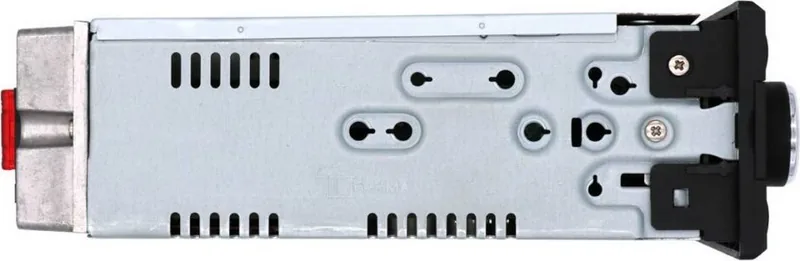
Before installing the Blaupunkt Milano 200 BT, ensure that the negative battery terminal is disconnected to prevent electrical shorts. Always use the provided disassembly tools to remove the existing unit safely. Verify that your vehicle's wiring harness matches the ISO connector standards or purchase the appropriate adapter cable from an authorized dealer. Do not attempt to modify the internal circuitry, as this voids the warranty and poses safety risks.
Key Features Summary
- Wireless Bluetooth calling and music streaming
- Digital Radio (DAB) support for crystal clear audio
- Multiple input options including USB, AUX, and CD
- Automatic traffic announcement priority
- Customizable display and equalizer settings
Search for 67,706 Manuals online


Type-in Brand or Model
Teagan Wood
5 months ago
Is the installation manual included in German or just available as a PDF download?
Manual.ly
5 months ago
The Blaupunkt Milano comes with a printed user manual in German included in the box, so you do not need to rely solely on a PDF download. This ensures you have clear instructions for the straightforward installation process.