
Blaupunkt Bluebot XTreme Manual
PDF manual · 44 Pages
English



Quick check
Incorrect answer, please try again.
Chat with your Blaupunkt Bluebot XTreme manual using AI
Get instant AI answers from your Blaupunkt Bluebot XTreme manual
Ask anything about the Blaupunkt Bluebot XTreme. Answers come from this manual, with the pages they are based on.
Bluebot XTreme Maintenance Schedule
If the robot is left unused for any length of time, charge it at least every three months to prevent battery damage.
Press the button to pull the dustbin out. Open, empty, and clean it before next use.
Remove the rolling brush cover, take out the brush, remove hair/dirt with a small brush, and reassemble.
Pull side brushes out upwards, remove hair and dirt, and reinstall ensuring L/R alignment until they click.
Remove filter gauze, sponge, and HEPA. Wash if needed, shake off water, dry completely, then reinstall in order.
Remove mop, empty water tank, wash mop (max 40C), and air dry both components naturally.
Wipe anti-drop sensors, charging contacts, and station signal area with a soft dry cloth. Power off robot first.
Free maintenance reminders
Timed to your purchase date. Always free, unsubscribe anytime.
Ask a Question
Do you recommend Bluebot XTreme?
Yes No
Tom Klein
7 months ago
Does the mop function work effectively for daily floor cleaning?
Frequently Asked Questions
Yes, the robot can vacuum carpets effectively using its Auto Boost feature which increases suction power. However, you must remove the mopping module or set a forbidden area in the app to prevent wetting the carpet.
Is this answer helpful?
No, the Blaupunkt Bluebot XTreme only supports 2.4GHz Wi-Fi networks. You must ensure your router separates 2.4GHz and 5GHz bands if they are currently combined.
Is this answer helpful?
You can wash the mopping cloth by hand or in a washing machine at a maximum temperature of 40°C. Do not use a tumble dryer; let it dry naturally before reattaching it to the robot.
Is this answer helpful?
If the battery level drops below 20%, the robot will automatically return to the charging station. Once charged back up to 80%, it will resume cleaning from where it left off.
Is this answer helpful?
Yes, through the Bluebot app, you can create virtual walls and restricted areas. This prevents the robot from entering specific rooms or crossing certain boundaries during cleaning.
Is this answer helpful?
No, this product is designed strictly for indoor household use. It should not be used on terraces, stairs without protection, or in commercial environments.
Is this answer helpful?
While the manual suggests regular cleaning, consumables like filters and brushes should be replaced when worn out. The app provides notifications when maintenance or replacement is required.
Is this answer helpful?
Advantages and Disadvantages
Advantages

- LDS laser navigation creates accurate maps for efficient cleaning paths
- Auto Boost technology increases suction power automatically on carpets
- Smart app integration allows remote control, scheduling, and zone management
- Long-lasting 5000mAh battery supports extended cleaning sessions
- 2-in-1 water tank provides adjustable water flow for different mopping needs
Disadvantages

- Mopping function is limited to surface wiping and cannot remove stubborn stains
- Requires 2.4GHz Wi-Fi network; does not support 5GHz bands
- Ineffective on very dark or highly reflective floors due to sensor limitations
- Cannot be used outdoors or on elevated surfaces like balconies or sofas
- Water tank must be removed during charging to ensure safety
Product Specification
Cleaning Robot
Battery
1x Battery (5.0Ah, Li-Ion)
Color
Black
Capacity
300ml Dust, 350ml Fresh Water
Recommended Room Size
Up to 2368 sq ft
Cleaning Modes
Mopping
Navigation
Laser Sensor, Camera (360° Camera System), Zones, Obstacle Avoidance (up to 0.79 in), Virtual Wall (Software)
Filtration
HEPA Filter
Features
1x Main Brush, 2x Side Brushes, Brushless Motor
Smart Home
App Control, Voice Assistant (Amazon Alexa, Google Assistant)
Runtime
230min
Charging Time
5h
Charging System
Automatic
Noise Level
70dB(A)
Dimensions
13.78x3.94 in (ØxH)
Weight
7.39 lbs
Package Contents
Station, Remote Control, 4x Side Brushes, Filter, 2x Mopping Pads, Cleaning Tool, Water Tank
Station
Station Color
Black
Station Features
Automatic Charging Function
Product Description
Discover the Blaupunkt Bluebot XTreme Saug-/Wischroboter
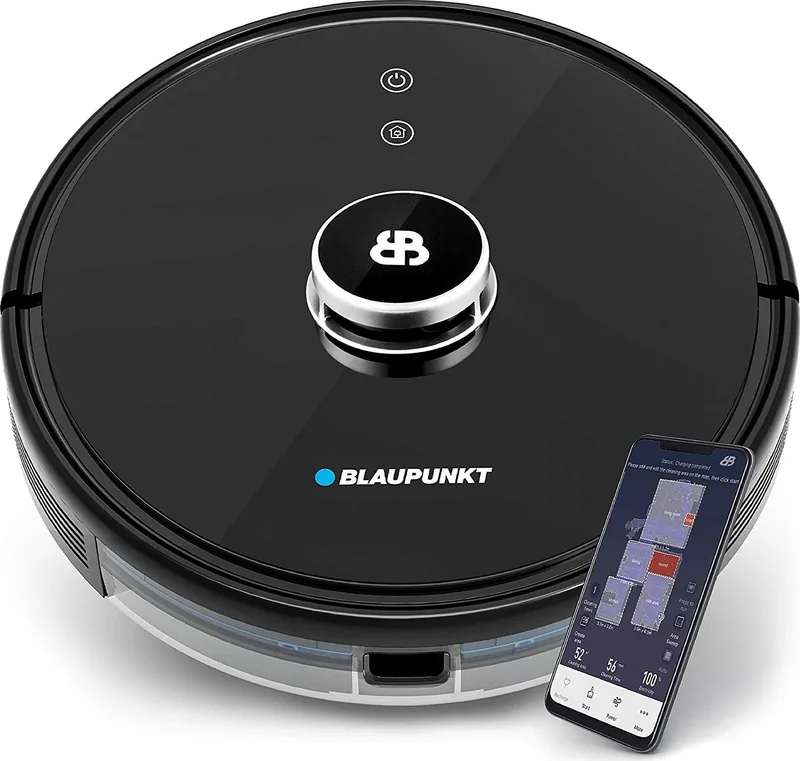
The Blaupunkt Bluebot XTreme is a versatile robotic vacuum and mop designed to simplify household cleaning. This intelligent device combines powerful suction with a 2-in-1 electrically controlled water tank for effective mopping, making it suitable for various floor types. The robot features an LDS laser ranging sensor that scans the environment to generate precise maps, allowing it to navigate efficiently in bow or S-shaped patterns while avoiding obstacles.
Equipped with a high-performance lithium-ion battery of 5000mAh, the Bluebot XTreme ensures long-lasting operation. It automatically returns to its charging station when the battery drops below 20% and resumes cleaning once fully charged. The device connects seamlessly via the Bluebot app, offering remote control, scheduling, and map management capabilities. Users can set no-go zones, adjust water flow levels, and monitor cleaning history directly from their smartphones. With a compact design measuring 350x350x100mm and weighing only 3.2 kg, it fits easily under furniture and into tight spaces.
Key Features and Benefits
This robot excels in both dry and wet cleaning tasks. The Auto Boost feature increases suction power on carpets, ensuring deep cleaning where needed. The HEPA filter system captures fine dust particles, improving indoor air quality. Safety is prioritized with anti-drop sensors that prevent falls down stairs and collision sensors that protect furniture. The unit operates quietly and includes a Do Not Disturb mode for scheduled quiet times.
Maintenance Tips
Regular maintenance extends the life of your Bluebot XTreme. Empty the dust bin after each use and clean the filters regularly. The mopping cloth should be washed by hand or in a machine at temperatures not exceeding 40°C. Always remove the water tank before charging to ensure safety. Keep the sensors clean to maintain optimal navigation performance.
Important Notes
Ensure the robot is used indoors only within a temperature range of 0°C to 40°C. Avoid using detergents in the water tank to prevent clogging. Do not place the robot on uneven surfaces or near open flames. Children should not operate the device as it is not a toy.
Search for 67,706 Manuals online


Type-in Brand or Model
Berniece Nienow
6 months ago
How reliable is the mobile app for controlling the robot and setting up no-go zones?
Manual.ly
6 months ago
The app allows users to control cleaning areas, set virtual walls, and schedule operations. While most users find it functional, some have reported occasional glitches that can be resolved by restarting the device or the phone. For detailed setup tips, we recommend downloading the user manual from our website.