
Bixolon XD5 Series Manual
PDF manual · 64 Pages
English



Quick check
Incorrect answer, please try again.
Chat with your Bixolon XD5 Series manual using AI
Get instant AI answers from your Bixolon XD5 Series manual
Ask anything about the Bixolon XD5 Series. Answers come from this manual, with the pages they are based on.
XD5 Series Maintenance Schedule
Turn off the printer. Remove adhesive or pollution from the print head using a cloth or cotton swab soaked in medical alcohol. Allow alcohol to evaporate completely (1-2 min) before use.
Turn off the printer. Remove dust or foreign substances with a dry cloth. Clean adhesive residues with a cloth or swab soaked in medical alcohol. Allow parts to dry completely before use.
Ask a Question
Do you recommend XD5 Series?
Yes NoFrequently Asked Questions
The primary difference lies in their printing speeds and resolution. The XD5-40t offers a maximum speed of 152mm/s (6ips) with 203 dpi resolution, while the XD5-43t provides a slower speed of 102mm/s (4ips) but with higher 300 dpi resolution for finer detail.
Is this answer helpful?
Yes, the Bixolon XD5 supports wireless connectivity through optional modules. You can equip the printer with Bluetooth or WLAN (Wi-Fi) adapters to enable wireless communication with computers, smartphones, or servers.
Is this answer helpful?
Always turn off the printer before cleaning. Use a cloth or cotton swab soaked in medical alcohol to gently wipe the print head. Ensure the area is completely dry before turning the printer back on to avoid damage.
Is this answer helpful?
Yes, if you purchase the optional Peeler module, the Bixolon XD5 can automatically separate printed labels from the liner, streamlining the application process for high-volume labeling tasks.
Is this answer helpful?
If the printer struggles to detect gaps, you can use the Gap Sensor Auto Calibration Mode found in the stand-alone configuration or settings menu to recalibrate the sensor for accurate detection.
Is this answer helpful?
Yes, the Bixolon XD5 supports firmware updates directly via USB storage. By placing the firmware file in a specific folder on a USB drive and selecting the update option in the menu, you can upgrade the device independently.
Is this answer helpful?
Advantages and Disadvantages
Advantages

- High printing speeds up to 152mm/s for efficient workflow
- Versatile connectivity with USB, Ethernet, Bluetooth, and WLAN options
- Smart media detection and auto-calibration reduce manual setup
- Optional peeler and auto-cutter enhance automation capabilities
- Compact design fits easily into various workspaces
Disadvantages

- Requires authorized supplies to maintain warranty and quality
- Print head becomes extremely hot during operation posing burn risks
- Some advanced features require additional optional hardware purchases
- Manual calibration may be needed for specialized media types
- Standard model lacks LCD display for direct menu navigation
Product Specification
Type
Label Printer
Roll Diameter
5 in
Paper Thickness
0.0024-0.0079 in
Print Width
4.16 in
Print Length
39.37 in
Memory
64 MB (RAM), 128 MB (Flash)
Emulation
BPL-E, BPL-Z, SLCS
Dimensions
7.64x9.76x6.65 in
Manufacturer Warranty
1 year
Product Description
Bixolon XD5: The Ultimate Thermal Transfer Label Printer
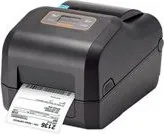
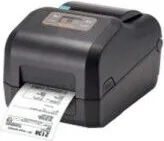
The Bixolon XD5 series represents a significant leap in thermal transfer label printing technology, designed for seamless integration with various electronic devices. Whether you are managing a busy warehouse or a retail environment, this printer offers the speed and reliability needed to keep operations running smoothly. With models like the XD5-40t and XD5-43t, users can choose between maximum speeds of 152mm/s or 102mm/s, ensuring that high-volume printing tasks are completed efficiently without compromising quality.
At its core, the Bixolon XD5 is a versatile 4-inch thermal transfer label printer. Its compact design measures 211 x 285 x 188 mm, making it easy to fit on any workspace while providing ample functionality. The device supports a wide range of interfaces, including standard USB and USB Host connections. For more complex setups, optional configurations add Serial, Ethernet, Bluetooth, and WLAN capabilities, allowing for flexible connectivity options tailored to specific network requirements. This adaptability ensures that the printer can be easily incorporated into existing workflows without extensive reconfiguration.
One of the standout features of the Bixolon XD5 is its ease of use. The media loading process is intuitive, allowing users to quickly swap out rolls without hassle. The printer also supports an array of barcode types, making it suitable for diverse labeling needs from simple product tags to complex inventory tracking codes. Optional accessories further enhance its utility; the Peeler option automates label separation, while the Auto Cutter provides clean, precise cuts for continuous roll applications. Additionally, the LCD model offers an interactive display for real-time status monitoring and menu navigation, simplifying setup and troubleshooting.
Safety and maintenance are prioritized in the design of the Bixolon XD5. Clear warnings and cautions guide users on proper handling, power connection, and cable management to prevent accidents and equipment damage. Regular maintenance, such as cleaning the print head and sensors with medical alcohol, ensures consistent print quality over time. The printer also features smart media detection and auto-calibration modes, which automatically adjust to different media types, reducing manual intervention and minimizing errors.
In summary, the Bixolon XD5 is a robust, efficient, and user-friendly solution for professional label printing. Its combination of speed, connectivity, and intelligent features makes it an ideal choice for businesses seeking reliable performance in demanding environments.
Search for 67,732 Manuals online


Type-in Brand or Model