
Bixolon XD3-40d Manual
PDF manual · 38 Pages
English



Quick check
Incorrect answer, please try again.
Chat with your Bixolon XD3-40d manual using AI
Get instant AI answers from your Bixolon XD3-40d manual
Ask anything about the Bixolon XD3-40d. Answers come from this manual, with the pages they are based on.
XD3-40d Maintenance Schedule
Open the paper cover and clean the printhead using a cloth or cotton swab soaked in medical alcohol. Wait 1-2 minutes for evaporation before use.
Remove dust with a dry cloth or soak a swab in medical alcohol to remove adhesive substances from the sensor, roller, and media path.
Ask a Question
Do you recommend XD3-40d?
Yes NoFrequently Asked Questions
The XD3 ships with USB B-Type as the standard interface. Optional interface modules are available for Serial (RS-232C) and Ethernet (LAN) connections to accommodate different host systems.
Is this answer helpful?
Use the stand-alone configuration mode (press feed >3s) and select sequence 2 for gap auto calibration or sequence 3 for black mark auto calibration. If auto calibration fails, use the manufacturer utility for manual sensor calibration and save optimal sensing values.
Is this answer helpful?
Regularly clean the thermal print head, platen roller, sensors and media path with an alcohol-soaked cloth or swab after powering off and cooling the printer. Replace rollers when worn. Perform cleaning each time you change media to avoid adhesive buildup and degraded output.
Is this answer helpful?
Run the printer self-test by powering on while holding the feed button to print configuration info. Use data dump mode (stand-alone sequence 5) to print incoming data in hex for diagnosing communication issues. Contact authorized support for persistent faults.
Is this answer helpful?
The XD3 accepts label widths from 15 to 118 mm and supports rolls with a maximum outer diameter of 127 mm on 25.4–38 mm cores. It also supports fan-fold and external large-capacity media with optional external supplier units.
Is this answer helpful?
Yes, the XD3 offers a peeler option that automatically separates labels from the liner. The peeler must be enabled via the peeler switch and media must be loaded per the peeler installation procedure. Auto cutter specifics depend on model/configuration.
Is this answer helpful?
The printer uses a 24V DC SMPS adapter (AC 100–240V input, 2.5A output). Operating temperature range is 0–40°C and storage -20–60°C, with operating humidity 10–80% RH. Use only the supplied or authorized power adapter to avoid damage.
Is this answer helpful?
Advantages and Disadvantages
Advantages

- Fast direct thermal printing up to 127 mm/s with 203 dpi resolution for clear labels and barcodes.
- Flexible connectivity: USB standard with optional serial and Ethernet for varied system integration.
- Easy media handling with simple loading, peeler option, and support for fan-fold or external media.
- Built-in calibration, self-test, and data-dump troubleshooting modes simplify setup and diagnostics.
- Compact footprint (181 x 222 x 168 mm) supports media rolls up to 127 mm diameter for space-limited locations.
Disadvantages

- Direct thermal method requires heat-sensitive labels and is not suitable for long-term archival without protective overlays.
- Optional interfaces (serial, Ethernet) require additional modules or configurations, adding cost and setup time.
- Print head can become very hot during operation; requires cooling time and careful handling during maintenance.
- Auto sensor calibration may fail with very unusual media types, necessitating manual calibration via utility.
- Replacement parts and authorized supplies are required to maintain warranty and avoid damage, limiting third-party options.
Product Specification
Type
Label Printer
Print Resolution
203dpi
Roll Diameter
5.00in
Print Width
4.09in
Print Length
39.37in
Print Speed
5.00in/s
Memory
64MB (RAM), 128MB (Flash)
Display
N/A
Emulation
BPL-E, BPL-Z, vSLCS
Manufacturer Warranty
1 Year
Product Description
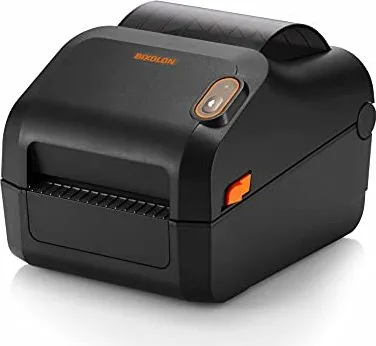
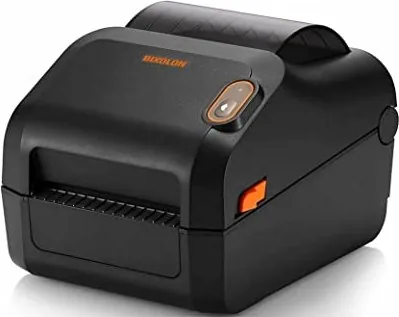
Bixolon XD3 — Reliable 4-inch Thermal Label Printer
The Bixolon XD3 is a compact, high-performance 4-inch direct thermal label printer built for retail, logistics, manufacturing, and office environments. With a maximum print width of 104 mm and top speeds up to 127 mm/s, the XD3 balances speed and clarity for barcode labels, shipping tags, and product identification. It supports USB as standard, with optional serial and Ethernet interfaces for flexible connectivity in diverse setups.
Designed for everyday use, the XD3 offers easy media loading, clear LED status indicators, and an intuitive feed button that handles label feeding, pause/resume and entry to stand-alone configuration mode. The device’s 203 dpi resolution ensures crisp text and barcode reproduction. Physical dimensions are compact (181 x 222 x 168 mm) and the unit accepts media rolls up to 127 mm diameter with label widths from 15 to 118 mm.
Operational convenience is enhanced through features like auto and manual sensor calibrations for gap or black mark detection, a peeler option for automatic label separation, and support for fan-fold or external media supplies including a large-capacity roll option. The printer includes diagnostic tools such as a self-test and a data-dump mode that prints incoming data in hex for troubleshooting communication issues.
Maintenance is straightforward: the XD3 recommends routine cleaning of the thermal head, platen rollers, sensors, and media path to maintain print quality. Replaceable roller assemblies and clear guidance for safe handling and power connection reduce downtime. The printer runs on a 24V DC SMPS adapter and operates reliably across typical working temperature and humidity ranges.
Safety and compliance are covered with clear precautions about power, grounding, static protection, and handling hot components. Bixolon provides supporting utilities and separate manuals for driver installation, label design, programming commands, font downloading, and Ethernet interface configuration to extend functionality and integration with existing systems.
Overall, the XD3 is a practical, user-friendly label printer offering dependable performance, flexible connectivity, and maintenance-friendly design suited to small-to-medium volume printing environments.
Notes
- Use only manufacturer-approved power supplies and media to avoid damage and preserve warranty.
- Perform sensor calibration (auto or manual) when switching label types to ensure accurate detection.
- Clean the thermal head and rollers after media changes or when print quality degrades.
Search for 67,732 Manuals online


Type-in Brand or Model