
Bixolon SPP-R200III Manual
PDF manual · 32 Pages
English



Quick check
Incorrect answer, please try again.
Chat with your Bixolon SPP-R200III manual using AI
Get instant AI answers from your Bixolon SPP-R200III manual
Ask anything about the Bixolon SPP-R200III. Answers come from this manual, with the pages they are based on.
SPP-R200III Maintenance Schedule
Use a cloth or cotton swab soaked in medical alcohol to clean the printhead and remove paper dust from the sensor. Do this after consuming ten rolls of linerless paper (100 meters) or more than once a week.
If the equipment is not used for a long time, charge the battery with the supplied charger at least once every six months to prevent performance degradation.
Free maintenance reminders
Timed to your purchase date. Always free, unsubscribe anytime.
Ask a Question
Do you recommend SPP-R200III?
Yes NoDo you recommend SPP-R200III?
Yes NoFrequently Asked Questions
To switch modes, turn on the printer, open the cover, and hold the paper feed button for more than two seconds until a buzzer sounds. Insert the paper and close the cover. Repeat these steps to return to receipt mode.
Is this answer helpful?
The printer achieves a maximum speed of 100 mm per second when using standard receipt paper and 80 mm per second when printing on linerless paper.
Is this answer helpful?
Yes, the SPP-R200III supports Bluetooth Class 2 V3.0 + EDR and features NFC auto-pairing for easy connection to compatible smartphones and PDAs.
Is this answer helpful?
It is recommended to clean the print head after consuming ten rolls of linerless paper or at least once a week to prevent dust buildup and ensure consistent print quality.
Is this answer helpful?
When the battery is fully charged, three blue indicator lights will illuminate on the control panel, signaling that the unit is ready for continuous use.
Is this answer helpful?
No, the SPP-R200III uses a manual tear-bar cutter located at the front of the device rather than an automatic blade cutter.
Is this answer helpful?
While the printer is durable, its wireless communications are limited to indoor use, and extreme temperatures outside the specified operating range may affect performance.
Is this answer helpful?
Advantages and Disadvantages
Advantages

- Highly portable with a lightweight design under 200 grams
- Versatile connectivity via Bluetooth, NFC, and Wireless LAN
- Supports both receipt and linerless label printing modes
- Fast print speed up to 100 mm per second
- Multiple charging options including vehicle and dock cradles
Disadvantages

- Requires manual calibration for certain label types if gaps are not detected
- Print head requires periodic cleaning to maintain optimal quality
- Limited to indoor use due to communication range restrictions
- Optional accessories like cases and cradles are sold separately
- Battery capacity may degrade over time with heavy usage
Product Specification
Type
mobile bond printer
Technology
direct thermal
Print resolution
203 dpi
Roll diameter
1.57 in
Paper thickness
0.0028 in
Print width
1.89 in
Print speed
3.94 in/s
Memory
8MB (RAM), 4MB (Flash)
Connections
USB 2.0, serial
Network
Bluetooth 3.0
Display
N/A
Emulation
POS, BXL
Dimensions
3.13x4.99x1.70 in
Weight
8.04 oz
Features
IP43 certified, battery (Li-Ion, 1200mAh)
Manufacturer warranty
2 years
Product Description
Bixolon SPP-R200III: The Ultimate Mobile Thermal Printer
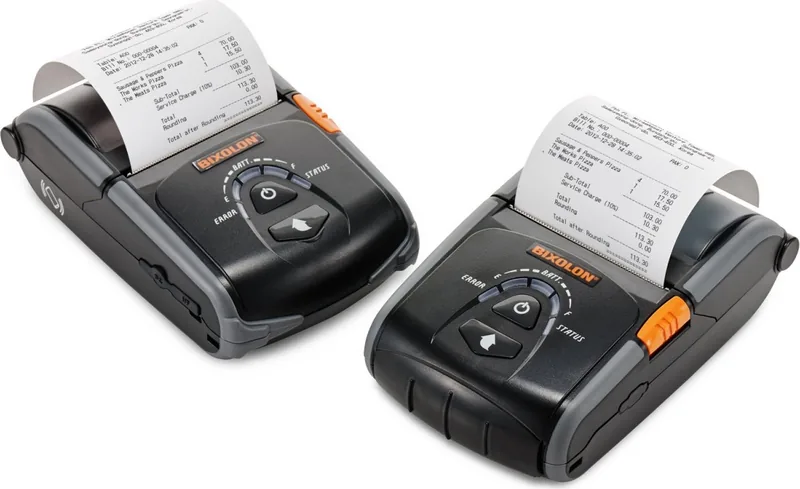
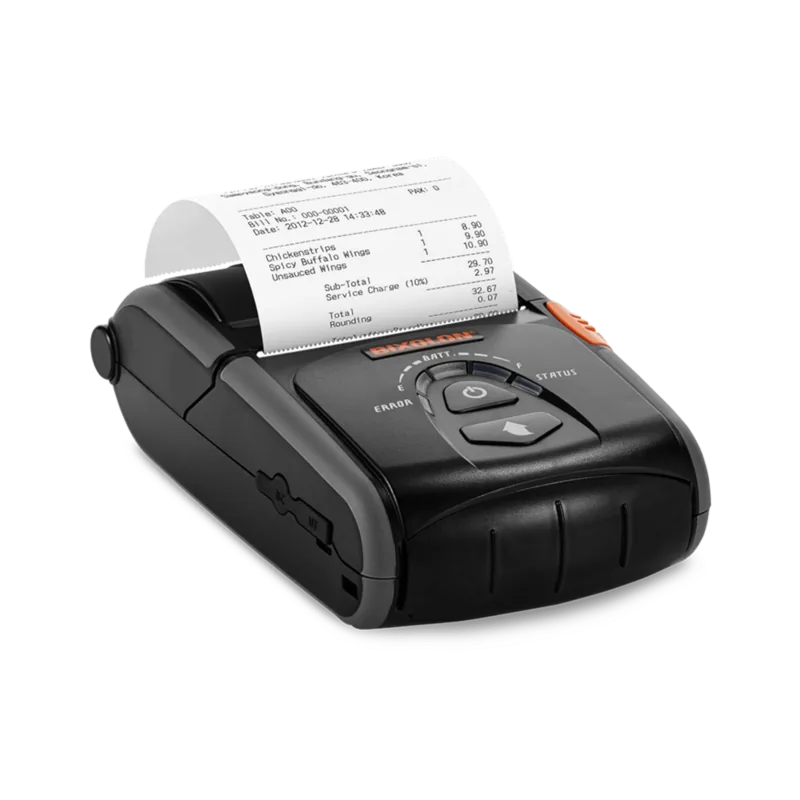
The Bixolon SPP-R200III Bluetooth dark gray thermal direct printer stands as a robust solution for professionals requiring mobility and reliability. Designed with a sleek dark gray finish, this compact device integrates seamlessly into mobile workflows for retail, logistics, and field services. Its thermal direct printing technology ensures crisp receipts and labels without the need for ink or toner, making it an eco-friendly and cost-effective choice.
Portability is at the heart of the SPP-R200III design. Weighing just 183 grams, it fits easily into a pocket or attaches securely to a belt using the included clip or optional strap. The internal rechargeable lithium-ion battery provides extended operation, allowing users to print throughout their shifts without interruption. Charging is versatile, supporting standard wall chargers, vehicle adapters, and optional docking cradles for rapid power replenishment.
Connectivity defines the modern utility of this printer. Equipped with Bluetooth Class 2 V3.0 + EDR and NFC auto-pairing, it connects effortlessly to smartphones, tablets, and PCs. For environments where wireless signals are unstable, the optional interface cables offer reliable USB or Serial connections. Additionally, Wireless LAN support in Ad-hoc or Infrastructure modes expands its network capabilities significantly.
Versatility extends to media handling. The printer supports both receipt paper and linerless label stock, adapting to various business needs through simple mode switching. An automatic calibration function ensures precise label alignment, while the tear-bar cutter provides clean finishes on every transaction. Maintenance is straightforward; regular cleaning of the printhead keeps print quality optimal even when using linerless paper.
Key Features Summary
- Compact and lightweight design for maximum portability.
- Dual connectivity options including Bluetooth and Wireless LAN.
- Supports receipt and label printing with auto-calibration.
- Long-lasting battery with multiple charging solutions.
- Durable construction suitable for demanding mobile environments.
Search for 67,732 Manuals online


Type-in Brand or Model