
Bitspower ASUS ROG Dominus Extreme Manual
PDF manual · 3 Pages
English



Quick check
Incorrect answer, please try again.
Chat with your Bitspower ASUS ROG Dominus Extreme manual using AI
Get instant AI answers from your Bitspower ASUS ROG Dominus Extreme manual
Ask anything about the Bitspower ASUS ROG Dominus Extreme. Answers come from this manual, with the pages they are based on.
Ask a Question
Do you recommend ASUS ROG Dominus Extreme?
Yes NoFrequently Asked Questions
This block is specifically designed for the ASUS ROG Dominus Extreme MOSFET layout. Compatibility with other motherboards is unlikely due to unique mounting points and pad positions; verify board layout before purchasing.
Is this answer helpful?
Bitspower recommends distilled or purified water mixed with Bitspower dye. Using other coolants can cause plating corrosion, channel clogging, pump issues, tubing failure, or O-ring deformation, and any resulting damage is the user’s responsibility.
Is this answer helpful?
Install all components, fill the loop, then power only the pump (do not turn on the PC). Run the pump for 24 hours while checking all fittings and seams for leakage. Only power the PC after confirming there are no leaks.
Is this answer helpful?
The kit includes thermal pads (1.5 mm and 11.5 mm variants), plastic washers, M2.5 screws (various lengths), and mounting hardware matched to the ROG Dominus Extreme. Exact parts and colors may vary with production.
Is this answer helpful?
No. Do not run the pump dry. Operating the pump without coolant can damage it and lead to failures; always ensure the reservoir is filled before powering the pump.
Is this answer helpful?
Immediately power down the pump and PC, identify the leak source, re-seat fittings or replace damaged O-rings, then repeat a 24-hour pump-only leak test. If damage occurred, consult Bitspower support for guidance.
Is this answer helpful?
Yes. Bitspower reserves the right to modify product design, colors, and included accessories without prior notice; the shipped item’s contents and appearance are the final reference.
Is this answer helpful?
Advantages and Disadvantages
Advantages

- Custom-fit design for ASUS ROG Dominus Extreme ensures optimal MOSFET contact and heat transfer.
- Includes thermal pads, washers, and screws for a complete installation kit.
- Durable construction and refined finish enhance system aesthetics and longevity.
- Promotes stable operation under heavy loads by lowering MOSFET temperatures.
- Clear safety guidance (24-hour leak test, do not run pump dry) reduces risk of damage.
Disadvantages

- Requires careful installation and correct thermal pad placement to function properly.
- Using non-recommended coolants can damage components and void responsibility.
- May need exact screw sizing and parts verification which can be fiddly for novices.
- Design or accessory changes may occur without notice, causing mismatches with expectations.
- Not a universal block — only compatible with ASUS ROG Dominus Extreme layout.
Product Specification
Type
Mosfet
Compatibility
ASUS ROG Dominus Extreme
Connectors
G1/4"
Product Description
Bitspower Mosfet Block ASUS ROG Dominus Extreme Manual
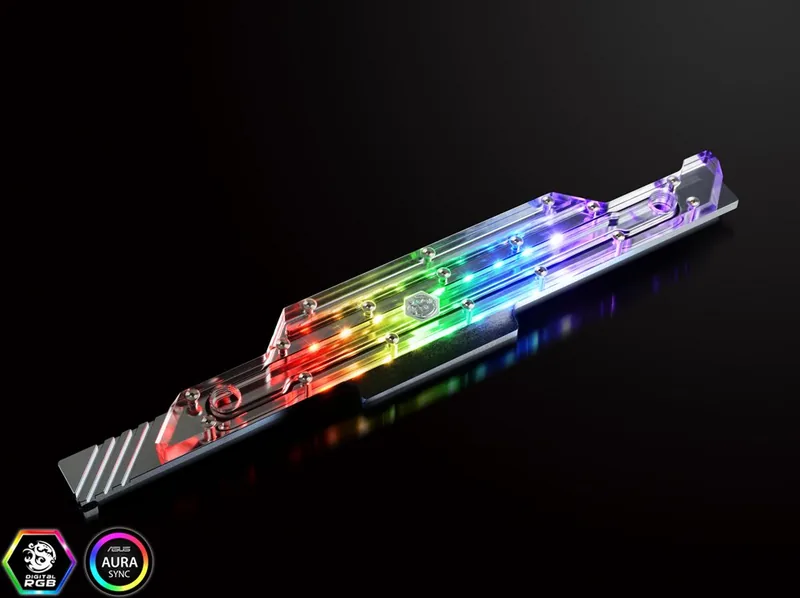
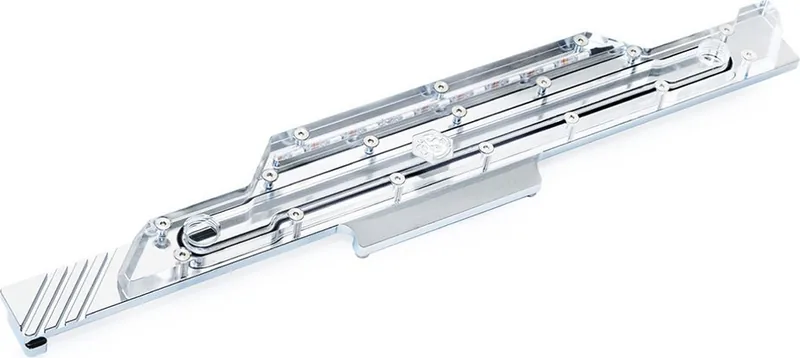
The Bitspower Mosfet Block for the ASUS ROG Dominus Extreme is a precision-engineered water-cooling accessory designed to deliver efficient thermal management for high-performance motherboards. Tailored specifically for the ROG Dominus Extreme platform, this block integrates snugly with the board’s MOSFET array, providing targeted cooling where power delivery components generate the most heat. Built from quality materials and finished with Bitspower’s signature attention to detail, it promises improved stability under heavy loads and cleaner system aesthetics for custom loop enthusiasts.
Installation is straightforward but requires careful preparation. The kit includes thermal pads, washers, and screws sized for a secure fit. Before operating the system, confirm every component is installed correctly and perform a 24-hour leak test with only the pump powered to ensure there are no leaks. Bitspower recommends distilled or purified water mixed with Bitspower dye as the coolant; using other fluids can corrode plating, clog channels, damage pumps, or deform seals, and such issues are the user’s responsibility.
The product comes with multiple 1.5 mm and 11.5 mm thermal pads for correct contact with MOSFETs and related components, plus M2.5 screws and plastic washers to secure the block. Its layout matches the ASUS ROG Dominus Extreme’s MOSFET arrangement for optimal contact and thermal transfer. Careful application of thermal pads in the specified positions ensures efficient heat conduction from components to the block.
Safety and longevity are emphasized: do not power the pump with an empty reservoir, and always verify part placement prior to filling the loop. Bitspower reserves the right to change design or accessories without notice; final product color and included parts are determined by the shipped item.
Notes:
- Perform a 24-hour leak test with only the pump powered before using the PC.
- Use distilled/purified water with Bitspower dye; other coolants may void responsibility for damage.
- Do not run the pump dry. Ensure thermal pads are placed as specified for best results.
Search for 67,706 Manuals online


Type-in Brand or Model