
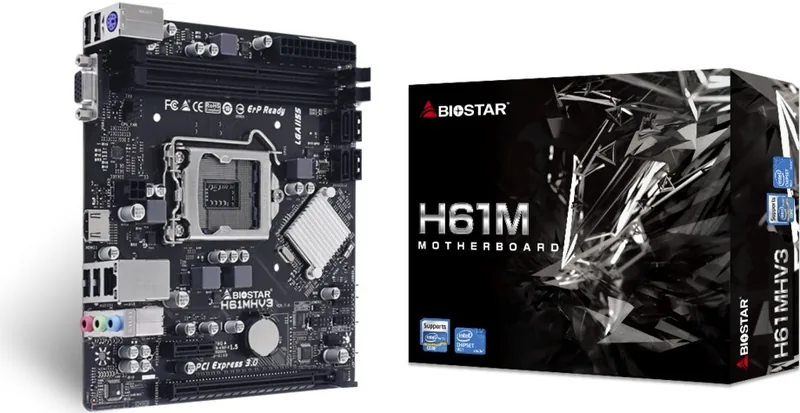
Biostar H61MHV3 Manual
PDF manual · 109 Pages
English



Quick check
Incorrect answer, please try again.
Chat with your Biostar H61MHV3 manual using AI
Get instant AI answers from your Biostar H61MHV3 manual
Ask anything about the Biostar H61MHV3. Answers come from this manual, with the pages they are based on.
Ask a Question
Do you recommend H61MHV3?
Yes No
Leanne Hunter
5 months ago
Are there any known issues or improvement suggestions for this motherboard in its price range?
Frequently Asked Questions
This motherboard supports Intel LGA1155 socket processors, including Core i7, i5, i3, Pentium, and Celeron series.
Is this answer helpful?
It supports up to 16 GB of DDR3 memory across two DIMM slots, running at speeds of 1066, 1333, or 1600 MHz depending on the CPU.
Is this answer helpful?
Yes, it includes one HDMI port and one VGA port, both utilizing the integrated Intel graphics processor.
Is this answer helpful?
Yes, it has one PCIe 3.0 x16 slot compatible with most standard graphics cards, though bandwidth depends on the CPU used.
Is this answer helpful?
You can use the BIOSTAR BIOS-FLASHER utility from a USB drive or the BIOSTAR BIOS Update Utility within Windows.
Is this answer helpful?
It officially supports Windows 7, 8, 8.1, and 10, though specific driver availability may vary.
Is this answer helpful?
Yes, it uses standard cooling solutions and lacks active fan noise issues common in older boards, provided case airflow is adequate.
Is this answer helpful?
Advantages and Disadvantages
Advantages

- Supports latest Intel LGA1155 processors including Core i series
- Dual-channel DDR3 memory support up to 16GB capacity
- Integrated HDMI and VGA ports for versatile display connections
- Comes with easy-to-use BIOS update utilities for maintenance
- Compact uATX form factor fits smaller computer cases
Disadvantages

- Limited to SATA II speeds which may bottleneck newer SSDs
- Only two DDR3 DIMM slots limit maximum upgrade potential
- No native PCIe 3.0 x16 slot support for high-end graphics cards
- Basic audio codec may not satisfy audiophile requirements
- Lacks built-in Wi-Fi or Bluetooth connectivity options
Product Specification
Form Factor
µATX
Socket
Intel 1155
Chipset
Intel H61 (B3)
RAM
2x DDR3 DIMM, dual PC3-12800U/DDR3-1600, max. 16GB (UDIMM)
Expansion Slots
1x PCIe 3.0 x16, 1x PCIe 2.0 x1
External Ports
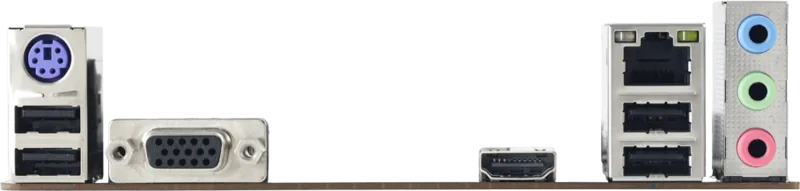
1x VGA (iGPU), 1x HDMI 1.4 (iGPU), 4x USB-A 2.0 (480Mb/s), 1x LAN (Realtek RTL8111H), 3x Jack, 1x PS/2 Combo
Internal Ports
2x USB 2.0 Header (480Mb/s, 4x USB 2.0), 4x SATA 3Gb/s (H61), 1x Serial
Cooling Headers
1x CPU Fan 4-Pin, 1x Fan 3-Pin
Lighting Headers
N/A
Buttons/Switches
N/A
Audio
7.1 (Realtek ALC897)
Graphics
iGPU
Wireless
N/A
RAID Level
N/A
Multi-GPU
N/A
Power Connectors
1x 24-Pin ATX, 1x 4-Pin ATX12V
Lighting
N/A
Features
B3 Stepping, All solid capacitors
USB Spelling
Link
Product Description
Biostar H61MHV3 Motherboard Overview
The Biostar H61MHV3 is a reliable micro-ATX motherboard designed for users seeking a stable and cost-effective platform for everyday computing tasks. Built around the Intel H61 chipset, this board supports a wide range of Intel processors including Core i7, i5, i3, Pentium, and Celeron models with the LGA1155 socket. It serves as an excellent foundation for home offices, educational setups, or light gaming rigs where budget efficiency is key without sacrificing essential connectivity.
Equipped with dual-channel DDR3 memory support, the H61MHV3 allows for up to 16 GB of RAM, ensuring smooth multitasking for standard applications. The board features four SATA II ports for storage expansion, accommodating both traditional hard drives and solid-state drives for faster boot times. Connectivity options are robust for its class, offering integrated HDMI and VGA outputs that work seamlessly with Intel integrated graphics, allowing users to connect modern displays or older monitors easily.
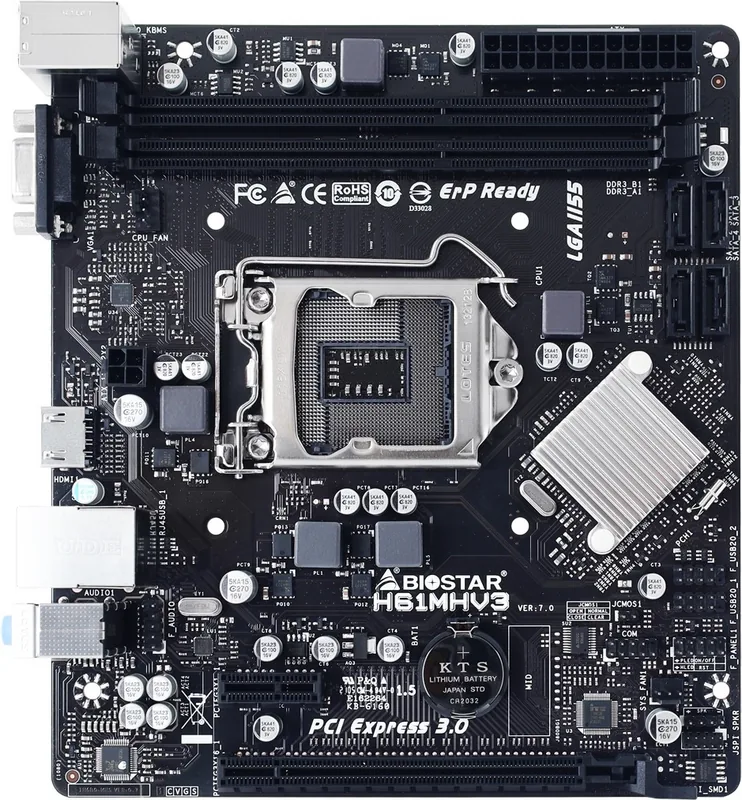
Installation is straightforward thanks to clear documentation included in the package. The layout includes dedicated headers for front panel USB connections, audio inputs, and system fans, providing flexibility for custom PC builds. The UEFI BIOS setup offers intuitive navigation for adjusting system settings, while the BIOSTAR BIOS Update utility simplifies keeping firmware current directly from Windows or via USB drive. Whether you are upgrading an old system or building a new one on a tight budget, the Biostar H61MHV3 delivers dependable performance with essential features for modern usage.
Important Notes
- Ensure proper grounding when handling the motherboard to prevent static damage.
- Use a standard ATX 24-pin power supply for optimal compatibility.
- Dual-channel memory mode requires installing identical modules in pairs.
- Clear CMOS procedures should be followed carefully if resetting BIOS settings.
Search for 67,732 Manuals online


Type-in Brand or Model
Tijmen
6 months ago
Is this Biostar H61M motherboard suitable for upgrading an old LGA 1155 Intel Core 2000/3000 series CPU?
Manual.ly
6 months ago
Yes, the Biostar H61M is designed specifically for LGA 1155 processors, including older Intel Core 2nd and 3rd generation CPUs. It offers solid build quality and meets expectations for budget-friendly upgrades of legacy systems.