
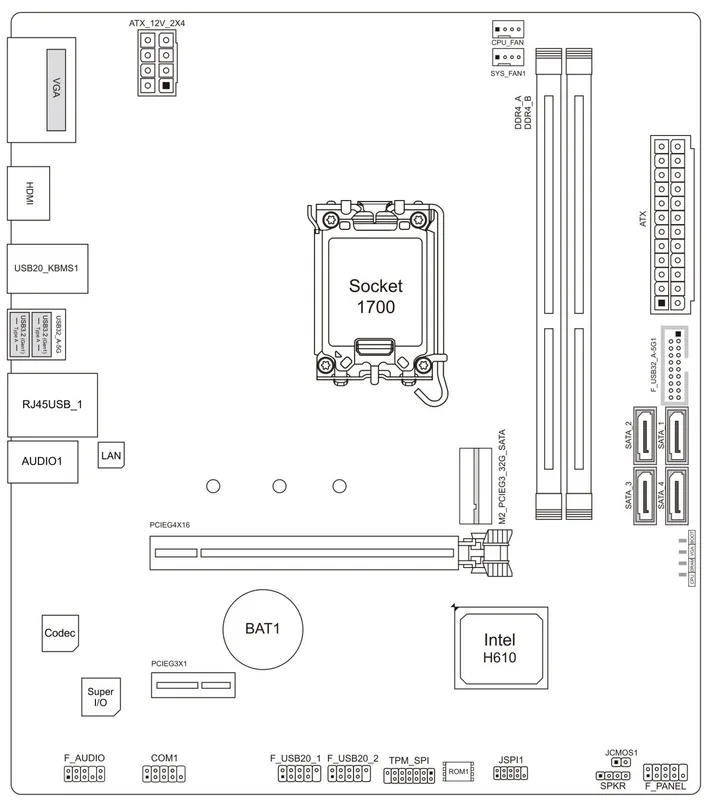
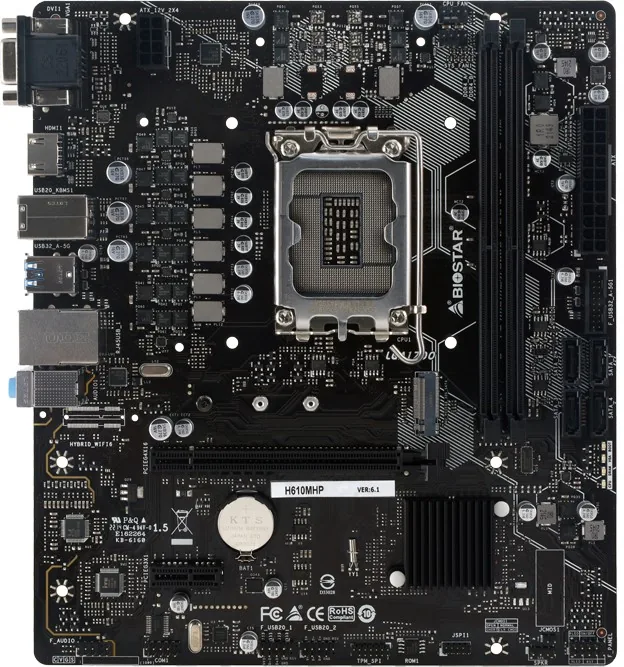
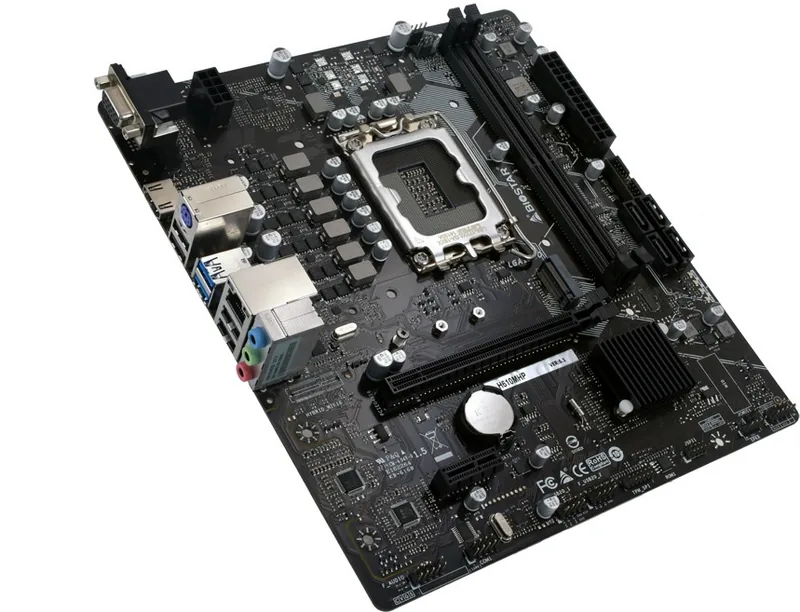
Biostar H610 Series Manual
PDF manual · 160 Pages
English



Quick check
Incorrect answer, please try again.
Chat with your Biostar H610 Series manual using AI
Get instant AI answers from your Biostar H610 Series manual
Ask anything about the Biostar H610 Series. Answers come from this manual, with the pages they are based on.
Ask a Question
Do you recommend H610 Series?
Yes NoFrequently Asked Questions
It supports 12th Generation Intel Core i9/i7/i5/i3, Pentium, and Celeron processors in the LGA1700 package.
Is this answer helpful?
It supports up to 64 GB of DDR4 memory across two DIMM slots, with speeds ranging from 1866 to 3200 MHz.
Is this answer helpful?
Most variants do not include a Wi-Fi card. Some models have an M.2 E-Key slot for adding a Wi-Fi module separately.
Is this answer helpful?
Yes, it features a PCIe 4.0 x16 slot compatible with modern graphics cards for enhanced gaming and rendering performance.
Is this answer helpful?
Yes, you can update the BIOS using the BIOSTAR BIO-Flasher utility from a USB drive or via the Windows-based update tool.
Is this answer helpful?
The motherboard officially supports Windows 10 and Windows 11 in 64-bit versions.
Is this answer helpful?
Advantages and Disadvantages
Advantages

- Supports 12th Gen Intel Core processors with LGA1700 socket
- Dual-channel DDR4 memory support up to 64GB at 3200MHz
- Includes PCIe 4.0 x16 slot for modern graphics cards
- Multiple video outputs including HDMI, VGA, and DVI
- Realtek ALC897 audio codec for 7.1 channel sound
Disadvantages

- No onboard Wi-Fi module included in most variants
- Limited number of M.2 slots compared to higher-end boards
- Does not support overclocking due to H610 chipset limitations
- Only two DIMM slots limit maximum memory expansion potential
- Basic VRM design may struggle with high-end CPUs under heavy load
Product Specification
Form Factor
µATX
Socket
Intel 1700
Chipset
Intel H610
CPU Compatibility
Core i-14000, Core i-13000, Core i-12000, Pentium Gold G7000, Celeron G6000
Cooling Headers
1x CPU Fan 4-Pin, 1x Fan 4-Pin
Lighting Headers
N/A
Buttons/Switches
N/A
Audio
7.1 (Realtek ALC897)
Graphics
iGPU
Wireless
N/A
RAID Level
N/A
Multi-GPU
N/A
Power Connectors
1x 24-Pin ATX, 1x 8-Pin EPS12V
Lighting
N/A
Features
All solid capacitors, Onboard TPM 2.0 Support (Intel PTT)
Manufacturer Warranty
Three years (from production date, handled by authorized retailer)
USB Spelling
Link
Product Description
Biostar H610 Motherboard: A Solid Foundation for Your PC Build
The Biostar H610 series represents a reliable entry point into modern computing, designed to support the latest 12th Generation Intel Core processors. Whether you are building a budget-friendly office machine or a home theater PC, this motherboard offers the essential features needed for stable performance without unnecessary complexity. The platform centers around the Intel H610 chipset, ensuring compatibility with a wide range of CPUs including i9, i7, i5, i3, Pentium, and Celeron models in the LGA1700 package.
Performance is enhanced by support for dual-channel DDR4 memory running at speeds up to 3200 MHz, with a maximum capacity of 64 GB. This flexibility allows users to upgrade their system as needs grow while maintaining cost-effectiveness. Storage options are plentiful, featuring one M.2 socket for high-speed NVMe SSDs and four SATA III ports for traditional hard drives or additional storage expansion. The board also includes a PCIe 4.0 x16 slot for graphics cards and a PCIe 3.0 x1 slot for other expansion cards like sound or network adapters.
Connectivity is well-rounded for everyday tasks. Most variants come equipped with HDMI, VGA, and DVI output ports, allowing connection to various monitors using integrated Intel graphics. USB connectivity includes multiple USB 3.2 Gen1 and USB 2.0 ports both on the rear panel and via internal headers for front case connections. Audio is handled by the Realtek ALC897 codec, providing 7.1 channel High Definition audio for immersive sound experiences. Network capabilities are provided by the Intel I219V Gigabit LAN controller, ensuring fast and stable internet connections.
Installation is straightforward thanks to clear labeling and logical layout. The manual guides users through CPU installation, heatsink mounting, and memory seating with step-by-step instructions. Debug LEDs help identify hardware issues during the boot process, making troubleshooting easier for beginners. The UEFI BIOS interface allows for easy configuration of system settings and updates can be performed conveniently using the BIOSTAR BIO-Flasher utility or within Windows.
Important Notes
Always ensure the computer is disconnected from power before installing components to prevent damage. Use an anti-static wrist strap when handling the motherboard to avoid electrostatic discharge. When installing the CPU, ensure the correct orientation and do not force it into the socket. For optimal cooling, apply thermal paste correctly and connect the CPU fan header securely.
Search for 67,732 Manuals online


Type-in Brand or Model