
Biostar H510 Series Manual
PDF manual · 92 Pages
English



Quick check
Incorrect answer, please try again.
Chat with your Biostar H510 Series manual using AI
Get instant AI answers from your Biostar H510 Series manual
Ask anything about the Biostar H510 Series. Answers come from this manual, with the pages they are based on.
Ask a Question
Do you recommend H510 Series?
Yes NoFrequently Asked Questions
The H510MHP 2.0 supports Intel LGA1200 10th and 11th Generation Core, Pentium, and Celeron processors. Check Biostar's current CPU support list before selecting a processor, especially when using an older BIOS version.
Is this answer helpful?
It supports up to 64GB of non-ECC DDR4 memory through two DIMM slots. For dual-channel operation, install two matching modules with the same capacity and preferably the same brand and specifications.
Is this answer helpful?
The board supports four SATA III drives and one M.2 M-Key SSD in 2242, 2260, or 2280 sizes. The M.2 socket supports PCIe 3.0 x4 and SATA SSDs. Using a SATA M.2 drive disables SATA_1.
Is this answer helpful?
Yes, the board can support two onboard display outputs simultaneously when using a compatible Intel processor with integrated graphics. HDMI and VGA ports do not function with CPUs that lack integrated graphics.
Is this answer helpful?
The main PCIe x16 slot can operate with PCIe 4.0 capability only when paired with a compatible Rocket Lake processor. With other supported CPUs, the slot operates according to the available PCIe generation.
Is this answer helpful?
Start or restart the computer and press the Delete key after the POST memory test begins, before the operating system loads. This opens the UEFI BIOS setup interface for reviewing and changing system settings.
Is this answer helpful?
Advantages and Disadvantages
Advantages

- Supports Intel 10th and 11th Generation LGA1200 Core, Pentium, and Celeron processors.
- Dual-channel DDR4 support with two DIMM slots and up to 64GB total memory capacity.
- Includes an M.2 slot, four SATA III ports, Gigabit LAN, HDMI, VGA, and multiple USB ports.
- Micro-ATX dimensions suit compact cases while preserving PCIe x16 and two PCIe x1 expansion slots.
- Offers UEFI controls and BIOS update tools for system configuration and maintenance.
Disadvantages

- Only two memory slots are available, limiting future RAM expansion compared with larger boards.
- A SATA-based M.2 SSD disables the SATA_1 connector, reducing usable SATA ports.
- PCIe 4.0 on the x16 slot requires a compatible Rocket Lake CPU.
- HDMI and VGA outputs require a processor with integrated Intel graphics.
- Legacy PS/2 and VGA connections may be unnecessary for some modern builds.
Product Specification
Form Factor
microATX
Socket
Intel 1200
Chipset
Intel H510
CPU Compatibility
Core i-11000, Core i-10000, Pentium Gold G6000, Celeron G5000
RAM
2x DDR4 DIMM, dual PC4-25600U/DDR4-3200, max. 64 GB (UDIMM)
Cooling Headers
1x 4-pin CPU fan, 1x 4-pin fan
Lighting Headers
N/A
Buttons/Switches
N/A
Graphics
iGPU
Wireless
N/A
RAID Levels
N/A
Power Connectors
1x 24-pin ATX, 1x 8-pin EPS12V
Lighting
N/A
Manufacturer Warranty
three years (processed through retailer)
USB Notation
Link
Product Description
Biostar H510 - Read, Download & Print Free
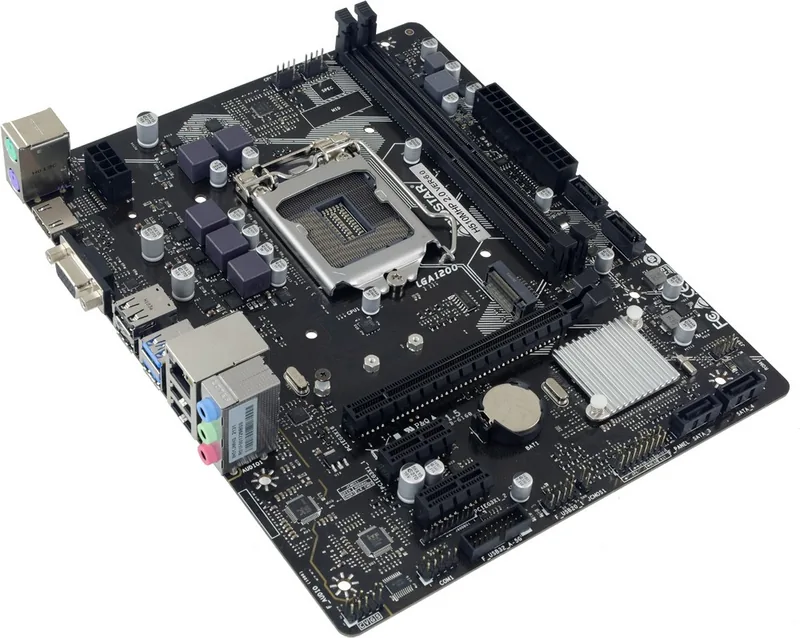
The Biostar H510 platform is a practical foundation for compact desktop systems built around Intel LGA1200 processors. Designed for 10th and 11th Generation Intel Core, Pentium, and Celeron CPUs, it gives home users, students, office workers, and entry-level PC builders a balanced route to reliable everyday performance. Its micro-ATX size, measuring 226 x 185 mm, makes it suitable for space-conscious cases while retaining the essential connections needed for a flexible build.
Everyday Performance and Memory Support
With two DDR4 DIMM slots, the Biostar H510 supports up to 64GB of non-ECC memory in dual-channel mode. Compatible memory speeds reach DDR4-3200, depending on the installed processor and supported configuration. Using matching memory modules in both slots helps activate dual-channel operation, providing a smoother experience for multitasking, productivity tools, web browsing, and general media use.
Storage and Expansion Options
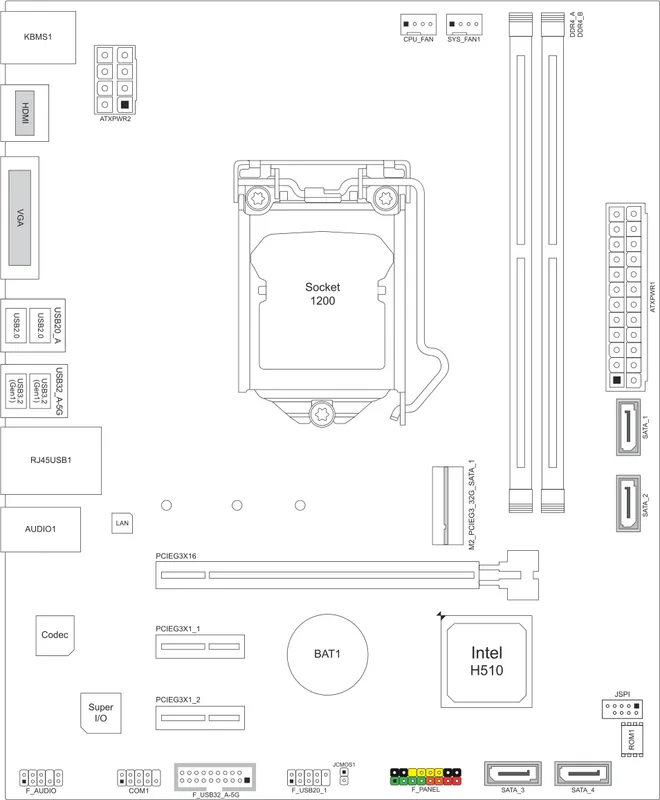
Storage support includes four SATA III connectors and one M.2 M-Key socket for 2242, 2260, and 2280 SSDs. The M.2 slot accepts PCIe 3.0 x4 and SATA-based drives, offering a convenient path to fast system storage. Builders should note that installing a SATA M.2 drive disables the SATA_1 connector. Expansion is handled by one PCIe x16 slot and two PCIe x1 slots. PCIe 4.0 capability on the x16 slot depends on using a compatible Rocket Lake processor.
Useful Connectivity for Modern and Legacy Setups
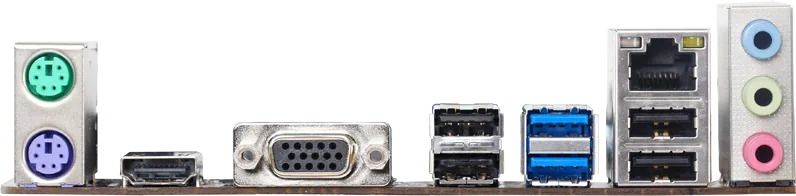
The rear connection layout includes HDMI, VGA, Gigabit LAN, PS/2 ports, USB 3.2 Gen1, USB 2.0, and three audio jacks. HDMI can deliver up to 4096 x 2160 at 24Hz, while VGA supports up to 1920 x 1200 at 60Hz when the CPU provides integrated graphics. Internal headers add front-panel USB 3.2 Gen1, USB 2.0, HD audio, COM, fan, and front-panel controls. Realtek ALC897 7.1-channel high-definition audio and Intel I219V Gigabit Ethernet round out the essential desktop feature set.
Setup, Firmware, and Maintenance
The Biostar H510 includes UEFI setup access through the Delete key during startup and supports BIOS updates through BIO-Flasher or a Windows-based update utility. Careful installation is important: disconnect power, prevent static discharge, seat the CPU and memory correctly, and connect both the 24-pin and CPU power connectors. Windows 10 and Windows 11 64-bit systems are supported.
Notes: Confirm CPU and memory compatibility before purchase. Use a FAT16 or FAT32 single-partition USB drive for BIOS flashing, and never restart or power off the system during an update.
Biostar H510 - Read, Download & Print Free provides a clear overview of the platform's connectivity, installation considerations, and upgrade potential for a dependable compact PC build.
Search for 67,706 Manuals online


Type-in Brand or Model