
Biostar H310MHP 3.0 Manual
PDF manual · 114 Pages
English



Quick check
Incorrect answer, please try again.
Chat with your Biostar H310MHP 3.0 manual using AI
Get instant AI answers from your Biostar H310MHP 3.0 manual
Ask anything about the Biostar H310MHP 3.0. Answers come from this manual, with the pages they are based on.
Ask a Question
Do you recommend H310MHP 3.0?
Yes NoFrequently Asked Questions
It supports 8th and 9th generation Intel Core, Pentium, and Celeron processors using the LGA 1151 socket.
Is this answer helpful?
The motherboard supports up to 32 GB of DDR4 RAM installed across two DIMM slots.
Is this answer helpful?
Yes, you can use the BIOSTAR BIO-FLASHER utility from a USB drive during the POST process.
Is this answer helpful?
Yes, HDMI and VGA ports are available for use with Intel integrated graphics processors when installed.
Is this answer helpful?
Windows 10 64-bit is fully supported for installation and driver usage on this hardware.
Is this answer helpful?
Short the JCMOS1 jumper pins with power disconnected, wait five seconds, then return to open position.
Is this answer helpful?
Advantages and Disadvantages
Advantages

- Affordable H310 chipset ensures budget-friendly system builds without sacrificing core functionality for daily tasks
- Supports dual channel DDR4 RAM configuration up to 32GB for improved memory bandwidth and multitasking
- Includes UEFI BIOS interface allowing users to easily update firmware and configure boot settings
- Offers flexible storage options with four SATA III ports for versatile drive expansion and data retention
- Robust rear I/O panel features HDMI and VGA outputs for reliable graphics signal transmission without extra cards
Disadvantages

- Lacks PCIe Gen4 support limiting future proofing for next-generation graphics cards and high speed devices
- Limited VRM cooling options may not suit high power demanding CPUs under extended heavy loads
- Only two memory slots restrict maximum upgrade potential compared to full ATX boards in larger cases
- Audio quality relies on integrated Realtek codec which may lack high fidelity for audiophile grade setups
- Basic troubleshooting capabilities rely on manual beep codes rather than comprehensive on-screen diagnostic displays
Product Specification
Form Factor
Micro ATX
Socket
Intel 1151 v2
Chipset
Intel H310
CPU Compatibility
Core i-9000, Core i-8000, Pentium Gold G5000, Celeron G4000
Header Lighting
N/A
Buttons/Switches
N/A
Graphics
iGPU
Wireless
N/A
RAID Level
N/A
Multi-GPU
N/A
Lighting
N/A
Warranty
3 years (via retailer)
USB Location
Left
Product Description
Discover the Reliability of the Biostar H310 Motherboard
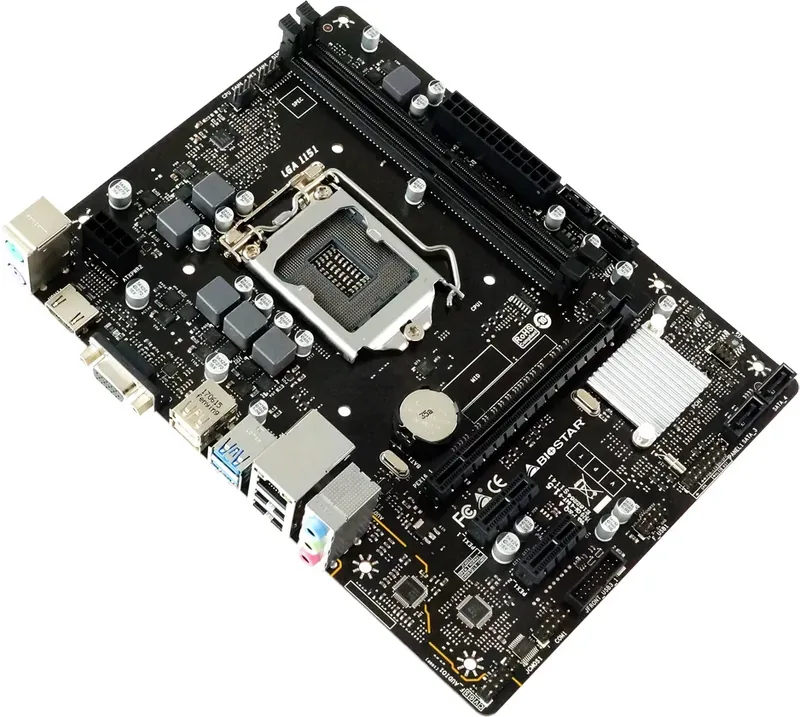
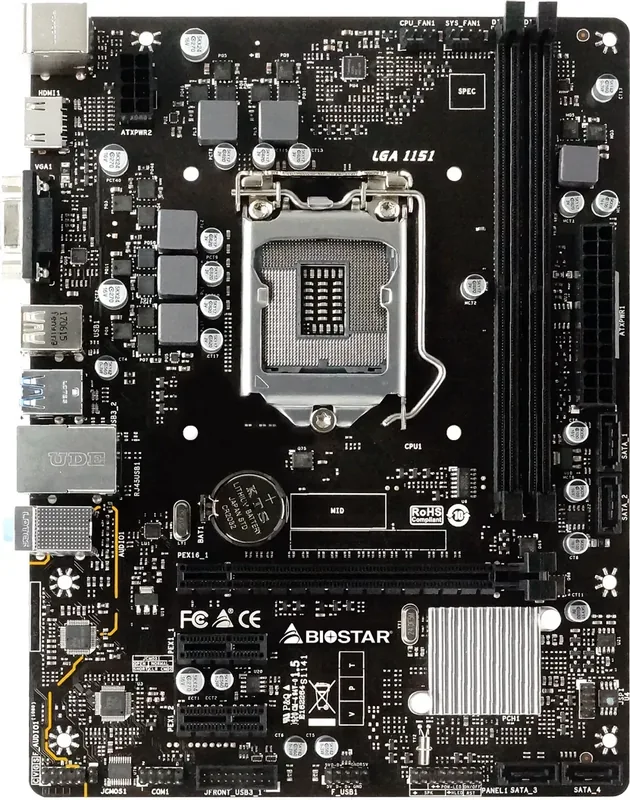
Building a personal computer begins with selecting a trustworthy motherboard. The Biostar H310 series stands out as a dependable solution for users seeking balanced performance without excessive cost. This platform utilizes the H310 chipset paired with the LGA 1151 socket. It supports both 8th and 9th generation Intel Core processors effectively. Whether you are assembling a home workstation or a light gaming machine, this board provides the necessary backbone for stable operation.
Technical Specifications and Connectivity
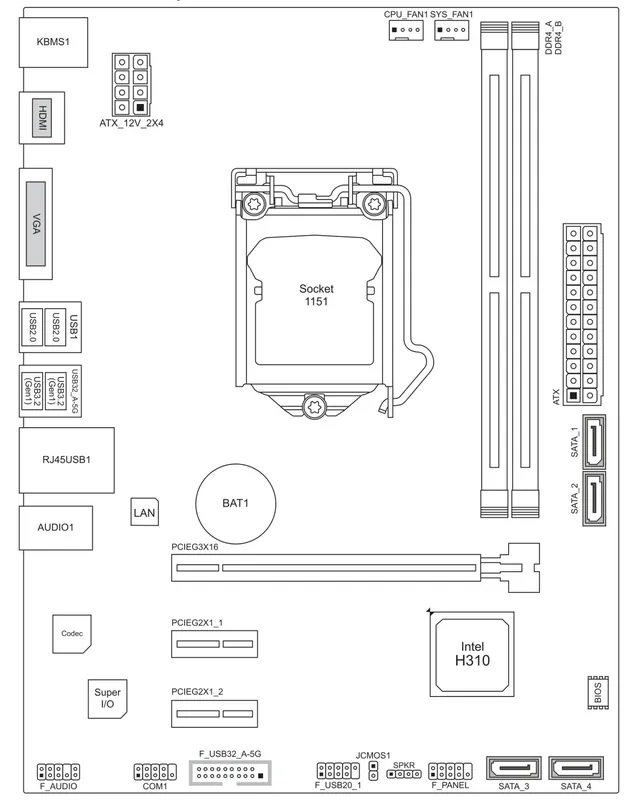
Memory support is robust with two DDR4 DIMM slots capable of handling up to 32 GB of RAM. Running dual channel memory configuration maximizes data throughput for smoother multitasking. Storage connectivity includes four SATA III ports offering 6Gb/s transfer speeds. These connectors support various hard drives and solid-state drives for flexible storage expansion. Video output options include HDMI and VGA ports for direct use with integrated graphics. The uATX form factor ensures this board fits into various compact chassis designs easily. This makes it ideal for space-conscious builders.
Installation and Setup Procedures
Proper installation ensures longevity for all system components. Consult the Biostar H310 Manual for precise guidance during assembly. You must align the CPU correctly within the socket to prevent bent pins. Locking levers secure the processor in place once seated. Heatsink mounting requires thermal paste application for optimal heat dissipation. All fan headers are labeled clearly to simplify cable management inside the case. Expansion slots support standard PCIe cards for enhanced graphics or I/O capabilities.
Firmware Updates and Software Drivers
System functionality depends on up-to-date firmware. The BIOS can be updated using the utility provided by the vendor directly from Windows. This process fixes bugs and improves hardware compatibility over time. The UEFI interface allows users to configure boot priorities and voltage settings. Comprehensive driver installation is available via the included driver disc. Troubleshooting sections within the manual cover common beep codes and error messages to aid diagnosis. The onboard audio codec delivers 7.1 channel sound quality for immersive entertainment experiences during use.
Important Safety and Usage Notes
Always disconnect power cables before inserting or removing any cards inside the chassis. Static electricity can damage sensitive electronics so use grounding measures. Check all connections meticulously to avoid electrical shorts. Keep the ambient temperature between zero and forty-five degrees Celsius. Ensure the power supply unit provides adequate wattage for the system load. Regular maintenance ensures the computer operates within safe thermal limits. Follow all warranty terms regarding modifications for uninterrupted support services.
Search for 67,732 Manuals online


Type-in Brand or Model