
Biostar B250 Series Manual
PDF manual · 64 Pages
English



Quick check
Incorrect answer, please try again.
Chat with your Biostar B250 Series manual using AI
Get instant AI answers from your Biostar B250 Series manual
Ask anything about the Biostar B250 Series. Answers come from this manual, with the pages they are based on.
Ask a Question
Do you recommend B250 Series?
Yes NoFrequently Asked Questions
It supports Socket 1151 for Intel Core i7, i5, i3, Pentium, and Celeron processors with a maximum TDP of 95Watt for standard thermal design power.
Is this answer helpful?
The board supports Dual Channel DDR4 2400 and has two slots that can be populated with up to 32 GB total memory module size.
Is this answer helpful?
The TB250-BTC PRO has eleven x1 slots plus one x16 slot, while the TB250-BTC+ has seven x1 slots plus one x16 slot.
Is this answer helpful?
Yes, you can use the BIOSTAR BIOS Update Utility in the Windows environment to download and update the BIOS file from the web.
Is this answer helpful?
Check for POST errors, verify cable connections, ensure CPU power is connected and clear CMOS data if configuration is invalid.
Is this answer helpful?
Official support lists Windows 7, 8.1, and 10 in 64-bit versions though community drivers may exist for other systems.
Is this answer helpful?
Short the JCMOS1 pins to clear CMOS data, wait five seconds, then restore the jumper to normal operation before powering on.
Is this answer helpful?
Advantages and Disadvantages
Advantages

- Extensive PCIe x1 slot availability supports up to 11 GPUs simultaneously for mining or rendering tasks.
- Intel B250 chipset offers reliable performance with good power management features for stability.
- Dual channel DDR4 support maximizes memory bandwidth for efficient multitasking and processing.
- Multiple USB ports provide flexibility for connecting various peripherals and external storage devices.
- Dedicated 4-pin auxiliary power connectors assist multi-GPU mining stability effectively.
Disadvantages

- Only two memory slots limit maximum RAM capacity to 32GB which restricts heavy virtualization.
- Integrated graphics output requires specific Intel CPU compatibility on board for display.
- Basic audio codec restricts high-fidelity sound output for audiophiles or pro studios.
- No built-in Wi-Fi module requires separate card for wireless networking connection.
- Windows 7 support is limited to 6th generation Intel processors due to driver compatibility.
Product Specification
Socket
Intel 1151
Chipset
Intel B250
CPU Compatibility
Core i-7000, Core i-6000, Pentium Gold G4000, Pentium G4000, Celeron G3000
Graphics
iGPU
Wireless
N/A
RAID Level
N/A
Multi-GPU
N/A
Lighting
N/A
Features
Audio + solid capacitors
Manufacturer Warranty
2 years (via retailer)
USB Layout
Left
Product Description
Overview of the Biostar B250 Series
Building a powerful computer requires a solid foundation, and the Biostar B250 series stands out for enthusiasts and professionals alike who demand reliability. This motherboard utilizes the Intel B250 chipset to ensure stable performance across various workloads without unnecessary complexity. Whether you are gaming, video editing, or running background processes, the platform offers the necessary connectivity and efficiency to handle the load.
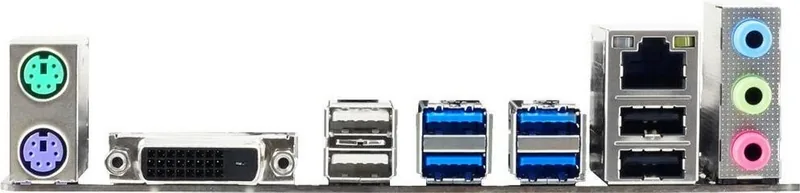
The board features a Socket 1151 design, supporting Intel Core i7, i5, i3, Pentium, and Celeron processors up to 95W TDP. This flexibility allows users to choose from a wide range of compatible CPUs depending on their budget and performance requirements. Memory expansion is handled through dual-channel DDR4 slots, allowing configurations up to 32 GB for seamless multitasking. For storage needs, there are six SATA III connectors providing fast data transfer rates suitable for SSDs and HDDs. Connectivity is robust with multiple USB 3.0 and 2.0 ports distributed across the rear I/O and internal headers for external devices.
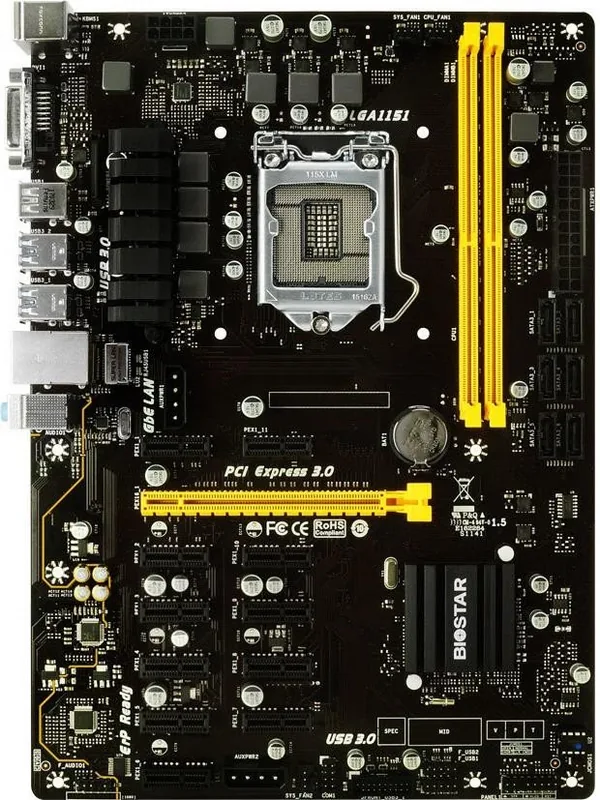
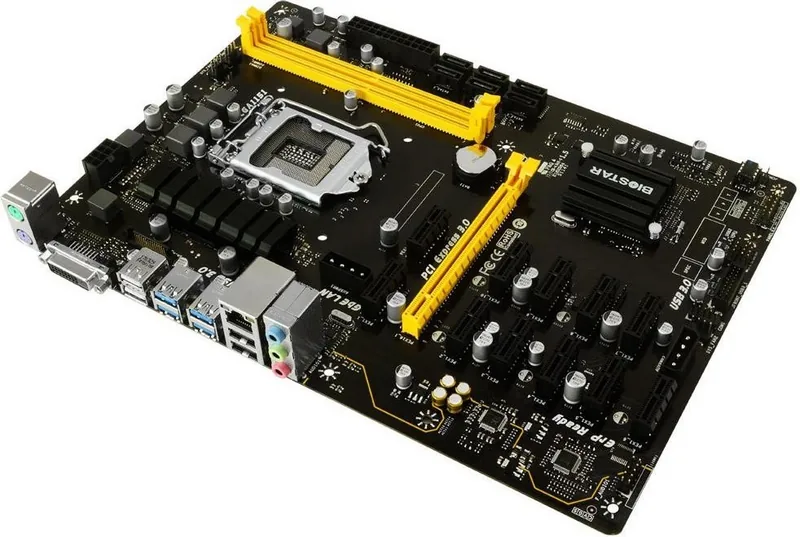
A unique feature of this series is the extensive support for expansion cards found in BTC models. The TB250-BTC PRO variant includes eleven PCIe 3.0 x1 slots, while the TB250-BTC+ offers seven of the same. This makes it ideal for users focusing on cryptocurrency mining or multi-GPU setups for rendering. Power requirements include an 8-pin and 24-pin main connector with auxiliary 4-pin connectors for graphics power.
Setting up the system is straightforward when you consult the detailed guides typically included with the hardware purchase. Referencing the Biostar B250 Manual ensures proper jumper settings and CPU installation techniques are followed to avoid hardware damage. Safety precautions such as grounding yourself during assembly are emphasized to protect sensitive electronic components from static discharge. The board also includes a Clear CMOS jumper for troubleshooting boot issues.
Software management is equally comprehensive within the UEFI environment. The BIOS provides a user interface for tweaking power settings and enabling profiles easily. Users can update firmware via the provided utility or by downloading the latest version from the official website. Audio capabilities are handled by an ALC887 codec offering 7.1 channel sound for immersive experiences. The onboard LAN controller ensures reliable networking speeds through wired connections.
Operating system compatibility covers Windows 7, 8.1, and 10 in 64-bit versions primarily. However, older OS versions may have limitations with newer processor generations regarding driver support. If troubleshooting is needed, the system logs POST codes to help identify hardware initialization failures during boot. With careful planning and adherence to installation guidelines, this motherboard delivers a reliable platform for diverse computing needs.
Notes
Please ensure you have adequate power supply wattage for multi-GPU setups. Keep the environment dry and stable for longevity.
Search for 67,732 Manuals online


Type-in Brand or Model