
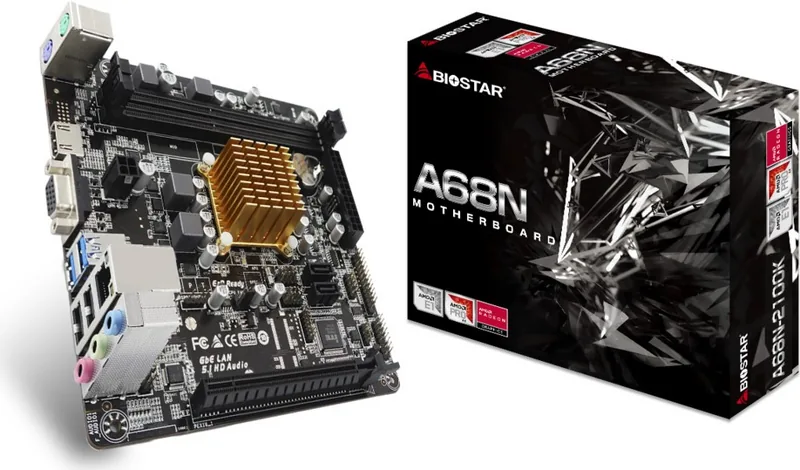
Biostar A68N-2100K Manual
PDF manual · 34 Pages
English



Quick check
Incorrect answer, please try again.
Chat with your Biostar A68N-2100K manual using AI
Get instant AI answers from your Biostar A68N-2100K manual
Ask anything about the Biostar A68N-2100K. Answers come from this manual, with the pages they are based on.
Ask a Question
Do you recommend A68N-2100K?
Yes NoFrequently Asked Questions
The motherboard supports up to 16 GB of single channel DDR3 memory across two DIMM slots. Each module can range from 512MB to 8GB non-ECC.
Is this answer helpful?
Official support lists Windows XP through 8.1. Newer OS versions may work but are not guaranteed by the vendor documentation provided.
Is this answer helpful?
Yes there are two SATA 6Gb/s connectors available. These support native IDE and AHCI modes for fast storage performance.
Is this answer helpful?
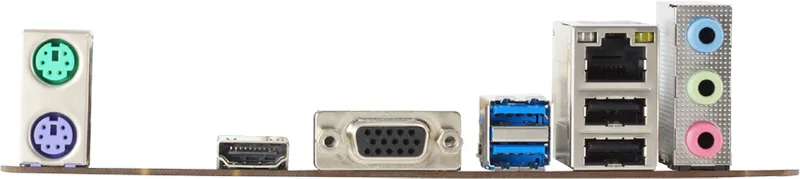
Yes the rear panel features an HDMI port capable of 1920 by 1080 resolution at 60Hz for high definition display.
Is this answer helpful?
Move the CMOS jumper to pins 2-3 close then wait five seconds before moving back. Alternatively clear settings in menu.
Is this answer helpful?
Standard heatsink sizes for FM1 socket are compatible. Ensure adequate airflow through system fans to prevent overheating.
Is this answer helpful?
The Realtek controller supports 10 100 or 1000 Mb/s auto negotiation for stable network connectivity performance.
Is this answer helpful?
Advantages and Disadvantages
Advantages

- Compact mini-ITX form factor ideal for small cases
- Integrated AMD processor saves space and reduces power usage
- Includes USB 3.0 ports for high speed data transfer capabilities
- HDMI and VGA output allows flexible display connection options
- Dual channel DDR3 support enables up to 16 GB memory
Disadvantages

- Integrated graphics limit performance for heavy gaming tasks
- Only supports DDR3 memory limiting future upgrade potential
- Single PCIe x16 slot restricts multi-card configurations
- CPU performance may struggle with modern intensive applications
- Lack of NVME support restricts fastest storage options
Product Specification
Form Factor
Mini-ITX
CPU
AMD E1-6010, 2C/2T, 1.35GHz, 1MB Cache, 10W TDP, Codename "Beema" (Puma, GF 28nm)
Chipset
System-on-Chip (SoC)
RAM
2x DDR3 DIMM, PC3L-10667U/DDR3L-1333, max. 16GB (UDIMM)
Expansion Slots
1x PCIe 2.0 x16 (x4)
External Ports
1x VGA (iGPU), 1x HDMI 1.4 (iGPU), 2x USB-A 3.0 (5Gb/s), 2x USB-A 2.0 (480Mb/s), 1x Gb LAN (Realtek RTL8111H), 3x Jack, 1x PS/2 Keyboard, 1x PS/2 Mouse
Internal Ports
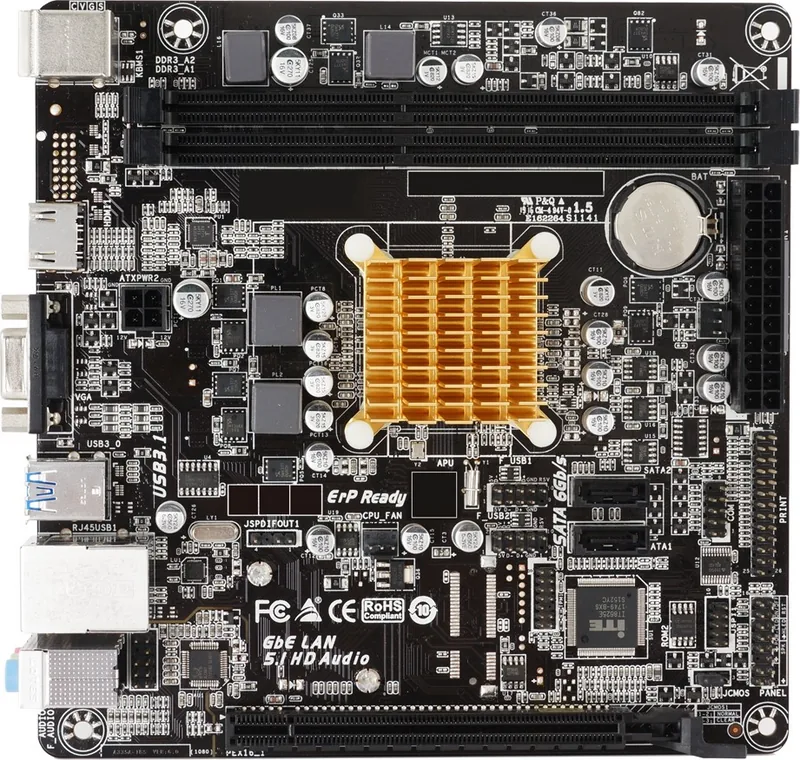
2x USB 2.0 Header (480Mb/s, 4x USB 2.0), 2x SATA 6Gb/s, 1x Serial, 1x Parallel
Fan Headers
1x CPU Fan 3-Pin (Occupied), 1x Fan 3-Pin
Lighting Headers
N/A
Audio
7.1 (Realtek ALC887)
Graphics
AMD Radeon R2 (iGPU), 2CU/128SP, 0.35GHz, Architecture "GCN 2.0/1.1" (Beema)
Wireless
N/A
RAID Level
N/A
Multi-GPU
N/A
Power Connectors
1x 24-Pin ATX, 1x 4-Pin ATX12V
Lighting
N/A
Features
All solid capacitors, passively cooled
USB Label
Link
Product Description
Introduction to Compact Computing Solutions
When selecting hardware for a small form factor system, the Biostar A68N-2100K stands out as a reliable foundation offering exceptional value. This motherboard integrates an AMD E1-2100 processor, offering a balance between power consumption and performance for everyday tasks. Users seeking an efficient PC build for home or office use will find the specifications tailored to meet essential computing needs without excessive energy draw making it perfect for always-on applications. The integrated graphics simplify the build process removing the need for dedicated video cards in standard configurations.
Key Features and Connectivity
The design supports single-channel DDR3 memory up to sixteen gigabytes, providing ample storage for your operating system and applications. Connectivity options are robust with two SATA 6Gb/s ports for storage drives and a wide range of USB ports including USB 3.0 for fast data transfer. Video output supports both HDMI and VGA connections, allowing flexibility in display selection with resolutions up to 1920 by 1080 pixels on HDMI. Ethernet connectivity is handled by a realtek controller ensuring stable network performance for streaming and browsing internet resources efficiently.
Advanced Configuration and Hardware
Installing this unit requires attention to cooling components and static safety measures during assembly. The mini-ITX board layout fits well into smaller cases saving desk space. Power delivery is managed through a 24-pin and 4-pin ATX connector ensuring system stability under load. The onboard audio codec delivers five point one channel sound enhancing multimedia experiences significantly. The expansion slot allows for PCIe add-ons if specific hardware is needed for specialized software suites requiring extra interface capabilities. Users should refer to pin assignments for headers to avoid incorrect connections during the installation process.
Conclusion and Summary
Overall this platform serves well for basic multimedia and light office workloads providing great efficiency per watt. The BIOS settings allow for necessary configuration adjustments for optimal performance. Compatibility with Windows systems spanning XP to 8.1 ensures broad software support for legacy and modern applications alike. Whether building a low-cost workstation or a dedicated media center the integration of graphics and connectivity makes it a practical choice for modern entry-level computing enthusiasts who prioritize efficiency and quiet operation throughout daily usage cycles. This hardware solution is suitable for users who need reliability without high power consumption requirements in their workspace.
Final Notes
Ensure all connections are secure before powering up the system regularly. Check fan headers for proper airflow management to maintain safe operating temperatures. Consult official resources for the latest driver updates compatible with current operating environments.
Search for 67,732 Manuals online


Type-in Brand or Model
Max Weber
8 months ago
Does the CPU run too hot in Mini-ITX cases or is the passive cooling sufficient for safe temperatures?
Manual.ly
8 months ago
Based on customer experiences, this system can run very hot. Temperatures reached 113 C in BIOS settings with insufficient cooling. The passive heat sink is 35x35 mm. You must ensure good case ventilation. Avoid staying in BIOS for long durations. Using a compatible power supply is also critical for temperature control.