Manual.ly Logo

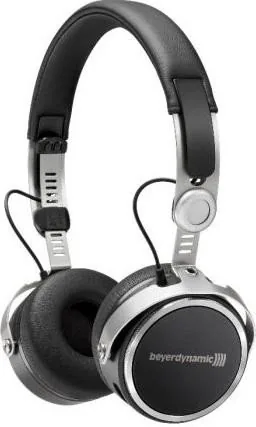
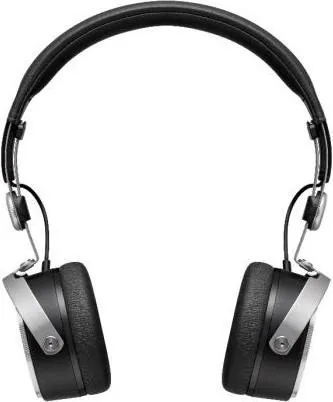
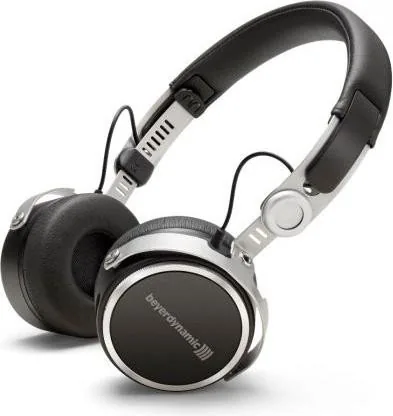
beyerdynamic Aventho wireless Manual

0.0 · 0 Ratings

PDF manual · 150 Pages

English

M: OA-GPT-54-NAN
page

/ 150

Loading...
6d09ea587f5c72de6479594012c93421c281 page 4
Thank you for choosing Aventho wireless headphones with Bluetooth
®
wireless technology.
For your best possible listening experience, you will find a comprehensive description
on how to use your Aventho wireless.
Safety instructions
Caution:
When you connect the headphones, please make sure that the volume level is
set to minimum. Adjust the volume level only after putting on the headphones.
We would like to point out that excessively high volumes and long listening times
may cause hearing damage. Hearing defects always constitute an irreversible
impairment of hearing ability.
Always ensure an adequate volume level. It is advisable to keep listening times as short
as possible at high volume levels. This also shows an example from working life:
According to occupational regulations for safety and health the noise exposure should
not exceed 85 dB (low volume) when working with an allowed time of listening of
8 hours at maximum. If the volume is increased by 3 dB, the allowed time of listening
is halved, i.e. with 88 dB the time of listening is 4 hours, with 91 dB 2 hours and so
on.
The beyerdynamic MIY App allows you to personalise your Aventho wireless. The App’s
tracking function allows to use the Aventho so that the headphones will not exceed a
maximum of acoustic impact (“noise”) that is calculated from common, general find-
ings. Please note that the Aventho wireless and the MIY App can only register noise
impact that is created by the headphones themselves; other, external sources of noise
such as construction noise, concerts, etc. can of course not be considered in the
calculation of acoustic impact. Therefore, the Aventho wireless and the MIY App do not
offer a summary of the entire exposure of your hearing. The MIY App only displays the
acoustic load that is wirelessly transmitted via the Aventho wireless and allows to limit
it to acceptable levels.
Danger to life!
Headphones drastically reduce perception of external sounds. Using headphones in road
traffic can be potentially dangerous. The user’s hearing must not be impaired to the
extent that it causes road safety risks. Please also make sure that you do not use the
in-ear headphones within an area of potentially dangerous machines and tools.
Risk of injury!
Avoid sudden movements when using wired headphones. You might seriously hurt
yourself especially if you wear piercings, earrings, glasses, etc., where the wire can get
caught.
Aventho wireless – Headphones
4

Chat with your beyerdynamic Aventho wireless manual using AI

Get instant AI answers from your beyerdynamic Aventho wireless manual

Ask anything about the beyerdynamic Aventho wireless. Answers come from this manual, with the pages they are based on.

Aventho wireless Maintenance Schedule

As needed
Clean headphones

Use only a soft dry or slightly damp cloth. Do not use cleaners containing solvents.

Show in the manual (page 19)
As needed
Replace ear pads

Ear pads undergo natural wear and should be replaced from time to time by pulling them off and pressing new ones on until they snap.

Show in the manual (page 19)
M: QW-35-FL

Ask a Question

0/1000

Do you recommend Aventho wireless?

Yes No

Product Specification

Design

Headphones (On-Ear)

Form factor

Headband

Acoustic design

closed

Microphone

integrated

Connection

3.5mm jack

Wireless

Bluetooth 4.2, AAC, aptX, aptX HD, NFC, Multipoint

Cable

47.24 in, single-sided, detachable

Controls

Touch Control

Battery life

30h

Battery

USB-C charging port, 2h charging time

Frequency range

10Hz-40kHz

Impedance

32Ω

Sensitivity

105dB

Software Features

Equalizer presets, individual equalizer, sound personalization, app control

Color

black

Weight

0.52 lb

M: OA-GPT-54-NAN

Product Description

M: OA-GPT-54-NAN

© Copyright 2026 Manual.ly
