
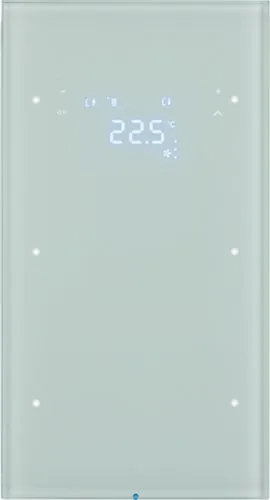
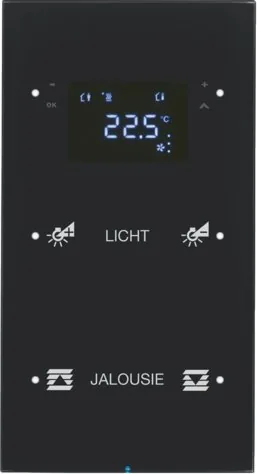
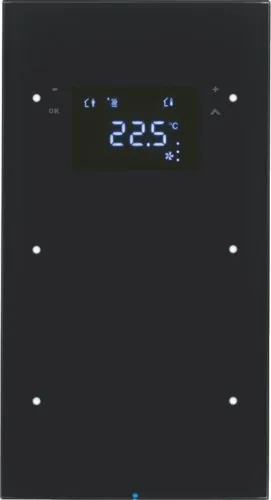
Berker R.3 KNX Glass Sensor 2-Gang Manual
PDF manual · 13 Pages
English



Quick check
Incorrect answer, please try again.
Chat with your Berker R.3 KNX Glass Sensor 2-Gang manual using AI
Get instant AI answers from your Berker R.3 KNX Glass Sensor 2-Gang manual
Ask anything about the Berker R.3 KNX Glass Sensor 2-Gang. Answers come from this manual, with the pages they are based on.
Ask a Question
Do you recommend R.3 KNX Glass Sensor 2-Gang?
Yes NoVideo Manual
MOES WiFi+RF 2 Gang Switch Light Switch Module,Install with Neutral Wire Needed
Frequently Asked Questions
It can be configured for KNX functions such as switching lights, dimming, operating blinds, sending values, and recalling or storing scenes. The specific actions assigned to each touch area depend on the system programming.
Is this answer helpful?
Yes. It has an integrated room temperature sensor and controller that can manage heating or cooling based on the current room temperature and selected target temperature. Optional external sensing can extend temperature-related functions.
Is this answer helpful?
Yes. When enabled by configuration, users can temporarily raise or lower the target temperature through the touch controls. Adjustments are made in 0.5 degree C increments and are shown on the display.
Is this answer helpful?
The controller supports comfort, standby, night, and frost or heat protection modes. It can also support a timed comfort extension, allowing comfort settings to remain active temporarily after an automated mode change.
Is this answer helpful?
Depending on programming and connected KNX devices, the display can show room temperature, target temperature, outdoor temperature, time, weekday, operating mode, fan level, and heating or cooling status.
Is this answer helpful?
Use a lightly dampened, lint-free cloth. A mild glass cleaner may be used if necessary. Do not use sharp objects, abrasive materials, acids, organic solvents, or scouring powder. Activate the cleaning lock before cleaning.
Is this answer helpful?
Advantages and Disadvantages
Advantages

- Combines two-gang KNX control, status indication, display functions, and room temperature regulation in one interface.
- Configurable for lighting, dimming, blind control, value commands, scenes, and other KNX functions.
- Supports comfort, standby, night, and frost or heat protection modes with adjustable temperature setpoints.
- Can display room and outdoor temperature, time, weekday, target values, and heating or cooling status.
- Includes a 60-second cleaning lock to prevent unintended commands during surface care.
Disadvantages

- Requires qualified electrical installation and KNX system planning, programming, and commissioning.
- Final features and available menus depend on the installed KNX application and parameter settings.
- Needs both KNX bus voltage and an additional SELV supply voltage.
- Touch installation requires a two-gang flush-mounted box; one-gang boxes are not suitable.
- Rear-mounted programming controls can be difficult to access after the unit is fully installed.
Product Specification
Type
Hardware control unit
Standard
KNX
Function
Control, on/off, temperature, brightness, dimming function, heating control, blind control
Topology
Bus
Special features
IP20, display
Product Description
Berker KNX R.3 Touch Sensor 2-Gang With Temperature Controller
The Berker KNX R.3 touch sensor 2-gang with temperature controller - Read, Download & Print Free is a refined smart-building control solution designed to unite room automation and climate management in one elegant interface. Its touch-sensitive operating areas provide direct access to individually configured KNX functions, while the integrated room temperature sensor supports responsive heating and cooling control.
Flexible Everyday Control
Two configurable sensor areas can be assigned to common building functions such as switching lights, dimming luminaires, controlling blinds, selecting brightness values, activating scenes, or sending value commands. Depending on configuration, a short or long touch can trigger different actions. Single-surface and paired-surface operating modes allow the control layout to match the needs of the room and the user.
Status LEDs provide clear feedback for programmed functions or button activity. This makes the sensor suitable for residential spaces, offices, hospitality settings, and other KNX installations where intuitive local control is important.
Integrated Climate Management
Beyond switching and scene control, the unit includes an integrated temperature sensor and room temperature controller. It compares the actual room temperature with the selected setpoint and can control heating or cooling equipment according to demand. Users can make short-term setpoint changes in 0.5 degree C steps directly from the sensor.
The display can show the current room temperature, target temperature, outdoor temperature, time, weekday, operating mode, and controller status when these functions are configured in the KNX system. Available modes include comfort, standby, night, and frost or heat protection. A comfort extension can temporarily maintain comfort conditions when scheduled operation would otherwise reduce the setpoint.
Designed for Configured KNX Systems
The Berker R.3 sensor is intended for professional KNX planning, installation, and commissioning. Its final behavior depends on the programmed application. It uses KNX TP1 with S-Mode commissioning and requires KNX bus voltage plus an additional SELV supply voltage. Optional external temperature sensing can support functions such as floor-heating temperature limitation.
The touch version is intended for a two-gang flush-mounted box, while the glass sensor version uses a dedicated two-gang mounting box. Installation should be completed by qualified electrical professionals. The programming button and LED are located on the rear, so addressing is best completed before final mounting.
Notes
- Clean the surface with a lightly dampened, lint-free cloth and mild glass cleaner if needed.
- Avoid sharp tools, abrasive cleaners, acids, and organic solvents.
- A 60-second cleaning lock prevents accidental commands while the surface is cleaned.
- Display and menu functions depend on KNX programming and connected system components.
Search for 67,706 Manuals online


Type-in Brand or Model