
Berker KNX Touch Control 7574 01 01 Manual
PDF manual · 55 Pages
English



Quick check
Incorrect answer, please try again.
Chat with your Berker KNX Touch Control 7574 01 01 manual using AI
Get instant AI answers from your Berker KNX Touch Control 7574 01 01 manual
Ask anything about the Berker KNX Touch Control 7574 01 01. Answers come from this manual, with the pages they are based on.
Ask a Question
Do you recommend KNX Touch Control 7574 01 01?
Yes NoFrequently Asked Questions
Installation must be performed exclusively by a qualified electrician to ensure safety and compliance with local regulations. Improper installation can damage the device or cause electrical hazards.
Is this answer helpful?
Yes, you can load custom graphics and icons onto a Micro-SD card and import them into the device. These files must meet specific resolution and naming requirements to be recognized correctly.
Is this answer helpful?
The internal proximity sensor detects when a person approaches the device. If activated in the menu settings, the display will automatically wake up from standby mode and show the last used page.
Is this answer helpful?
If you do not confirm your entries using the navigation button, the device will return to the previous menu level without saving any changes made during that session.
Is this answer helpful?
No, the Berker KNX Touch Control Display is designed strictly for indoor use. It has an IP20 protection rating and should not be exposed to weather elements or direct sunlight.
Is this answer helpful?
Use the special cleaning mode found in the system menu to lock the touch surface. Then wipe the display with a lint-free cloth slightly dampened with water. Do not use harsh chemicals.
Is this answer helpful?
Advantages and Disadvantages
Advantages

- High-resolution touch-sensitive display with automatic brightness adjustment
- Supports up to 10 customizable pages and 16 scenes for flexible control
- Integrated proximity sensor for automatic wake-up from standby mode
- Allows importing custom icons and graphics via Micro-SD card
- Dedicated cleaning mode prevents accidental touches during maintenance
Disadvantages

- Requires professional installation by a certified electrician
- Initial setup and programming require KNX-certified software knowledge
- Micro-SD card must remain inserted if custom images are used
- Physical address loading requires entering programming mode manually
- Limited viewing angles compared to larger commercial displays
Product Specification
Type
Hardware Control Unit
Standard
KNX
Function
Control
Topology
Bus
Dimensions
3.74x2.95x1.73 in
Features
IP20, Display
Product Description
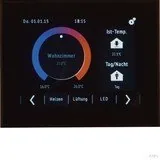
Berker KNX Touch Control Display Black: The Ultimate Smart Home Hub
The Berker KNX Touch Control Display black is a sophisticated central interface designed to transform how you interact with your smart home environment. This sleek device features a high-resolution touch-sensitive display that serves as the command center for lighting, shading, climate control, and security systems. Its elegant black finish allows it to blend seamlessly into modern interiors while providing a powerful tool for managing complex automation tasks.
At the heart of this device is its versatility. It supports up to ten freely configurable pages, allowing users to create custom layouts tailored to their specific needs. Whether you need quick access to room temperature settings, one-touch scene activation, or detailed energy monitoring, the display adapts to your lifestyle. The integrated proximity sensor ensures the screen wakes up automatically when you approach, offering a seamless user experience without unnecessary power consumption.
The device excels in automation capabilities. You can program up to sixteen different scenes and utilize timer functions to manage ventilation, heating, cooling, and blinds according to precise schedules. The built-in brightness sensor automatically adjusts the display illumination based on ambient light conditions, ensuring readability at any time of day. For added security, each page can be protected by a password, preventing unauthorized changes to critical system settings.
Customization is a key strength of the Berker KNX Touch Control Display. Users can import personal icons and graphics via a Micro-SD card, allowing for a truly personalized interface. The device also includes a dedicated cleaning mode that locks the touch surface, making maintenance safe and easy without triggering accidental commands. With support for external temperature sensors and binary contacts, it extends its functionality beyond simple switching to comprehensive environmental management.
Key Notes
- Requires installation by a qualified electrician.
- Compatible with standard DIN wall boxes.
- Supports multiple languages for global use.
- Features a 3.5-inch diagonal screen with 320x240 resolution.
Search for 67,706 Manuals online


Type-in Brand or Model