Manual.ly Logo

Berker KNX-DALI Gateway Tunable White Manual

0.0 · 0 Ratings

PDF manual · 4 Pages

English

M: gpt-5.6-terra
page

/ 4

Loading...
7dee995d0cf849fd704bd236538c4ad15d73 page 1
z
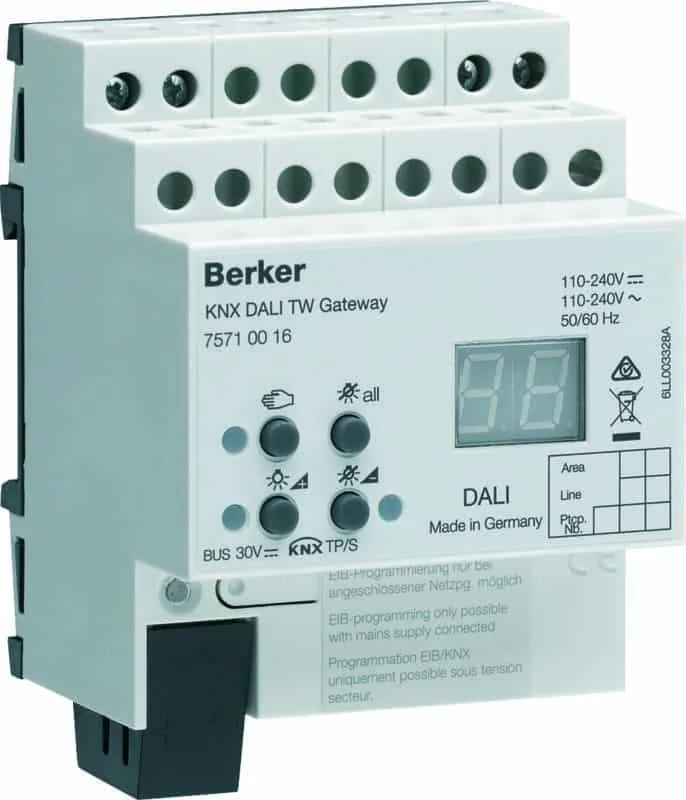
KNX-DALI Gateway
tunable white
y
Gateway KNX-DALI
bianco modulabile
Description
1 Keyboard for manual control
2 Push Button and LED indicator for addressing
3 KNX Connection
4 Display of Dali numbers
5 Connection to the network
6 Dali connection.
Control
Control Elements
4 Display of the DALI numbers
- 4
a
DALI Groups
- 4
b
Individual participants
- bc :
If the display shows bc (broadcast
operation), the device is not programmed or set
to master control in the KNX configuration. All
DALI devices are then controlled jointly.
7 Key
: manual control
8 LED
on : Manual mode permanently enabled
9
Key : Turn on or adjust the light intensity
brighter
A LED on : Individual participant or DALI group
enabled : light intensity 1…100%
Z
Key : Turn o or adjust the light intensity
darker
E LED on : Individual participant or DALI group
disabled: light intensity 0%
R
Key
all
: Turn o all DALI participants.
Operating mode
Bus mode controls via push button
Short-term
manual mode
manual control using the
keyboard, automatic return to
bus mode
Permanent
manual mode
manual control exclusively via
the gateway
H
- In manual mode, a bus mode is not possible.
- In the event of a failure of the bus, manual
control is possible.
- After the bus failure and a return to service, the
device operates in bus mode.
- After a power cut and a return to service, the
gateway operates in bus mode.
- Manual mode is disabled by a telegram in current
mode.
Enabling short-term manual mode
The operation of the keyboard is programmed and
is not locked.
- Press the
key briefly (<1 second). 01 is
displayed on the screen, the LED remains
o or
is displayed on the screen (refer to bc). In this
mode, individual control of the participants is not
possible.
Disabling short-term manual mode
The gateway is in short-term manual mode.
- No manipulation for 5 seconds
or
- Short press on the
key (<1 second) until
the gateway exits short-term manual mode. The
display turns o.
Enabling permanent manual mode
The operation of the keyboard is programmed and
is not locked.
- Press the
key for at least 5 seconds.
The LED is lit, 01 is displayed on the screen,
permanent manual mode is enabled.
or
-
is displayed on the screen (refer to bc)
Disabling permanent manual mode
- Press the
key for at least 5 seconds.
The LED turns o and bus mode is enabled.
Controlling the DALI participants
The gateway is in permanent or short-term manual
mode.
-
Press briefly on the key ( < 1 second) until the
number of the desired DALI participant is displayed
The and LEDs display the status.
- Control the DALI participant with the key or
with the
key Short press : turns on and o
Long press : varies the light intensity brighter/
darker
The
and LEDS display the status.
- In permanent manual mode, after having
been through all the available DALI participant
Product description
The DALI 75710016 KNX gateway is used to
interface DALI lighting applications with the KNX
system.
Function
Sytem information
This device is a product of the KNX system and
complies with the KNX directives. Detailed technical
knowledge obtained in KNX training courses is a
prerequisite to proper undertsanding.
The function of this device depends upon the
software. Detailed information on loadable software
and attainable functionality as well as the software
itself can be obtained from the manufacturer's
product dartabase.
Planning, installation and commissioning of the
device are carried out with the aid of KNX-certified
software. Full functionality with KNX commissioning
software version ETS3.0f onwards.
An updated version of the product database,
technical descriptions and conversion programs
and other auxiliary programs are availbale on our
internet website.
Product characteristics
• Controls up to 64 DALI products in up to 32
groups
• Individual control, group control or general control
• Setting the color temperature for luminaires with
DALI operating device Type 8 for Tunable White in
accordance with IEC 62386-209
• 16 scenes
• Eect control for dynamic sequences and sets of
colours
• Reading of the status of DALI products via KNX,
e.g. light intensity, light fitting fault, etc.
• Manual control of DALI groups
• Priority
• Feedback on the status of switching and the value
of light intensity in bus mode and manual mode
• General status feedback
• General command function
• Emergency lighting function
• Inhibition function for each group
• Separate switching and tripping delay
• Timer function with cut-o pre-warning
• Movement function : in combination with a
presence detector, reduction of the light intensity
when no movement is detected before turning o
• Online or oine commissioning of DALI products
with ETS plug-ins
• Surge protection and overload protection
• Possibility to replace an individual DALI product
without software during service
• Operating hours counter
• Delivery status : job-site mode, possibility of
ordering DALI groups using the keyboard. All
DALI products are ordered jointly.
• Signal of the global switching status of the DALI
devices, e.g. to switch o the mains voltage of
the DALI devices to avoid stanby losses.
Area
Line
Ptcp.
Nb.
all
6LE001033B
BERKER
KNX DALI TW Gateway
7571 00 16
6LE005275A
1 6LE005275A
:.?nB
75710016
- Electrical equipment must be installed
and fitted by qualified electricians only.
-
Failure to observe the instructions may
cause damage to the device and result
in fire or other hazards.
-
Danger of electric shock. Always dis-
connect before carrying out work on the
device or load. In so doing, take all the cir
-
cuit breakers into account, which support
dangerous voltages to the device or load.
- This device is not suitable for dis-
connection of the mains power supply.
- The DALI control voltage is a functional
extra-low voltage (FELV). During the ins-
tallation, ensure there is a safe separa-
tion between KNX and DALI.
Da+
Da-
L
N
Area
Line
Ptcp.
Nb.
BERKER
KNX DALI TW Gateway
7571 00 16
6LE001033B
all
BERKER
KNX DALI TW Gateway
7571 00 16
all
DALI

Chat with your Berker KNX-DALI Gateway Tunable White manual using AI

Get instant AI answers from your Berker KNX-DALI Gateway Tunable White manual

Ask anything about the Berker KNX-DALI Gateway Tunable White. Answers come from this manual, with the pages they are based on.

Ask a Question

0/1000

Do you recommend KNX-DALI Gateway Tunable White?

Yes No

Frequently Asked Questions

A

It connects DALI lighting equipment to a KNX automation system. It enables switching, dimming, group control, status monitoring, scenes, timers, and other lighting functions through KNX.

Is this answer helpful?

A

The gateway controls up to 64 DALI devices. These can be organized into up to 32 groups for coordinated control of lighting zones.

Is this answer helpful?

A

Yes. It can set colour temperature for compatible DALI Device Type 8 Tunable White luminaires in line with IEC 62386-209.

Is this answer helpful?

A

Yes. Short-term and permanent manual modes allow local switching and dimming. Permanent manual mode also supports selecting DALI groups or participants and switching all connected devices off.

Is this answer helpful?

A

The gateway can provide feedback on switching state, brightness value, general DALI status, and faults such as luminaire or load problems, depending on the configured system.

Is this answer helpful?

A

It can be used in centrally powered emergency-lighting systems. The final design must follow local legal requirements, applicable standards, and the limits of the connected emergency luminaires.

Is this answer helpful?

M: gpt-5.6-terra

Advantages and Disadvantages

Advantages

  • Controls up to 64 DALI devices in up to 32 groups for scalable lighting installations.
  • Supports switching, dimming, individual control, group control, broadcast control, and 16 lighting scenes.
  • Provides Tunable White colour-temperature control for compatible DALI Type 8 luminaires.
  • Offers KNX feedback for brightness, switching state, lamp faults, and general DALI status.
  • Includes local manual control, emergency-lighting support, operating-hours counting, and replacement support for one DALI device.
VS

Disadvantages

  • Requires KNX knowledge, ETS commissioning software, and installation by qualified electricians.
  • Manual mode prevents normal bus-mode operation until it is disabled.
  • Full individual control is unavailable when the gateway is unprogrammed or configured for broadcast operation.
  • DALI cable length depends on conductor size, which can limit layout flexibility on large sites.
  • Emergency-lighting use must be planned around applicable local laws and standards.
M: gpt-5.6-terra

Product Specification

Type

Control unit hardware

Standard

KNX

Function

On/off, dimming function, gateway (KNX, DALI)

Features

IP20

M: gpt-5.6-terra

Product Description

Berker KNX-DALI Interface Switch Actuator with Dimmer - Read, Download & Print Free

The Berker KNX-DALI Interface Switch Actuator with Dimmer is a professional lighting gateway designed to connect DALI lighting installations with KNX building automation. Model 75710016 supports flexible switching, dimming, monitoring, and colour-temperature control, making it suitable for commercial spaces, public buildings, and advanced residential projects.

Intelligent DALI Lighting Control

This gateway can manage up to 64 DALI devices arranged in as many as 32 groups. Installers can use individual, group, or broadcast control to tailor lighting behaviour to the needs of each zone. It also supports 16 scenes, allowing predefined lighting settings to be recalled for work areas, presentations, cleaning, reception zones, or other daily routines.

For Tunable White luminaires using DALI Device Type 8, the actuator can adjust colour temperature in accordance with IEC 62386-209. This gives KNX projects the ability to combine brightness and white-tone control for more comfortable, responsive lighting environments. Dynamic effects and colour sequences add further options where adaptable lighting is required.

Monitoring, Automation, and Local Operation

The Berker gateway returns useful status information to the KNX system, including brightness values, switching states, lamp faults, and overall DALI status. Features such as priority control, inhibition per group, switching delays, timer functions, and switch-off warnings help create structured automation strategies.

Its movement-related function can work with a presence detector to reduce light output before switching off when no movement is detected. An operating-hours counter supports maintenance planning, while general status feedback can help reduce standby losses by enabling broader energy-management logic.

Local controls and a display provide practical access during commissioning, servicing, or bus faults. Short-term manual mode offers temporary local operation with automatic return to bus control, while permanent manual mode allows direct operation through the gateway. Users can select DALI groups or participants, switch them on or off, dim them brighter or darker, and switch off all connected DALI devices.

Installation Considerations

The actuator is a 4-module DIN-rail unit with a 72 mm fitting width. It operates from 110 to 240 V AC or DC and has a maximum power loss of 3 W. DALI wiring supports cable runs up to 300 m with 1.5 mm2 conductors. KNX commissioning requires compatible ETS software, with full functionality available from ETS3.0f onward.

Note: Installation, programming, and electrical work should be performed by qualified professionals. Safe separation between KNX and DALI circuits is essential because DALI uses functional extra-low voltage.

Note: The gateway can be used in centrally supplied emergency-lighting systems where local regulations, system design requirements, and the number of connected emergency luminaires are observed.

M: gpt-5.6-terra

© Copyright 2026 Manual.ly