
be quiet! Silent Base 600 Manual
PDF manual · 44 Pages
English



Quick check
Incorrect answer, please try again.
Chat with your be quiet! Silent Base 600 manual using AI
Get instant AI answers from your be quiet! Silent Base 600 manual
Ask anything about the be quiet! Silent Base 600. Answers come from this manual, with the pages they are based on.
Ask a Question
Do you recommend Silent Base 600?
Yes NoFrequently Asked Questions
It suits quiet, flexible builds for gaming, work, or mixed-use PCs. Its layout supports airflow, storage variety, and clean assembly, making it a good choice for users who want both silence and practicality.
Is this answer helpful?
The case supports Mini-ITX, Micro-ATX, and ATX motherboards. This makes it compatible with compact systems as well as more standard full-featured desktop builds.
Is this answer helpful?
Yes. The case supports optional radiators at the front, rear, and top. That gives builders room to use liquid cooling if they want better thermal control or a quieter fan profile.
Is this answer helpful?
It offers space for multiple drive types, including 3.5-inch, 2.5-inch, and 5.25-inch devices. The removable HDD cage also makes it easier to adapt the layout for different storage needs.
Is this answer helpful?
Yes. It uses air filters in key intake areas, including the front and side sections, plus a filter under the power supply. Regular cleaning helps maintain airflow and reduces dust buildup.
Is this answer helpful?
The built-in 3-step fan controller lets you quickly adjust fan speed without software. It is a simple way to balance noise and cooling based on the workload or time of day.
Is this answer helpful?
Advantages and Disadvantages
Advantages

- Quiet-focused construction helps reduce system noise during daily use.
- Supports ATX, Micro-ATX, and Mini-ITX builds for wide compatibility.
- Flexible drive layout works with HDDs, SSDs, and 5.25-inch devices.
- Includes dust filters and a fan controller for easier upkeep and tuning.
Disadvantages

- Front drive and cage layout can limit space if many devices are installed.
- Maximum GPU clearance drops when the HDD cage stays in place.
- Only basic stock cooling is included, so heavy builds may need upgrades.
- Window and door features add convenience, but make the layout more complex.
Product Specification
External
3x 5.25"
Internal
3x 2.5"/3.5" (transverse, drive rails)
Ports
2x USB-A 3.0 (5Gb/s), 2x USB-A 2.0 (480Mb/s), 1x 3.5mm jack (Line-Out), 1x 3.5mm jack (Line-In)
PCI Slots
7
Fan (rear)
1x 4.72 in, 1200rpm
Fan (right)
N/A
Fan (top)
2x 5.51 in (optional)
Fan (bottom)
1x 5.51 in (optional)
Fan (other)
N/A
Motherboard
up to ATX
Power Supply
ATX
Power Supply Position
bottom
CPU Cooler
max. 6.57 in height
Graphics Cards
max. 11.57 in (16.26 in without HDD cage)
Lighting
without lighting
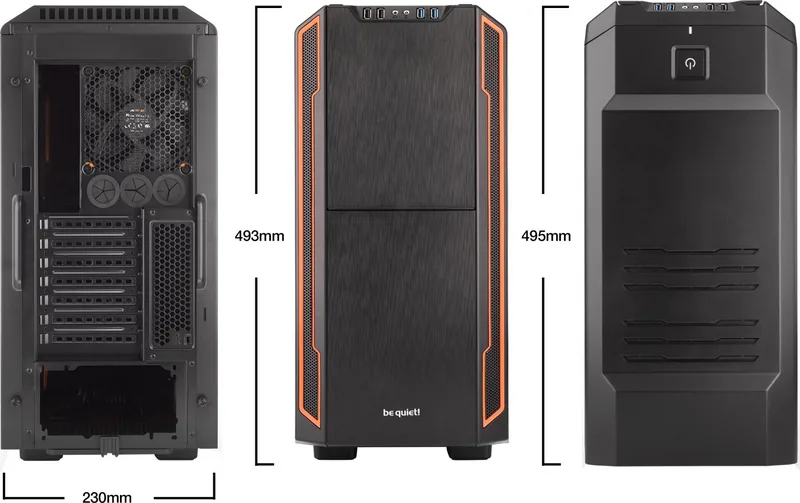
Dimensions (WxHxD)
9.06x19.41x19.49 in
Volume
1.98 cu ft
Weight
17.20 lb
Case Type
Midi-Tower
Top
closed, ventilation slots rear, ventilation slots middle, insulation mat inside
Bottom
partially closed, fan grille rear
Right
closed, insulation mat inside
Rear
partially closed, fan grille top right, PCI-Slots (7x horizontal), 3x hose/tube grommet middle right
Front I/O Position
Case side: top, Height: Front, Position: middle
Product Description
be quiet! Silent Base 600: Quiet Design with Practical Flexibility
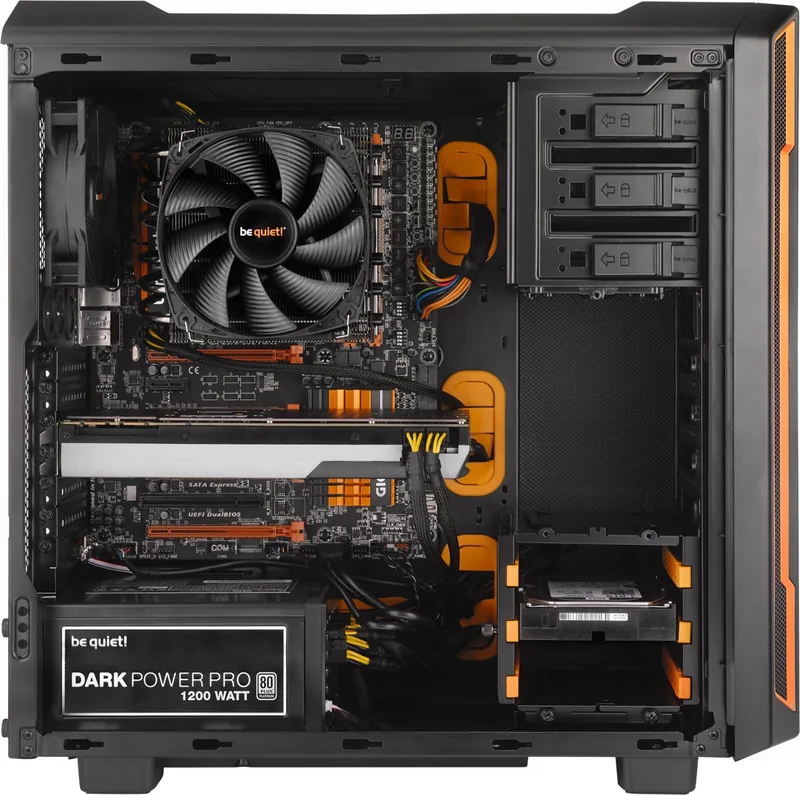
The be quiet! Silent Base 600 is a mid-tower case built for users who want a cleaner, quieter PC without giving up useful features. Its design focuses on low-noise operation, solid airflow, and an interior layout that makes assembly easier for both first-time builders and experienced enthusiasts. With a windowed side panel and a range of color options, it also adds a polished look to a gaming or productivity setup.
One of its biggest strengths is versatility. The case supports Mini-ITX, Micro-ATX, and ATX motherboards, along with multiple storage formats including 3.5-inch, 2.5-inch, and 5.25-inch drives. That gives builders room to mix classic hard drives, SSDs, and optical or accessory devices. The internal HDD cage can also be repositioned or removed, which helps when a longer graphics card or extra cooling is needed.
Cooling is another highlight. The Silent Base 600 ships with Pure Wings 2 fans and includes a 3-step fan controller for quick adjustment. Optional mounting points support extra fans or radiators at the top, front, and bottom, making it suitable for air-cooled systems as well as more advanced liquid-cooled builds. Dust filters on key intake areas help keep the system cleaner over time.
The front I/O panel offers the essentials: USB 3.0, USB 2.0, audio jacks, power controls, reset, and fan control. Inside, the layout is designed for sensible cable routing and straightforward installation of the motherboard, power supply, and drives. Even details like the reversible front door and removable side-panel window show that the case was built with flexibility in mind.
For builders who value a balanced combination of silence, cooling support, and modularity, the be quiet! Silent Base 600 Manual reflects a product that is more than just an enclosure—it is a practical foundation for a neat, durable PC build.
Notes
- Best suited for quiet-focused builds and tidy cable management.
- Check component dimensions before installation, especially GPU and CPU cooler size.
- Cleaning the air filters regularly helps maintain airflow and low noise.
Search for 67,706 Manuals online


Type-in Brand or Model