Manual.ly Logo

be quiet! Dark Rock TF 2 Manual

4.1 · 17 Ratings

PDF manual · 2 Pages

English

M: QW-35-FL
page

/ 2

Loading...
3c1a6e33e472dd2e46c4b170a0f2eebcd11e page 2
Installation of the mounting
brackets
Screw the Intel spacer nut B (7) onto the
previously positioned Intel backplate
(3). Then position the Intel mounting
brackets (4) over the Intel spacer nut B (7)
and affi x these with the mounting bracket
fastening srews (9). You can use any
cross-tip screwdriver for this.
Place the 135mm fan (2) with the fan
clips (13) on the rubber elements so
you can see the be quiet! logo. The
funnel-shaped Silent Wings 3 135mm
fan (2) is mounted above. Next connect
the 135mm fans (2) with the Y-cable
(16) to the right con-nectors on the
motherboard.
Installation der Montagebrücken
Schrauben Sie die Intel Gewindebolzen B
(7) auf die zuvor platzierte Intel-Back-
plate (3). Dann platzieren Sie die Intel
Montagebrücken (4) auf den Intel Gewinde-
bolzen B (7), um sie dann mit den Befesti-
gungsschrauben für die Montagebrücke
(9) zu fi xieren. Hierfür können Sie einen
Kreuzschraubendreher verwenden.
Befestigung der Backplate
Platzieren Sie die Intel Backplate Schrauben
(10) in die auf der Rückseite der Intel-
Backplate (3) befi ndlichen Aussparungen.
Beachten Sie hierzu die Bohrlöcher für den
jeweiligen Sockel.
Verwenden Sie zur Befestigung der
Backplate-Schrauben (10) auf der Intel
Backplate (3) die O-Ringe (12). Sobald
die Intel Backplate (3) für den jeweiligen
Intel-Sockel zusammengebaut ist, posi-
tionieren Sie es unter dem Mainboard.
Achten Sie dabei darauf, dass die Intel
Backplate-Schrauben (10) genau in den
Mainboardlöchern positioniert sind.
Platzieren Sie die 135mm Lüfter (2) mit
den Lüfterklammern (13) so auf den
Gummielementen, dass Sie das be
quiet! Logo sehen können. Der Silent
Wings 3 mit der Trichterform wird oben
verbaut. Schließen Sie anschließend die
135mm Lüfter (2) mit dem Y-Kabel (16)
an den entsprechenden Anschluss Ihres
Mainboards an.
Mounting the CPU cooler
First remove the protective foil from
the underside of the cooler. Spread the
thermal paste (15) on the surface of the
CPU. The amount supplied is suffi cient
for one or two applications.
Caution: The thermal paste supplied
is not suitable for human consumption.
If swallowed, drink lots of water and
urgently seek medical attention. Keep
it out of the reach of children. Avoid
contact with skin and eyes.
Montage des CPU-Kühlers
Entfernen Sie zunächst die Schutzfolie
von der Unterseite des Kühlers. Tragen
Sie die Wärmeleitpaste (15) auf die
CPU-Oberfl äche auf. Der Inhalt reicht
für ca. 1 – 2 Anwendungen.
Vorsicht: Die mitgelieferte Wärmeleit-
paste ist nicht zum Verzehr geeignet.
Bei Verzehr ausreichend Wasser trinken
und umgehend einen Arzt aufsuchen.
Außerhalb der Reichweite von Kindern
aufbewahren. Vermeiden Sie Haut- und
Augenkontakt.
Place the cooler onto the CPU unit. Then
screw the mounting bridge alternately
tight.
Platzieren Sie den Kühler auf der
CPU und schrauben Sie die Kühler-
Montagebrücke von oben fest.
Place the four AMD spacer nuts (8) onto
the backplate bolts protruding through
the front side and affix short AMD
mounting brackets (5) with the AMD
backplate screws (11).
Assembly of the cooler mounting
frame
To permit mounting of the cooler please
remove both the plastic retainers of the
AMD retention module. The factoryfi tted
backplate affi xed to the rear side of the
motherboard will be needed for sub-
sequent installation of the cooler.
Note: To mount the Dark Rock TF 2
(1) on an AM3 motherboard, please
use the four AM3 washers (14), placing
these below the backplate bolts
protruding through the front side of the
motherboard.
Place the cooler onto the CPU unit. Then
screw the mounting bridge alternately
tight.
Place the 135mm fan (2) with the fan
clips (13) on the rubber elements so
you can see the be quiet! logo. The
funnel-shaped Silent Wings 3 135mm
fan (2) is mounted above. Next connect
the 135mm fans (2) with the Y-cable
(16) to the right connectors on the
motherboard.
Platzieren Sie über die Vorderseite die
vier AMD Abstandsbolzen (8) auf die
Bolzen der Backplate und fi xieren Sie die
beiden kurzen AMD Montagebrücken (5)
mit Hilfe der AMD Backplate-Schrauben
(11).
Platzieren Sie den Kühler auf der
CPU und schrauben Sie die Kühler-
Montagebrücke von oben fest.
Platzieren Sie die 135mm Lüfter (2) mit
den Lüfterklammern (13) so auf den
Gummielementen, dass Sie das be
quiet! Logo sehen können. Der Silent
Wings 3 mit der Trichterform wird oben
verbaut. Schließen Sie anschließend die
135mm Lüfter (2) mit dem Y-Kabel (16)
an den entsprechenden Anschluss Ihres
Mainboards an.
Mounting the CPU cooler
First remove the protective foil from the
underside of the cooler. Spread the
thermal paste (15) on the surface of the
CPU. The amount supplied is suffi cient
for one or two applications.
Caution: The thermal paste supplied
is not suitable for human consumption.
If swallowed, drink lots of water and
urgently seek medical attention. Keep it
out of the reach of children. Avoid con-
tact with skin and eyes.
Montage des CPU-Kühlers
Entfernen Sie zunächst die Schutzfolie
von der Unterseite des Kühlers. Tragen
Sie die Wärmeleitpaste (15) auf die
CPU-Oberfl äche auf. Der Inhalt reicht
für ca. 1 – 2 Anwendungen.
Vorsicht: Die mitgelieferte Wärmeleit-
paste ist nicht zum Verzehr geeignet.
Bei Verzehr ausreichend Wasser trinken
und umgehend einen Arzt aufsuchen.
Außerhalb der Reichweite von Kindern
aufbewahren. Vermeiden Sie Haut- und
Augenkontakt.
Aufbau des Kühlerbefestigungs-
rahmens
Bitte entfernen Sie zur Kühlermontage
die beiden Künststoffhalterungen des
AMD-Retentionmoduls. Die werkseitig
auf der Mainboard-Rückseite befestigte
Backplate wird für die weitere Instal-
lation des Kühlers benötigt.
Hinweis: Zur Installation des Dark Rock
TF 2 (1) auf einem AM3 Mainboard nutzen
Sie bitte die vier AM3 Unterlegscheiben
(14) und legen diese auf die Bolzen der
werkseitig montierten Backplate über
die Mainboard Vorderseite.
AMD: AM4 / AM3(+)
The following parts are needed for this:
1x Dark Rock TF 2 CPU cooler (1), 2x 135mm fan (2), 1x Intel backplate (3), 2x Intel mounting brackets (4), 4x Intel spacer nut B
(7), 4x mounting bracket fastening screws (9), 4x Intel backplate screws (10), 4x O-rings (12), 4x fan clips (13), 1x thermal paste
(15), 1x Y-cable (16)
Es werden folgende Bauteile benötigt:
1x Dark Rock TF 2 CPU-Kühler (1), 2x 135mm Lüfter (2), 1x Intel Backplate (3), 2x Intel Montagebrücken (4), 4x Intel Gewindebolzen
B (7), 4x Befestigungsschrauben für die Montagebrücke (9), 4x Intel Backplate-Schrauben (10), 4x O-Ringe (12), 4x Lüfterklammern
(13), 1x Wärmeleitpaste (15), 1x Y-Kabel (16)
Mounting the backplate
Position the Intel backplate screws (10)
in the notches situated on the rear side
of the Intel backplate (3). Pay attention
in so doing to align with the holes drilled
for each socket.
For fi xing the backplate screws (10)
onto the Intel backplate (3) use the
O-rings (12). Once assembly of the Intel
backplate (3) for the respective Intel
socket has been completed, position
it under the motherboard. In so doing
make sure that the Intel backplate
screws (10) are precisely located within
the motherboard holes.
The following parts are needed for this:
1x Dark Rock TF 2 CPU cooler (1), 2x 135mm fan (2), 2x short AMD mounting brackets (5), 4x AMD spacer nuts (8), 4x AMD
backplate screws (11), 4x fan clips (13), 4x AM3 washers (14), 1x thermal paste (15), 1x Y-cable (16)
Es werden folgende Bauteile benötigt:
1x Dark Rock TF 2 CPU-Kühler (1), 2x 135mm Lüfter (2), 2x Kurze AMD Montagebrücken (5), 4x AMD Abstandsbolzen (8), 4x
AMD Backplate-Schrauben (11), 4x Lüfterklammern (13), 4x AM3 Unterlegscheiben (14), 1x Wärmeleitpaste (15), 1x Y-Kabel (16)
When dismantling the fan (2), push
the notches of the fan clips (13) away
from the fan.
!
Zur Demontage des 135mm Lüfters
(2) drücken Sie die Kerben der Lüfter-
klammern (13) vom Lüfter weg.
!
When dismantling the fan (2), push
the notches of the fan clips (13) away
from the fan.
!
Zur Demontage des 135mm Lüfters
(2) drücken Sie die Kerben der Lüfter-
klammern (13) vom Lüfter weg.
!

Chat with your be quiet! Dark Rock TF 2 manual using AI

Get instant AI answers from your be quiet! Dark Rock TF 2 manual

Ask anything about the be quiet! Dark Rock TF 2. Answers come from this manual, with the pages they are based on.

Ask a Question

0/1000

Do you recommend Dark Rock TF 2?

Yes No
0
User Pic

Alex K

7 months ago

Is the installation of this cooler difficult, especially for mounting the fans in tight spaces?

0
User Pic

Manual.ly

6 months ago

Thank you for your question. The be quiet! Dark Rock TF 2 is designed with high-quality materials and excellent cooling performance. However, we acknowledge that installing the fans can be challenging due to limited space between the fins and RAM modules. We recommend assembling the fans before placing the cooler into the case if possible. For detailed guidance, please visit our official website where a step-by-step video tutorial is available. Additionally, ensure all rubber mounts are properly seated to prevent slipping or damage.

M: QW-35-FL
M: QW-35-FL
0
User Pic

Sarah M

5 months ago

Does the upper fan stay secure after installation or does it tend to slip down when moving the PC?

M: QW-35-FL

Frequently Asked Questions

A

It supports Intel LGA 2011(-3) and LGA 2066, as well as AMD AM4 and AM3+ sockets. Specific mounting brackets and spacers are included for each platform.

Is this answer helpful?

A

Yes, but the manual strongly recommends installing the cooler outside the case first. This makes handling the large heatsink easier and prevents accidental damage to motherboard components.

Is this answer helpful?

A

The supplied amount of thermal paste is sufficient for approximately one to two applications. It is important to spread it evenly on the CPU surface before placing the cooler.

Is this answer helpful?

A

The be quiet! Dark Rock TF 2 comes with a 3-year manufacturer guarantee for end consumers. Validity requires proof of purchase from an authorized dealer.

Is this answer helpful?

A

Yes, the Silent Wings 3 fans connect via a Y-cable to the motherboard, allowing for PWM speed control to balance performance and noise levels dynamically.

Is this answer helpful?

M: QW-35-FL

Advantages and Disadvantages

Advantages

  • Exceptional cooling performance with dual tower design
  • Ultra-quiet operation thanks to Silent Wings 3 fans
  • Compatible with wide range of Intel and AMD sockets
  • Easy external mounting option reduces installation complexity
  • Includes high-quality thermal paste for multiple uses
VS

Disadvantages

  • Large physical size may not fit all compact cases
  • Installation requires careful alignment of backplate screws
  • Fan cables may require management in smaller chassis
  • Higher price point compared to standard air coolers
  • Thermal paste application must be done carefully to avoid spills
M: QW-35-FL

Product Specification

Type

Top-Blow Cooler

Dimensions with fan

6.42x5.28x5.51 in (WxDxH)

Dimensions without fan

6.42x4.29x5.51 in (WxDxH)

Fan

1x 5.31x5.31x0.98 in, 1400rpm, 11.1-27.1dB(A) + 1x 5.31x5.31x0.87 in, 1400rpm, 11.1-27.1dB(A)

Weight with fan

2.08 lbs

Connection

4-Pin PWM

AMD Socket

AM5, AM4

Intel Socket

2011-0/2011-1/2011-3/2066, 1700 (note), 1150/1151/1155/1156/1200

Intel Socket Note

Socket-1700 mounting kit may not be included in package; socket-1700 mounting kit available from manufacturer

TDP Classification

230W

Features

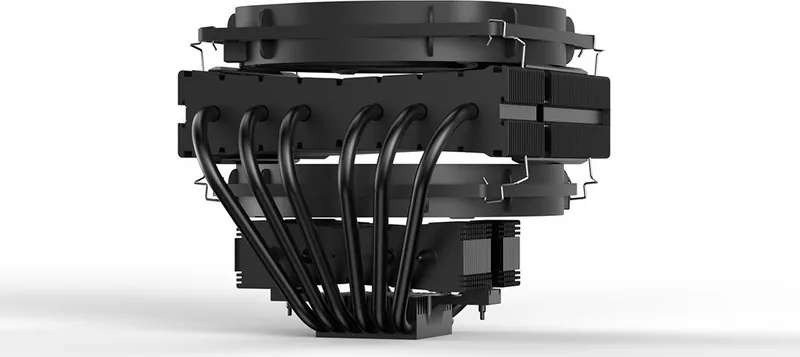
6 heat pipes (0.24 in), black heatsink

Manufacturer Warranty

3 years

M: QW-35-FL

Product Description

Experience Silent Power with the be quiet! Dark Rock TF 2

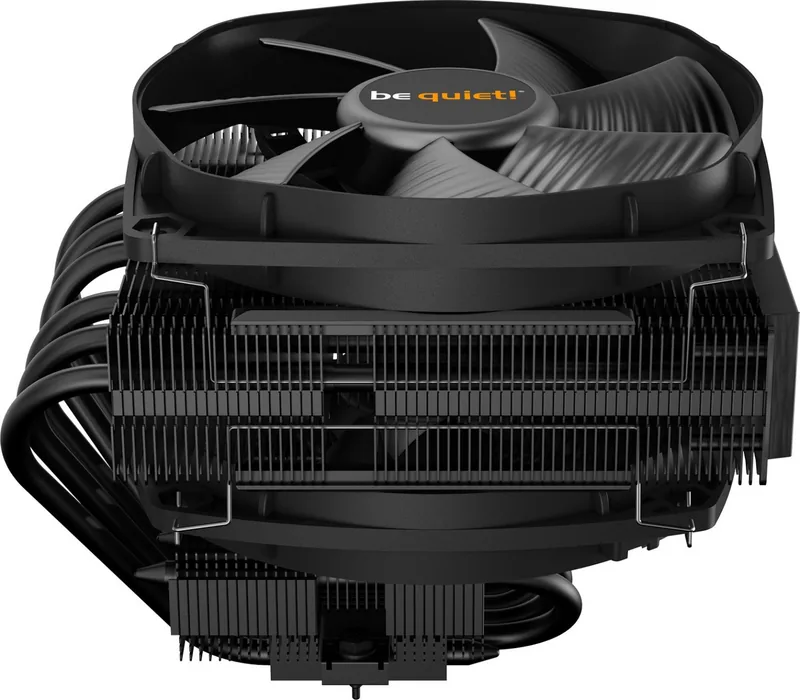
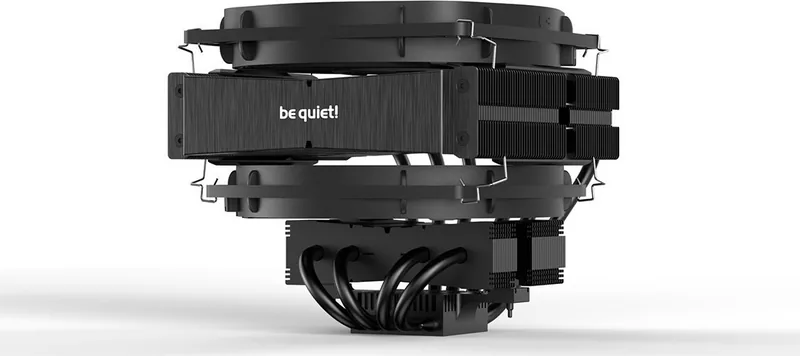
The be quiet! Dark Rock TF 2 stands as a pinnacle of thermal engineering, designed for users who demand high-performance cooling without compromising on acoustic comfort. This premium CPU cooler features a robust dual-tower heatsink structure paired with two Silent Wings 3 135mm fans. These fans are engineered to deliver exceptional airflow while maintaining whisper-quiet operation, making this unit ideal for both silent workstations and high-end gaming rigs.

Installation is streamlined through comprehensive compatibility support for major Intel and AMD sockets. The package includes dedicated mounting hardware for LGA 2011(-3), LGA 2066, AM4, and AM3+ platforms. A key feature of the installation process is the ability to mount the cooler outside the PC case before final insertion, ensuring easier handling and reduced risk of damaging other components during assembly. The included thermal paste is sufficient for one or two applications, simplifying the setup for first-time builders.

Safety and durability are paramount in the design philosophy of be quiet!. The unit comes with a three-year manufacturer guarantee for end consumers purchasing from authorized dealers. The product utilizes high-quality materials, including copper heat pipes and aluminum fins, to ensure efficient heat dissipation even under heavy loads. The fan clips allow for secure attachment to the rubber elements, preventing vibrations that could lead to noise issues over time. Whether you are pushing your processor to its limits or simply seeking a quieter environment, the Dark Rock TF 2 delivers reliable performance with minimal noise signature.

M: QW-35-FL

© Copyright 2026 Manual.ly