Manual.ly Logo

be quiet! Dark Rock Pro 5 Manual

5.0 · 21 Ratings

PDF manual · 2 Pages

English

M: qwen/qwen3.5-flash-20260224
page

/ 2

Loading...
70c3eb73f8de44688378fa8533b516f27b14 page 1
» Product information for this CPU cooler
» Produktinformationen zu diesem CPU-Kühler
» Informations produit pour ce système de refroidissement
» Información del producto para este refrigerador de CPU
» Informacje produktowe dla tego coolera CPU
» Engelstalige productinformatie voor deze processorkoeler
» Produktinformation för den här processorkylaren, på engelska
» Подробнаяинформацияоданномкулередляпроцессора
» 此CPU散熱器的產品資訊
» 此CPU散热器的产品信息
» 製品情報(クーラー)
NL
SE
Installation of the mounting
brackets
Screw the Intel spacer nut A onto the
previously positioned Intel backplate.
Then position the Intel mounting
brackets over the Intel spacer nut A and
affix these with the mounting bracket
fastening screws. You can use the cross-
tip screwdriver for this.
Center the Silent Wings 135mm fan
from above. Then slide it into the recess
between the heatsinks and press it firmly.
Connect both fans via the Y-cable. You
can remove the fan clips of the Silent
Wings 4 120mm and adjust the height.
Installation der Montagebrücken
Schraube den Intel Gewindebolzen A
auf die zuvor platzierte Intel Backplate.
Positioniere dann die Intel Montagebrücken
auf den Intel Gewindebolzen A, um sie
mit den Befestigungsschrauben für die
Montagebrücke zu fixieren. Hierzu kannst
du den Kreuzschraubendreher nutzen.
Befestigung der Backplate
Platziere die Intel Backplate Schrauben in
die auf der Rückseite der Intel Backplate
befindlichen Aussparungen. Beachte hierzu
die Bohrlöcher für den jeweiligen Sockel.
Verwende zur Befestigung der Backplate-
Schrauben auf der Intel Backplate die
O-Ringe. Sobald die Intel Backplate für den
jeweiligen Intel-Sockel zusammengebaut
ist, positioniere es unter dem Mainboard.
Achte dabei darauf, dass die Intel Backplate-
Schrauben genau in den Mainboardlöchern
positioniert sind.
Setze den Silent Wings 135mm Lüfter von
oben mittig an. Lass ihn anschließend in
die Aussparung zwischen den Kühlkörpern
hineingleiten und drücke ihn fest. Verbinde
beide Lüfter über die Y-Weiche. Du kannst die
Lüfterklammern des Silent Wings 4 120mm
abnehmen und in der Höhe verstellen.
Mounting the CPU cooler
First peel off the protective film from
the underside of the cooler. Apply
thermal paste on the CPU surface. The
tube contains enough for about 1 or 2
applications.
Caution: The thermal paste supplied
should not be swallowed. If any is
swallowed, drink lots of water and
urgently seek the advice of a doctor.
Store it beyond the reach of children.
Avoid contact with skin and eyes.
Montage des CPU-Kühlers
Entferne zunächst die Schutzfolie
von der Unterseite des Kühlers. Trage
die Wärmeleitpaste auf die CPU-
Oberfläche auf. Der Inhalt reicht für ca.
1-2 Anwendungen.
Vorsicht: Die mitgelieferte Wärmeleitpaste
ist nicht zum Verzehr geeignet. Bei Verzehr
ausreichend Wasser trinken und umgehend
einen Arzt aufsuchen. Außerhalb der
Reichweite von Kindern aufbewahren.
Vermeide Haut- und Augenkontakt.
Place the cooler onto the CPU unit.
Then screw the mounting bridge alter-
nately tight. You can use the cross-tip
screwdriver for this.
Dark Rock Pro 5 has a Quiet (Q) and
a Performance (P) mode. The mode
affects the maximum fan speeds and the
operating noise. To change modes, first
remove the magnetic top cover. Move the
switch to switch between the modes.
Lege den Kühler mittig auf die Intel
Montagebrücken, sodass sich der
Kühler mit selbigen verschrauben
lässt. Hierzu kannst du den
Kreuzschraubendreher verwenden.
Dark Rock Pro 5 hat einen Quiet (Q) und
einen Performance (P) Modus. Der Modus
hat Einfluss auf die maximalen Drehzahlen
des Lüfters und die Betriebsgeräusche.
Entferne zum Wechseln der Modi
zunächst den magnetischen Deckel.
Bewege den Schalter, um zwischen den
Modi zu wechseln.
The following parts are needed for this:
1x Dark Rock Pro 5 CPU cooler (1), 1x Silent Wings 135mm fan (2), 1x Silent Wings 4 120mm fan (3), 1x Intel backplate (4),
2x Intel mounting brackets (5), 4x Intel spacer nut A (7), 4x mounting bracket fastening screws (9), 4x Intel backplate screws (10),
4x O-rings (12), 1x thermal paste (13), 1x cross-tip screwdriver (14)
Es werden folgende Bauteile benötigt:
1x Dark Rock Pro 5 CPU-Kühler (1), 1x Silent Wings 135mm Lüfter (2), 1x Silent Wings 4 120mm Lüfter (3), 1x Intel Backplate (4),
2x Intel Montagebrücken (5), 4x Intel Gewindebolzen A (7), 4x Befestigungsschrauben für die Montagebrücke (9), 4x Intel
Backplate-Schrauben (10), 4x O-Ringe (12), 1x Wärmeleitpaste (13), 1x Kreuzschraubendreher (14)
Mounting the backplate
Position the Intel backplate screws in the
notches situated on the rear side of the
Intel backplate. Pay attention doing so to
align with the holes drilled for each socket.
For fixing the backplate screws onto
the Intel backplate use the O-rings.
Once assembly of the Intel backplate
for the respective Intel socket has
been completed, position it under the
motherboard. In so doing make sure that
the Intel backplate screws are precisely
located within the motherboard holes.
Pull off the top cover to remove the
Silent Wings 135mm fan. Separate
both fans from each other by pulling
off the Y-cable. Press the handles of
the fan clips from the Silent Wings 4
120mm to remove it.
!
Ziehe das Top Cover ab, um
den Silent Wings 135mm Lüfter
zu entfernen. Trenne anschließend
beide Lüfter, indem du sie von der
Y-Weiche trennst. Drücke die Griffe
der Lüfterklammern vom Silent Wings
4 120mm weg, um ihn zu entfernen.
!
Intel: LGA 1700 / 1200 / 1150 / 1151 / 1155
www.bequiet.com/bk036
Einleitung: Vielen Dank, dass du dich für ein be quiet!
Produkt entschieden hast. Diese Anleitung wird dir beim
Installationsprozess helfen. Kontaktiere bitte unseren
Kundenservice unter [email protected], sollten bei
der Installation Schwierigkeiten auftreten. be quiet! kann
keinerlei Haftung für durch Kompatibilitätsprobleme bedingte
Schäden übernehmen.
Garantie:
• 3 Jahre Herstellergarantie für Endkonsumenten (nur Erst-
erwerb vom autorisierten be quiet! Händler), ab Datum des
Kaufbelegs
• Eine Garantieabwicklung ist nur in Verbindung mit einer
beigefügten Kopie des Kaufbeleges eines autorisierten
be quiet! Händlers möglich
• Manipulationen und bauliche Veränderungen jeglicher
Art, sowie Beschädigungen durch äußere mechanische
Einwirkungen führen zum totalen Garantieverlust
• Es gelten unsere Allgemeinen Garantiebestimmungen,
die du unter www.bequiet.com im Internet abrufen kannst
Listan GmbH
Wilhelm-Bergner-Straße 11c
.
21509 Glinde
.
Germany
Für weitere Unterstützung erreichst du uns via E-Mail:
Introduction: Thank you for deciding to purchase a be quiet!
product. The following instructions will guide you through the
installation process. If you do encounter installation problems,
please don't hesitate to contact our customer services by
mailing [email protected]. Please note that be quiet!
cannot accept liability for damage caused by compatibility
problems.
Warranty:
• 3-year manufacturer guarantee for consumers (original
purchase from authorized be quiet! dealers only)
• Guarantee work can only be processed with a copy
included of the purchase receipt from an authorized be
quiet! dealer
• Manipulation and structural changes of any kind, including
any damage caused by external mechanical force, will lead
to a complete voiding of the guarantee
• Our General Warranty Conditions apply, which can be
viewed on bequiet.com
Listan GmbH
Wilhelm-Bergner-Straße 11c
.
21509 Glinde
.
Germany
For further information contact us via e-mail:
V1/23
Für die Montage des Kühlers empfehlen wir die Installation
außerhalb des Gehäuses.
!
We recommend preparatory mounting of the cooler outside
the PC case for subsequent installation.
!
V1/23
Part name Quantity
AMD spacer nuts
AMD Abstandsbolzen
4
Mounting bracket fastening
screws
Befestigungsschrauben für
die Montagebrücke
4
Intel backplate screws
Intel Backplate-Schrauben
4
AMD backplate screws
AMD Backplate-Schrauben
4
O-rings
O-Ringe
4
Thermal paste
Wärmeleitpaste
1
Cross-tip screwdriver
Kreuzschraubendreher
1
Part name Quantity
Dark Rock Pro 5 CPU cooler
Dark Rock Pro 5 CPU-Kühler
1
Silent Wings 135mm fan
Silent Wings 135mm Lüfter
1
Silent Wings 4 120mm fan
Silent Wings 4 120mm Lüfter
1
Intel backplate
Intel Backplate
1
Intel mounting brackets
Intel Montagebrücken
2
Short AMD mounting brackets
Kurze AMD Montagebrücken
2
Intel spacer nut A
Intel Gewindebolzen A
4
SCOPE OF DELIVERY / LIEFERUMFANG
8
10
11
12
13
2
3
4
5
6
7
9
1
14

Chat with your be quiet! Dark Rock Pro 5 manual using AI

Get instant AI answers from your be quiet! Dark Rock Pro 5 manual

Ask anything about the be quiet! Dark Rock Pro 5. Answers come from this manual, with the pages they are based on.

Ask a Question

0/1000

Do you recommend Dark Rock Pro 5?

Yes No
0
User Pic

PCBuilder_Mike

5 months ago

Does this cooler fit in a standard mid-tower case with tall RGB RAM? Worried about side panel clearance.

0
User Pic

Manual.ly

5 months ago

Thank you for your inquiry. The Dark Rock Pro 5 is a large tower cooler providing excellent performance. Please note that it has a substantial height and may block tall RGB RAM modules in some cases. User reports indicate fits vary significantly by case model. We generally recommend clearance of around 160mm height. For compact mid-towers, you should measure your space carefully before ordering. Side panels might require adjustment if RAM is tall. For full compatibility details, check our online support guide with your specific case model first.

M: qwen/qwen3.5-flash-20260224

Frequently Asked Questions

A

Yes, the Dark Rock Pro 5 supports Intel LGA 1700, 1200, 1150, 1151, and 1155 sockets using the provided backplate and mounting hardware set included in the package.

Is this answer helpful?

A

Quiet mode maximizes silence by limiting fan speed while Performance mode increases maximum fan speed for better cooling capacity. The switch is located under the magnetic top cover for easy access.

Is this answer helpful?

A

Yes, the cooler supports AMD AM5 and AM4 sockets utilizing the included short mounting brackets and specific spacing components found in the box for proper fitment.

Is this answer helpful?

A

No, you must apply the supplied thermal paste manually to the CPU surface after peeling the protective film from the cooling base. This ensures optimal thermal contact efficiency.

Is this answer helpful?

A

There is a 3-year manufacturer guarantee for consumers who purchased from an authorized be quiet! dealer with the required proof of purchase receipt included in the warranty claim.

Is this answer helpful?

A

Yes, the 135mm fan can be removed to access the top cover switch, and the 120mm clips can be detached for height adjustment or cleaning the heatsink fins effectively.

Is this answer helpful?

A

Contact customer service via email at [email protected] for installation issues or warranty claims requiring professional assistance or compatibility verification.

Is this answer helpful?

M: qwen/qwen3.5-flash-20260224

Advantages and Disadvantages

Advantages

  • 1. Dual Silent Wings fans provide efficient cooling with optimized airflow design.
  • 2. Quiet and Performance modes allow fan speed customization for different needs.
  • 3. Supports wide range of Intel and AMD sockets for high versatility.
  • 4. Includes thermal paste sufficient for multiple applications during setup.
  • 5. 3-year manufacturer warranty provides buyer peace of mind and coverage.
VS

Disadvantages

  • 1. Large physical dimensions require checking case clearance before purchase.
  • 2. Installation may be complex for first-time computer builders to assemble.
  • 3. Magnetic top cover removal needed to access fan speed control switch.
  • 4. Thermal paste application requires care to avoid skin contact or eye injury.
  • 5. Manual removal of 135mm fan requires Y-cable separation during maintenance.
M: qwen/qwen3.5-flash-20260224

Product Specification

Type

Tower Cooler (Dual-Tower)

Dimensions with Fan

5.35 x 6.61 x 5.71 inches (W x H x D)

Dimensions without Fan

5.35 x 6.61 x 4.70 inches (W x H x D)

Fan

1x 5.31 x 5.31 x 0.98 in, 1700rpm, 32.3dB(A), 3.36W + 1x 4.72 x 4.72 x 0.98 in, 2000rpm, 2.4W

Weight with Fan

2.85 lbs

Connector

4-Pin PWM

AMD Socket

AM5, AM4

Intel Socket

1700, 1150/1151/1155/1156/1200

TDP Rating

270W

Features

7 Heat Pipes (0.24 in), Black Heatsink, Screwdriver

Manufacturer Warranty

3 Years

M: qwen/qwen3.5-flash-20260224

Product Description

The be quiet! Dark Rock Pro 5 Experience

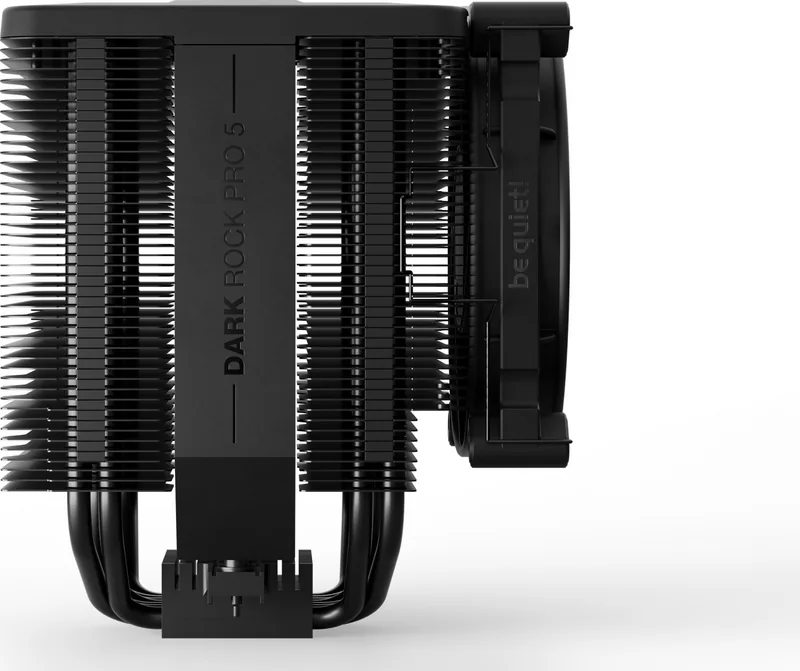
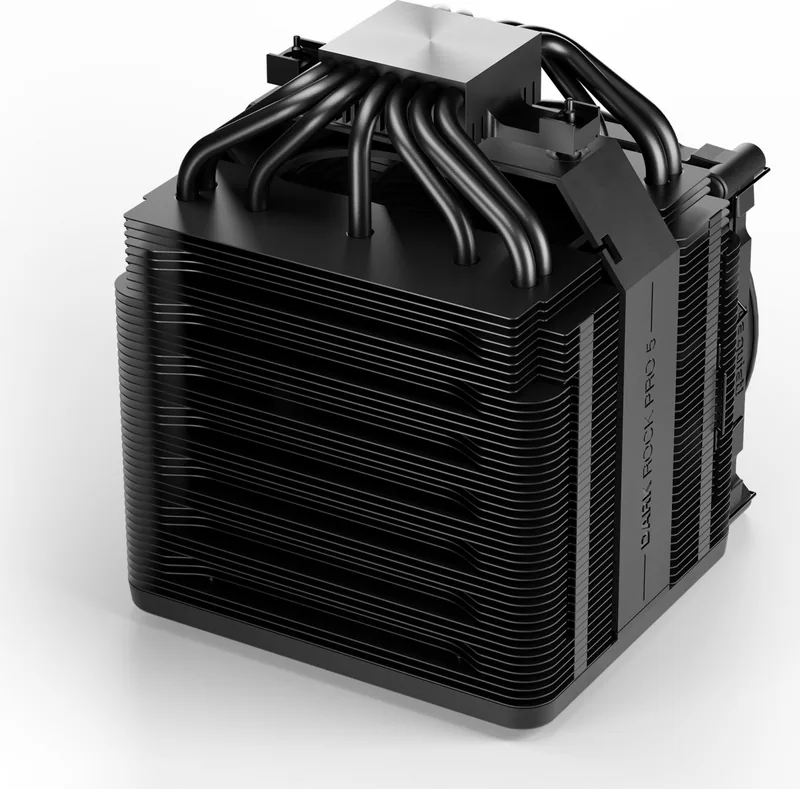
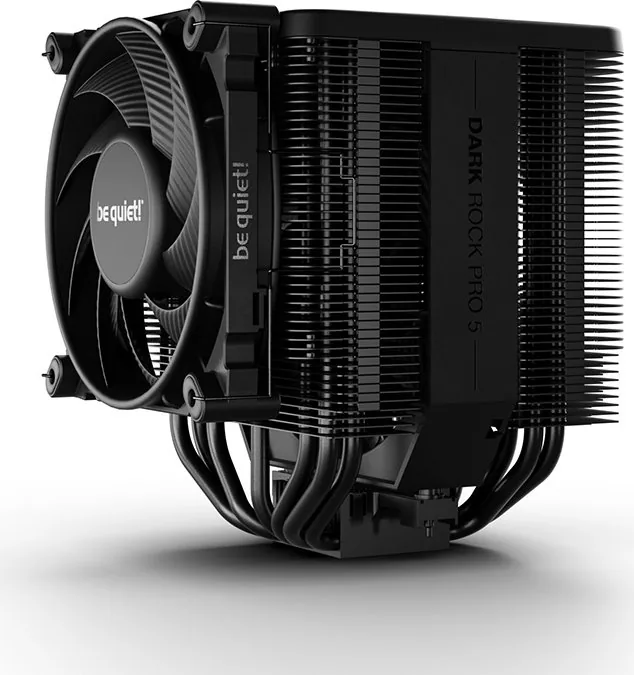
When building a high-performance PC, thermal management remains a critical component for system stability and longevity. The Dark Rock Pro 5 offers an outstanding solution for enthusiasts seeking silent operation without compromising on raw cooling capacity. This tower cooler utilizes dual Silent Wings fans to ensure efficient heat dissipation across your system components. The unit features a Quiet mode and a Performance mode within its internal control architecture. Adjusting fan speeds directly via a switch located under the removable magnetic top cover allows users to balance noise levels against thermal requirements dynamically. This flexibility ensures optimal thermal headroom depending on your daily usage scenarios.

Mounting is straightforward with detailed guidance available in the installation steps. Users need to ensure compatibility with their specific platform before attempting any physical installation. The cooler officially supports a wide range of sockets including Intel LGA 1700 and various 115-series platforms. AMD users can rely on support for AM4 and AM5 sockets using the included mounting brackets and hardware set. The package includes a tube of thermal paste sufficient for approximately one or two complete applications. Proper application on the CPU surface is vital for optimal heat transfer efficiency and low temperatures. Be careful not to swallow the paste during the installation process and keep it out of reach for children to ensure safety.

Installation outside the case is highly recommended for easier access to the motherboard and rear backplate. A backplate secures the assembly from the rear, providing structural stability across the board. The 135mm Silent Wings fan slides into the heatsink recess while the 120mm unit attaches via adjustable clips. For maintenance or upgrades, the top cover allows simple access to the fan speed switch settings. The guide specifies screw tightness for mounting bridges to prevent damage during assembly. Removing the 135mm fan requires pulling the top cover and separating the Y-cable link between units. Check for sufficient case clearance prior to purchase as physical dimensions are substantial. Overall, this cooling solution provides reliable performance for demanding processors while maintaining low noise emission during both idle operations and heavy load conditions. For full technical details, refer to the be quiet! Dark Rock Pro 5 Manual for accurate data. The system operates quietly thanks to the precision engineering of its fans. A three-year manufacturer guarantee covers consumers making the purchase from authorized dealers. Any structural changes or mechanical damage voids this protection. Customer support is available via email for any inquiries regarding compatibility or operation issues. Remember to use only the provided screws for the backplate to ensure the integrity of the motherboard.

M: qwen/qwen3.5-flash-20260224

© Copyright 2026 Manual.ly