Manual.ly Logo

be quiet! Dark Rock Elite Manual

5.0 · 8 Ratings

PDF manual · 2 Pages

English

M: qwen/qwen3.5-flash-20260224
page

/ 2

Loading...
5e1c427aea6d1845d2886a5f75d30c4f0a32 page 1
» Product information for this CPU cooler
» Produktinformationen zu diesem CPU-Kühler
» Informations produit pour ce système de refroidissement
» Información del producto para este refrigerador de CPU
» Informacje produktowe dla tego coolera CPU
» Engelstalige productinformatie voor deze processorkoeler
» Produktinformation för den här processorkylaren, på engelska
» Подробнаяинформацияоданномкулередляпроцессора
» 此CPU散熱器的產品資訊
» 此CPU散热器的产品信息
» 製品情報(クーラー)
NL
SE
Installation of the mounting
brackets
Screw the Intel spacer nut A onto the
previously positioned Intel backplate.
Then position the Intel mounting brackets
over the Intel spacer nut A and affix
these with the mounting bracket fastening
screws. You can use the cross-tip
screwdriver for this.
Center the Silent Wings 135mm fan
from above. Then slide it into the recess
between the heatsinks and press it
firmly. Connect both fans via the Y-cable.
You can adjust the height of the Silent
Wings 135mm front fan by pushing it
up and down.
Installation der Montagebrücken
Schraube den Intel Gewindebolzen A
auf die zuvor platzierte Intel Backplate.
Positioniere dann die Intel Montagebrü-
cken auf den Intel Gewindebolzen A, um
sie mit den Befestigungsschrauben für die
Montagebrücke zu fixieren. Hierzu kannst
du den Kreuzschraubendreher nutzen.
Befestigung der Backplate
Platziere die Intel Backplate Schrauben in
die auf der Rückseite der Intel Backplate
befindlichen Aussparungen. Beachte hierzu
die Bohrlöcher für den jeweiligen Sockel.
Verwende zur Befestigung der Backplate-
Schrauben auf der Intel Backplate die
O-Ringe. Sobald die Intel Backplate für den
jeweiligen Intel-Sockel zusammengebaut
ist, positioniere es unter dem Mainboard.
Achte dabei darauf, dass die Intel Backplate-
Schrauben genau in den Mainboardlöchern
positioniert sind.
Setze den Silent Wings 135mm Lüfter von
oben mittig an. Lass ihn anschließend in die
Aussparung zwischen den Kühlkörpern hin-
eingleiten und drücke ihn fest. Verbinde beide
Lüfter über die Y-Weiche. Du kannst den Silent
Wings 135mm Frontlüfter in seiner Höhe ver-
stellen, indem du ihn hoch und runter schiebst.
Mounting the CPU cooler
First peel off the protective film from
the underside of the cooler. Apply
thermal paste on the CPU surface. The
tube contains enough for about 1 or 2
applications.
Caution: The thermal paste supplied
should not be swallowed. If any is swal-
lowed, drink lots of water and urgently
seek the advice of a doctor. Store it
beyond the reach of children. Avoid con-
tact with skin and eyes.
Montage des CPU-Kühlers
Entferne zunächst die Schutzfolie
von der Unterseite des Kühlers. Trage
die Wärmeleitpaste auf die CPU-
Oberfläche auf. Der Inhalt reicht für ca.
1-2 Anwendungen.
Vorsicht: Die mitgelieferte Wärmeleitpaste
ist nicht zum Verzehr geeignet. Bei Verzehr
ausreichend Wasser trinken und umgehend
einen Arzt aufsuchen. Außerhalb der Reich-
weite von Kindern aufbewahren. Vermeide
Haut- und Augenkontakt.
Place the cooler onto the CPU unit.
Then screw the mounting bridge alter-
nately tight. You can use the cross-tip
screwdriver for this.
Dark Rock Elite has a Quiet (Q) and a
Performance (P) mode. The mode affects
the maximum fan speeds and the opera-
ting noise. To change modes, first remove
the top magnetic top frame. Move the
switch to switch between the modes.
Lege den Kühler mittig auf die Intel
Montagebrücken, sodass sich der
Kühler mit selbigen verschrauben lässt.
Hierzu kannst du den Kreuzschrauben-
dreher verwenden.
Dark Rock Elite hat einen Quiet (Q) und
einen Performance (P) Modus. Der Modus
hat Einfluss auf die maximalen Drehzahlen
des Lüfters und die Betriebsgeräusche.
Entferne zum Wechseln der Modi
zunächst den magnetischen Rahmen.
Bewege den Schalter, um zwischen den
Modi zu wechseln.
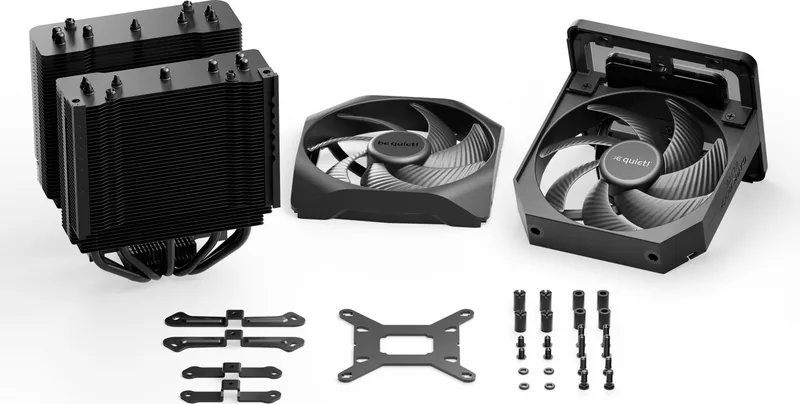
The following parts are needed for this:
1x Dark Rock Elite CPU cooler (1), 1x Silent Wings 135mm fan (2), 1x Silent Wings 135mm front fan (3), 1x Intel backplate (4),
2x Intel mounting brackets (5), 4x Intel spacer nut A (7), 4x mounting bracket fastening screws (9), 4x Intel backplate screws (10),
4x O-rings (12), 1x thermal paste (13), 1x cross-tip screwdriver (14)
Es werden folgende Bauteile benötigt:
1x Dark Rock Elite CPU-Kühler (1), 1x Silent Wings 135mm Lüfter (2), 1x Silent Wings 135mm Frontlüfter (3), 1x Intel Backplate (4),
2x Intel Montagebrücken (5), 4x Intel Gewindebolzen A (7), 4x Befestigungsschrauben für die Montagebrücke (9), 4x Intel Back-
plate-Schrauben (10), 4x O-Ringe (12), 1x Wärmeleitpaste (13), 1x Kreuzschraubendreher (14)
Mounting the backplate
Position the Intel backplate screws in the
notches situated on the rear side of the
Intel backplate. Pay attention doing so to
align with the holes drilled for each socket.
For fixing the backplate screws onto
the Intel backplate use the O-rings.
Once assembly of the Intel backplate
for the respective Intel socket has
been completed, position it under the
motherboard. In so doing make sure that
the Intel backplate screws are precisely
located within the motherboard holes.
Pull off the top cover to remove the
Silent Wings 135mm fan. Separate
both fans from each other by pulling
off the Y-cable. Push the Silent Wings
135mm front fan from the bottom up
out of the rail system to remove it.
!
Ziehe das Top Cover ab, um den Silent
Wings 135mm Lüfter zu entfernen. Trenne
anschließend beide Lüfter, indem du sie
von der Y-Weiche trennst. Drücke den
Silent Wings 135mm Frontlüfter von der
Unterseite nach oben aus dem Railsystem
raus, um ihn zu entfernen.
!
Intel: LGA 1700 / 1200 / 1150 / 1151 / 1155
Einleitung: Vielen Dank, dass du dich für ein be quiet!
Produkt entschieden hast. Diese Anleitung wird dir beim
Installationsprozess helfen. Kontaktiere bitte unseren
Kundenservice unter [email protected], sollten bei
der Installation Schwierigkeiten auftreten. be quiet! kann
keinerlei Haftung für durch Kompatibilitätsprobleme bedingte
Schäden übernehmen.
Garantie:
• 3 Jahre Herstellergarantie für Endkonsumenten (nur Erst-
erwerb vom autorisierten be quiet! Händler), ab Datum des
Kaufbelegs
• Eine Garantieabwicklung ist nur in Verbindung mit einer
beigefügten Kopie des Kaufbeleges eines autorisierten
be quiet! Händlers möglich
• Manipulationen und bauliche Veränderungen jeglicher
Art, sowie Beschädigungen durch äußere mechanische
Einwirkungen führen zum totalen Garantieverlust
• Es gelten unsere Allgemeinen Garantiebestimmungen,
die du unter www.bequiet.com im Internet abrufen kannst
Listan GmbH
Wilhelm-Bergner-Straße 11c
.
21509 Glinde
.
Germany
Für weitere Unterstützung erreichst du uns via E-Mail:
Introduction: Thank you for deciding to purchase a be quiet!
product. The following instructions will guide you through the
installation process. If you do encounter installation problems,
please don't hesitate to contact our customer services by
mailing [email protected]. Please note that be quiet!
cannot accept liability for damage caused by compatibility
problems.
Warranty:
• 3-year manufacturer guarantee for consumers (original
purchase from authorized be quiet! dealers only)
• Guarantee work can only be processed with a copy
included of the purchase receipt from an authorized be
quiet! dealer
• Manipulation and structural changes of any kind, including
any damage caused by external mechanical force, will lead
to a complete voiding of the guarantee
• Our General Warranty Conditions apply, which can be
viewed on bequiet.com
Listan GmbH
Wilhelm-Bergner-Straße 11c
.
21509 Glinde
.
Germany
For further information contact us via e-mail:
V1/23
Für die Montage des Kühlers empfehlen wir die Installation
außerhalb des Gehäuses.
!
We recommend preparatory mounting of the cooler outside
the PC case for subsequent installation.
!
V1/23
www.bequiet.com/bk037
Part name Quantity
AMD spacer nuts
AMD Abstandsbolzen
4
Mounting bracket fastening
screws
Befestigungsschrauben für
die Montagebrücke
4
Intel backplate screws
Intel Backplate-Schrauben
4
AMD backplate screws
AMD Backplate-Schrauben
4
O-rings
O-Ringe
4
Thermal paste
Wärmeleitpaste
1
Cross-tip screwdriver
Kreuzschraubendreher
1
Part name Quantity
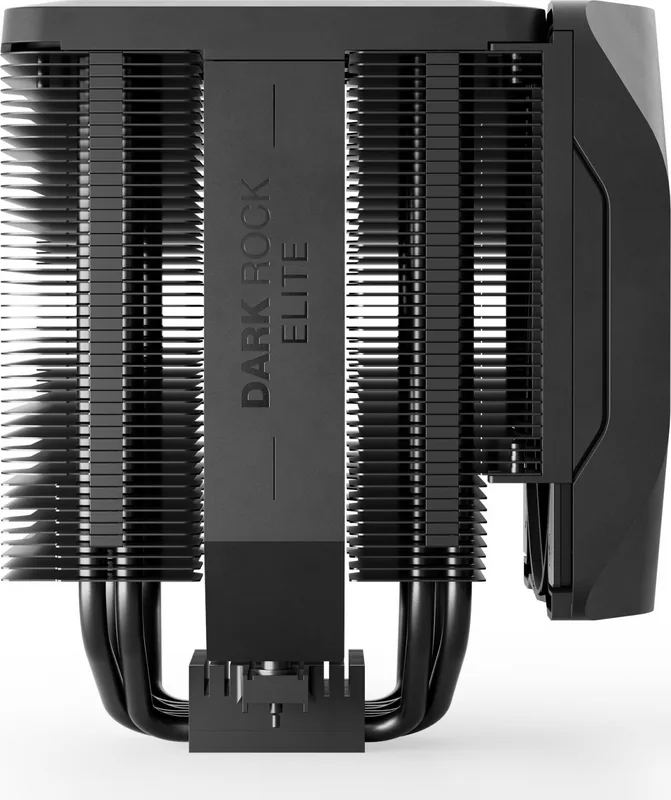
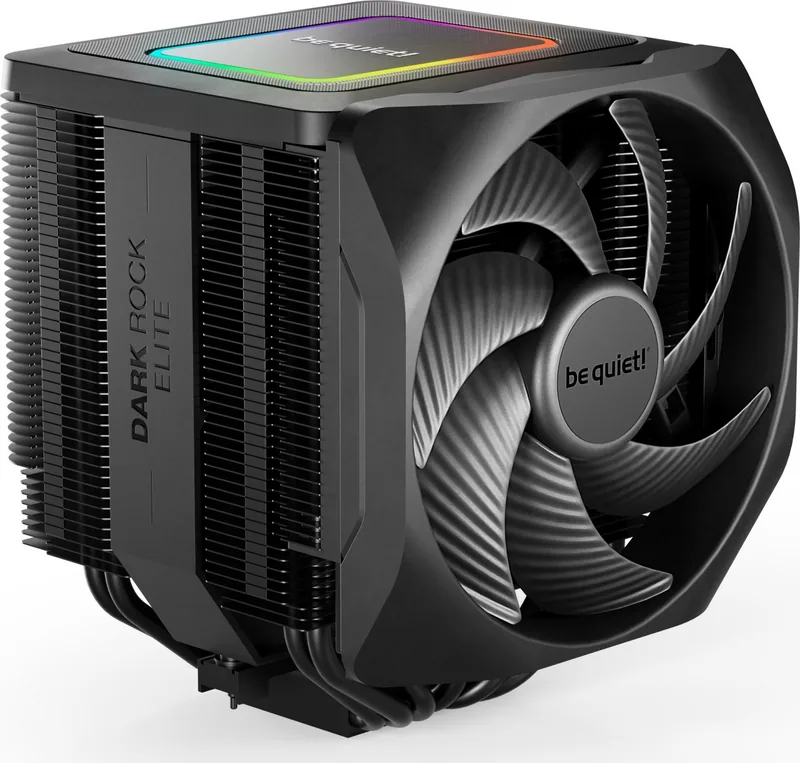
Dark Rock Elite CPU cooler
Dark Rock Elite CPU-Kühler
1
Silent Wings 135mm fan
Silent Wings 135mm Lüfter
1
Silent Wings 135mm front fan
Silent Wings 135mm Frontlüfter
1
Intel backplate
Intel Backplate
1
Intel mounting brackets
Intel Montagebrücken
2
Short AMD mounting brackets
Kurze AMD Montagebrücken
2
Intel spacer nut A
Intel Gewindebolzen A
4
SCOPE OF DELIVERY / LIEFERUMFANG
8
10
11
12
13
2
3
4
5
6
7
9
1
14

Chat with your be quiet! Dark Rock Elite manual using AI

Get instant AI answers from your be quiet! Dark Rock Elite manual

Ask anything about the be quiet! Dark Rock Elite. Answers come from this manual, with the pages they are based on.

Ask a Question

0/1000

Do you recommend Dark Rock Elite?

Yes No
0
User Pic

Michael Schmidt

7 months ago

I have a high-end CPU like the Ryzen 9 or i7 14700K. Does this air cooler maintain low temperatures and quiet operation during gaming and heavy workloads?

0
User Pic

Manual.ly

7 months ago

Based on verified user feedback, this air cooler delivers excellent performance for high-end processors, including Ryzen 9 and Intel i7 series. Users report stable temperatures around 72-82 degrees C even under full load or demanding games. It operates quietly on lower settings and includes a switch to limit fan speed if needed. Many customers recommend it over liquid cooling for reliability without significant performance loss. It is well-constructed with good RAM clearance for easy installation.

M: qwen/qwen3.5-flash-20260224

Frequently Asked Questions

A

To change the mode, you must first remove the magnetic top frame from the cooler. Once opened, locate the switch on the internal mechanism and move it to select either Quiet or Performance mode before replacing the frame.

Is this answer helpful?

A

The cooler is compatible with a wide range of sockets including Intel LGA 1700, 1200, 1150, 1151, and 1155, as well as AMD AM5 and AM4 platforms with specific mounting brackets included.

Is this answer helpful?

A

Yes, the product comes with a tube of thermal paste sufficient for approximately one to two applications, so a separate purchase is not necessary for a standard installation.

Is this answer helpful?

A

be quiet! offers a 3-year manufacturer guarantee for consumers. However, you must keep a copy of the purchase receipt from an authorized dealer to process any warranty claims or support requests.

Is this answer helpful?

A

Yes, the cooler enables direct synchronization of ARGB illumination. You must connect the ARGB cable to a 5V ARGB header on the motherboard and ensure the system is turned off during installation.

Is this answer helpful?

A

It is recommended to perform the preparatory mounting of the cooler outside of the PC case. This simplifies the process and prevents accidents or damage to other components inside the chassis.

Is this answer helpful?

A

The paste should not be swallowed. If ingested, drink water and seek medical advice immediately. Keep it out of reach of children and avoid contact with skin and eyes during application.

Is this answer helpful?

M: qwen/qwen3.5-flash-20260224

Advantages and Disadvantages

Advantages

  • Excellent cooling performance with dual Silent Wings 135mm fans
  • Quiet and Performance modes for operational flexibility
  • Supports wide range of Intel and AMD sockets
  • Thermal paste included in the scope of delivery
  • Integrated ARGB lighting with motherboard synchronization
VS

Disadvantages

  • Recommended installation outside the case initially
  • Heatpipe design creates significant height for case clearance
  • Warranty requires original proof of purchase from authorized dealer
  • Complex mounting brackets for some motherboard types
  • Mode switch requires removal of the magnetic top frame
M: qwen/qwen3.5-flash-20260224

Product Specification

Form Factor

Tower Cooler (Dual-Tower)

Dimensions with fan

5.35 x 6.61 x 5.72 in (WxHxD)

Dimensions without fan

5.35 x 6.61 x 4.88 in (WxHxD)

Fan

2x 5.31 x 5.31 x 0.98 in, 2000 rpm, 35.4 dB(A), 4.8 W

Weight with fan

2.94 lbs

Connector

4-Pin PWM

AMD Socket

AM5, AM4

Intel Socket

1700, 1150/1151/1155/1156/1200

TDP Rating

280 W

Lighting

RGB

Features

7 Heatpipes (0.24 in), black heatsink, screwdriver

Manufacturer Warranty

3 Years

M: qwen/qwen3.5-flash-20260224

Product Description

Experience Silence with the be quiet! Dark Rock Elite

An Overview of Premium Cooling

When searching for the perfect balance between thermal performance and acoustic comfort in a high-end PC build, the be quiet! Dark Rock Elite stands out as a superior choice for serious enthusiasts. Utilizing the information found in the comprehensive be quiet! Dark Rock Elite Manual ensures users understand how to get the absolute most from this robust cooling solution. The cooler features a sophisticated dual tower design equipped with two Silent Wings 135mm fans. These fans deliver impressive airflow while maintaining extremely low noise levels. This specific combination makes it ideal for overclocked systems that require steady heat dissipation during intense gaming sessions or demanding workstation tasks.

Operational Flexibility

One of the most innovative features available to current owners is the adjustable operation mode system. Users can switch between Quiet and Performance settings directly on the unit casing. To access this functionality, simply remove the magnetic top frame to reveal the mode switch mechanism. Flipping this switch alters the maximum fan speeds and changes the acoustic profile of the computer system. This flexibility allows owners to prioritize cooling efficiency over silence or vice versa depending on the specific need of the moment without needing external software.

Aesthetics and Lighting

Lighting enthusiasts will appreciate the integrated ARGB capabilities built into the model. The unit allows full synchronization with the motherboard software for a unified aesthetic experience across all components. Users must ensure they connect the ARGB connector to a 5V header specifically designated for addressable lighting. This prevents potential hardware damage and guarantees correct color output across the entire system case.

Compatibility and Installation

Compatibility is undeniably broad, supporting both Intel and AMD platforms effectively. The kit includes specific backplates and mounting hardware for LGA 1700, 1200, 1150, 1151, 1155, AM5, and AM4 sockets. The installation process includes a protective layer of thermal paste, which simplifies the initial setup phase significantly. It is highly recommended to install the cooler outside the case before securing it inside the chassis. This method prevents accidental damage to other components and makes alignment much easier for the average user.

The thermal paste included in the pack is sufficient for about one or two applications. Users must handle this substance carefully to avoid skin contact as it is not meant for ingestion. Store this material safely away from children to prevent accidents during the building process. Additionally, the magnetic frame design allows for quick removal without tools when adjusting lighting patterns.

Warranty and Support Overview

The product comes with a substantial warranty period covering consumer purchases. This ensures peace of mind regarding potential defects or manufacturing issues that might arise. Support is available via email for any troubleshooting steps that might be needed during the integration process. Overall, this cooler represents a significant step up in modern air cooling technology for anyone looking to upgrade their rig. The attention to detail in the mounting system shows a commitment to quality that is rare in this market category.

M: qwen/qwen3.5-flash-20260224

© Copyright 2026 Manual.ly