
be quiet! Dark Power Pro 12 Manual
PDF manual · 48 Pages
English



Quick check
Incorrect answer, please try again.
Chat with your be quiet! Dark Power Pro 12 manual using AI
Get instant AI answers from your be quiet! Dark Power Pro 12 manual
Ask anything about the be quiet! Dark Power Pro 12. Answers come from this manual, with the pages they are based on.
Ask a Question
Do you recommend Dark Power Pro 12?
Yes NoFrequently Asked Questions
The unit comes with a ten-year manufacturer warranty for consumers who purchase from authorized dealers.
Is this answer helpful?
Overcurrent protection, short circuit safeguard, overvoltage, undervoltage, temperature, and overload protections.
Is this answer helpful?
A tool that merges individual 12V rails into a single massive rail to optimize power for hardware.
Is this answer helpful?
No, opening the case risks injury from high voltages and will void your warranty immediately.
Is this answer helpful?
Power cables, slot cover with key, jumper, AC cable, cable ties, Velcros, combs, and screws.
Is this answer helpful?
Dispose separately from household waste according to European electronic waste directives and local laws.
Is this answer helpful?
Advantages and Disadvantages
Advantages

- High 1500W capacity supports extreme systems
- Ten year manufacturer warranty covers consumers
- Overclocking Key allows 12V rail merging
- Comprehensive protective features safeguard components
- Compatible with major motherboard standards
Disadvantages

- Requires direct wall outlet connection required
- Outdoor usage prohibited due to moisture risks
- Proprietary cables needed to ensure safety
Product Specification
Fan
5.31 in, 2600 RPM
Cable Management
Fully modular
Connections
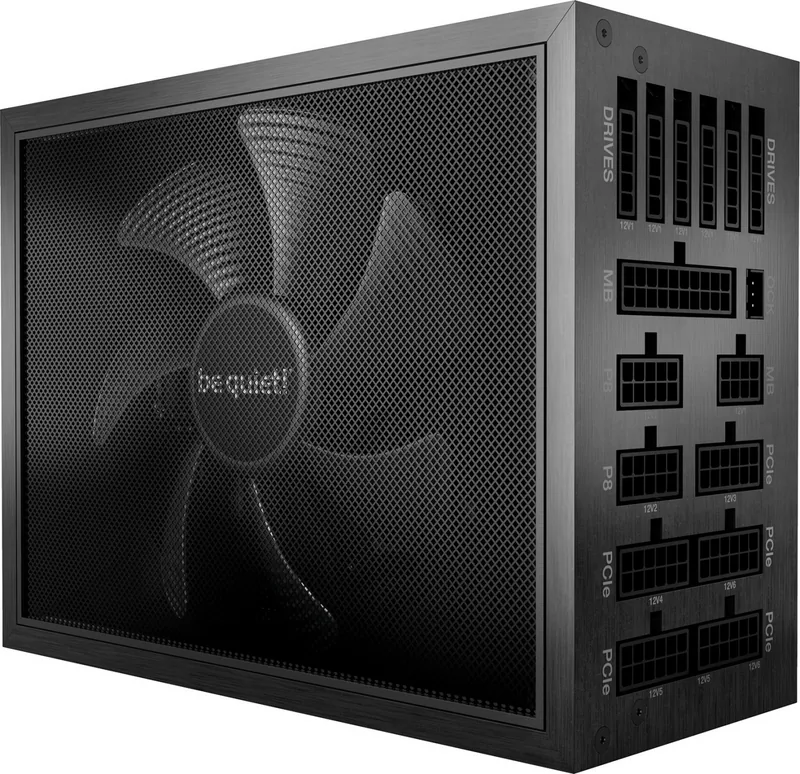
1x 20/24-Pin, 1x 8-Pin EPS12V, 1x 4/8-Pin ATX12V, 10x 6/8-Pin PCIe, 16x SATA, 8x IDE
Certifications according to manufacturer
80 PLUS Titanium (according to manufacturer, voltage unknown)
Certifications according to 80 PLUS
80 PLUS Titanium (115V, according to 80 PLUS certificate)
Dimensions (WxHxD)
5.91x3.39x7.87 in
Manufacturer Warranty
10 years
+3.3V
25A
+5V
25A
-12V
0.5A
+5Vsb
3.5A
Number of 12V rails
6
PFC
Active
Form Factor
ATX PS/2
Specification
ATX 2.51
Features
ErP Lot 6, digital signal processor, supports Haswell C6/C7 Low-Power States, switchable Multi-12V rail mode
Color
Black
Product Description
Exploring the be quiet! Dark Power Pro 12 Series
Powering Your Dream Machine
The be quiet! Dark Power Pro 12 stands as a pinnacle of efficiency and power delivery for high-end desktop systems. Designed for enthusiasts demanding stability and silence, this unit delivers an impressive 1500W of continuous power. It adheres to the latest ATX 2.51 specifications ensuring compatibility with modern motherboards and processors. Users benefit from a robust feature set tailored for extreme performance tasks. Energy Star 7.0 guidelines are met, ensuring responsible power consumption during idle and load states.
Advanced Overclocking Features
One standout capability is the Overclocking Key. This unique tool allows users to merge individual 12V rails into a single massive rail. This configuration optimizes power delivery for graphics cards and CPUs during intense workloads. It can be activated permanently via a jumper or temporarily using a switch on the included slot cover. An LED indicator confirms when the function is active. This flexibility allows customization based on specific hardware requirements without altering BIOS settings permanently.
Comprehensive Safety Protocols
Safety remains a top priority within the design. Multiple protection mechanisms safeguard against overcurrent, short circuits, and overheating. These safety features ensure connected components remain secure during unforeseen voltage fluctuations. Additional protections include overvoltage, undervoltage, and overload safeguards. If any issue arises, the system will typically reboot or power off to prevent hardware damage. Users are advised to check system errors immediately if such safeguards trigger. Manufacturers recommend against opening the case as internal high voltages remain dangerous even after disconnecting the power source.
Installation and Maintenance Guidelines
Installation requires careful attention to safety instructions. The unit should connect directly to wall outlets rather than power strips to minimize interference and potential hazards. Users must use original cables to avoid defects caused by incompatible wiring. Cleaning should only involve dry cloths on the exterior. Condensation prevention requires letting the unit warm up to room temperature for one hour before first use.
Accessories and Compatibility
The package provides essential accessories including power cables, cable combs, velcro ties, and mounting screws. A dedicated slot cover enables convenient access to the overclocking controls without reaching inside the chassis. Backed by a ten-year manufacturer warranty for consumers purchasing from authorized dealers, confidence in longevity is established. This product represents a commitment to quality engineering and reliable performance for serious PC builders looking for top-tier power solutions without compromise.
Troubleshooting and Support
In cases of power instability, users should check the power supply calculator tool on the official website before purchasing additional hardware. Voltage readings in BIOS may appear incorrect due to motherboard measurement imprecision rather than genuine faults. If problems persist, contacting customer service is recommended. The device must be disposed of separately from household waste according to regional electronic waste directives. Original purchase from authorized be quiet dealers is required for warranty validation. Check the specifications for exact cable lengths. Manufacturer details include Listan GmbH in Glinde for further support inquiries.
Search for 67,706 Manuals online


Type-in Brand or Model