
be quiet! AM4 Mounting Kit Manual
PDF manual · 2 Pages
English



Quick check
Incorrect answer, please try again.
Chat with your be quiet! AM4 Mounting Kit manual using AI
Get instant AI answers from your be quiet! AM4 Mounting Kit manual
Ask anything about the be quiet! AM4 Mounting Kit. Answers come from this manual, with the pages they are based on.
Ask a Question
Do you recommend AM4 Mounting Kit?
Yes NoFrequently Asked Questions
It is used to mount compatible be quiet! CPU coolers onto AMD AM4 socket motherboards. The kit provides the brackets, screws, spacers, and back plate needed for a secure installation.
Is this answer helpful?
The kit is intended for be quiet! Dark Rock 3, Dark Rock Pro 3, Dark Rock TF, Shadow Rock 2, and Shadow Rock Slim. It is made specifically for those compatible cooler families.
Is this answer helpful?
Yes. The pre-installed AMD retention module must be removed before installing the cooler. The motherboard’s socket area needs to be cleared so the AM4 mounting hardware can be fitted correctly.
Is this answer helpful?
No, thermal paste is not included. You need to provide thermal grease separately before installation so the cooler can make proper contact with the CPU surface.
Is this answer helpful?
No. The instructions specifically warn against using original mounting parts, even if they look similar. Only the parts supplied with this AM4 kit should be used for compatibility and safety.
Is this answer helpful?
No. It is designed only for AMD AM4 socket motherboards. It should not be used with other sockets or mounting systems because the fit and fastening method are specific to AM4.
Is this answer helpful?
Advantages and Disadvantages
Advantages

- Purpose-built for AM4, reducing guesswork during installation.
- Includes the needed hardware for secure cooler mounting.
- Supports several popular be quiet! cooler models.
- Clear step-by-step assembly helps simplify the process.
- Designed for stable contact and reliable cooler positioning.
Disadvantages

- Thermal grease is not included, so it must be purchased separately.
- Only works with AMD AM4 motherboards.
- Requires removal of the pre-installed retention module.
- Using it with other mounting parts is not recommended.
- Installation may be tighter inside already assembled cases.
Product Specification
Type
Mounting kit
Compatibility
be quiet! Shadow Rock Slim, Shadow Rock 2, Dark Rock 3, Dark Rock Pro 3, Dark Rock TF, Dark Rock Pro C1, Dark Rock Pro 2
Product Description
be quiet! AM4 Mounting Kit: Reliable Support for AMD Cooler Installation
The be quiet! AM4 Mounting Kit Manual highlights a practical solution for mounting compatible be quiet! CPU coolers on AMD AM4 motherboards. This kit is designed to help users achieve a stable, secure fit for popular models such as the Dark Rock 3, Dark Rock Pro 3, Dark Rock TF, Shadow Rock 2, and Shadow Rock Slim. For builders who want a clean installation and dependable contact between cooler and processor, the kit focuses on the essentials without unnecessary extras.
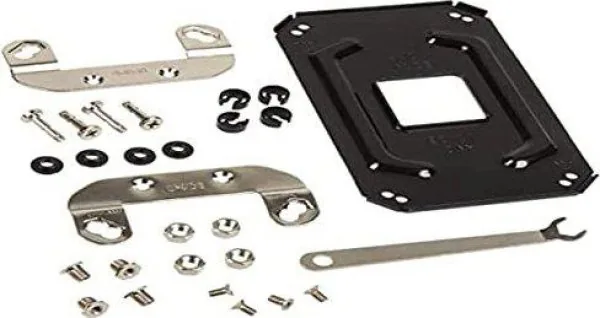
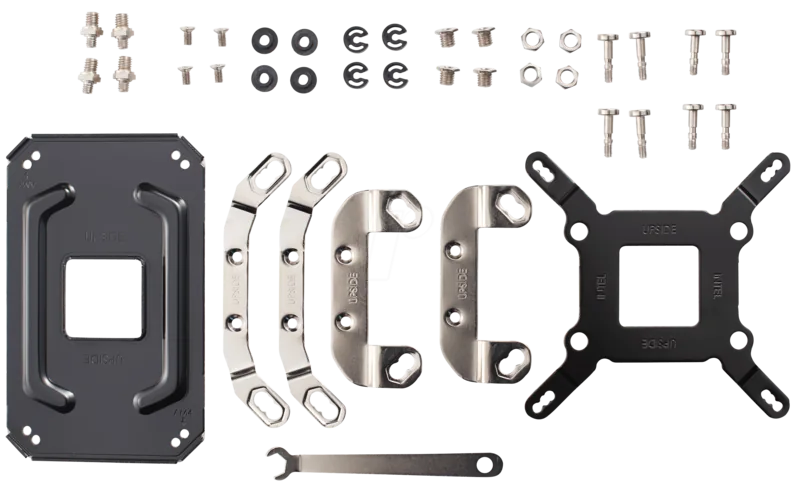
At the center of the package is a carefully matched set of hardware: an AM4 back plate, mounting brackets, screws, washers, spacers, nuts, and a hexagonal spanner for assembly. The instructions emphasize that the original mounting parts should not be reused, even if they appear similar. That detail matters, because the kit is built specifically for AM4 socket compatibility and is intended to work as a dedicated fastening system rather than a generic replacement.
Installation follows a clear sequence. First, the existing AMD retention module must be removed from the motherboard. Then the back plate is positioned, the screws and washers are inserted, and the spacers are used to lock everything in place from the front side. After the cooler brackets are attached to the underside of the cooler, the unit can be mounted to the CPU with thermal paste applied between the surfaces. The result is a firm, well-aligned connection that supports efficient cooling performance.
One of the most useful aspects of this kit is its focus on compatibility and clarity. It is especially helpful for users building inside a case with a pre-installed motherboard, where working through the motherboard cutout may make the process easier. The guide also notes that thermal grease is not included, so users should plan ahead and have paste ready before installation.
For PC enthusiasts, the be quiet! AM4 Mounting Kit offers confidence more than complexity. It is a small accessory, but it plays an important role in ensuring that high-performance air coolers can be installed properly and safely on AMD AM4 systems.
Notes
- Only compatible with AMD AM4 socket motherboards.
- Thermal paste is not included.
- Use only the supplied mounting parts for best fit and safety.
Search for 67,706 Manuals online


Type-in Brand or Model
Svenja Köhler
9 months ago
Will this mounting kit let me install my be quiet! Dark Rock Pro 3 on an AM4 (B450/B550) board without missing parts, and does it force top-blow (airflow) that could increase GPU temps?
Manual.ly
9 months ago
In most cases, yes. This adapter kit is designed to mount compatible be quiet! coolers (for example Dark Rock Pro 3) on AM4, and reviewers report an uncomplicated fit on boards like B450. Before installing, please verify that all required screws/brackets are included in your package; if anything is missing, contact support with your order details so we can help. About airflow: the kit can limit the cooler orientation depending on the included brackets. Some users end up with top-blow (warm air drawn upward). If your case layout leads to the CPU fan pulling GPU exhaust, adjust your case fan setup for clear front-to-back airflow and ensure the CPU cooler does not block GPU exhaust paths.