
AZZA Zeno Manual
PDF manual · 12 Pages
English



Quick check
Incorrect answer, please try again.
Chat with your AZZA Zeno manual using AI
Get instant AI answers from your AZZA Zeno manual
Ask anything about the AZZA Zeno. Answers come from this manual, with the pages they are based on.
Ask a Question
Do you recommend Zeno?
Yes NoFrequently Asked Questions
The AZZA Zeno Glass Window supports video cards up to 320mm in length, making it compatible with many high-performance GPUs.
Is this answer helpful?
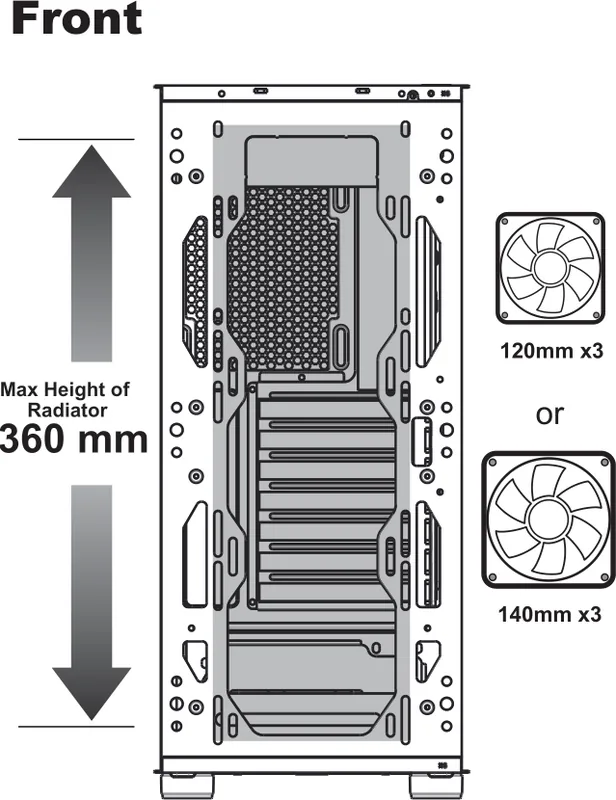
Yes, the case supports radiators up to 360mm in the front and up to 240mm on the top for advanced liquid cooling setups.
Is this answer helpful?
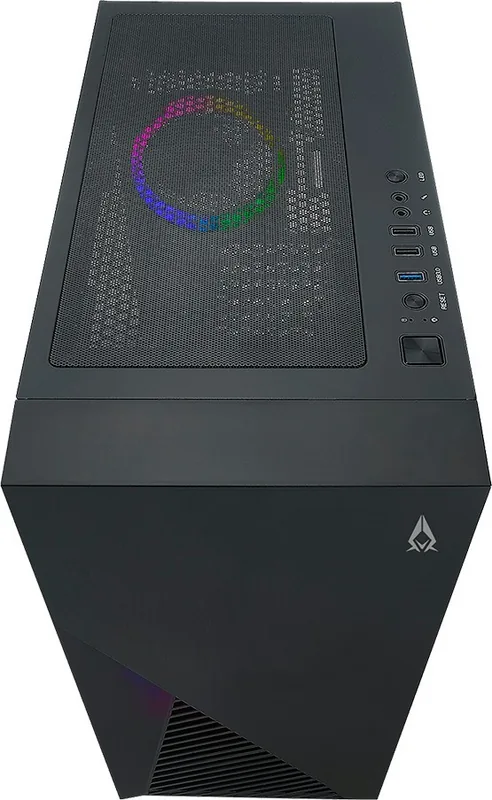
You can cycle through 13 modes using the LED button or hold it for three seconds to switch control to your motherboard's software.
Is this answer helpful?
No, the power supply is not included. You must purchase one separately that fits standard ATX dimensions.
Is this answer helpful?
It supports up to four 2.5-inch SSDs and two 3.5-inch HDDs using the included multifunctional brackets and cages.
Is this answer helpful?
Yes, the left side panel features a high-quality tempered glass window mounted with rubber for safety and stability.
Is this answer helpful?
Advantages and Disadvantages
Advantages

- Supports graphics cards up to 320mm long
- Includes high-quality tempered glass side window
- Versatile cooling options with radiator support up to 360mm
- Addressable RGB lighting with multiple control modes
- Removable magnetic dust filters for easy maintenance
Disadvantages

- Power supply is not included in the package
- No external 5.25-inch drive bays available
- Limited internal 3.5-inch drive bay count compared to some competitors
- Requires specific motherboard for full ARGB synchronization
- Black interior may show fingerprints easily on glass
Product Specification
Extern
N/A
Intern
1x 2.5"/3.5" (horizontal, drive rails), 1x 2.5"/3.5" (horizontal), 4x 2.5"
Connections
1x USB-A 3.0 (5Gb/s), 2x USB-A 2.0 (480Mb/s), 1x 3.5mm jack (Line-Out), 1x 3.5mm jack (Line-In)
PCI Slots
7
Fans (front)
1x 120mm (RGB lit) or 3x 120mm (optional) or 3x 140mm (optional)
Fans (rear)
1x 120mm
Fans (left)
N/A
Fans (right)
N/A
Fans (top)
2x 120mm (optional) or 2x 140mm (optional)
Fans (bottom)
N/A
Fans (other)
N/A
Radiator sizes
120/140/240/280/360mm front, 120/140/240mm top
Motherboard
up to ATX (10.8 inches wide)
Supported Motherboards
Mini-ITX (6.7"x6.7")/µATX (9.6"x9.6")/ATX (12"x9.6")/E-ATX (12"x10.8")
Power Supply
ATX
Power Supply Position
bottom
CPU Cooler
max. 6.5 inches height
Graphics Cards
max. 12.6 inches
Color
black, black interior
Lighting
RGB Header 3-Pin ARGB (+5V/DATA/GND), integrated LED controller, integrated RGB LED lighting, lit fans
Dimensions (WxDxH)
8.3x18.7x16.1 inches
Volume
1.44 cu ft
Weight
13.2 lbs
Chassis Type
Mid-Tower
Front
closed, ventilation slots bottom, ventilation slots side
Top
partially closed, mostly fan grille, dust filter outside
Bottom
partially closed, fan grille rear, dust filter outside
Left
closed, glass
Right
closed
Rear
partially closed, fan grille right top, PCI Slots (7x horizontal)
Front I/O Position
Chassis Side: top, Height: middle, Position: right
Features
Cable management, dust filter, glass window
Note on E-ATX
Motherboard and chassis manufacturers designate different dimensions as E-ATX. Motherboards with E-ATX/SSI EEB dimensions of 12x13 inches are not supported.
USB Spelling
Link
Product Description
Discover the AZZA Zeno Glass Window: A Masterpiece of Performance and Style
The AZZA Zeno Glass Window stands as a testament to modern PC building, blending robust engineering with aesthetic flair. This ATX mid-tower chassis invites enthusiasts to showcase their custom builds through a stunning left-side tempered glass panel secured by rubber mounts. The design prioritizes clarity, allowing every component from high-end graphics cards to intricate cooling setups to be viewed in sharp detail.
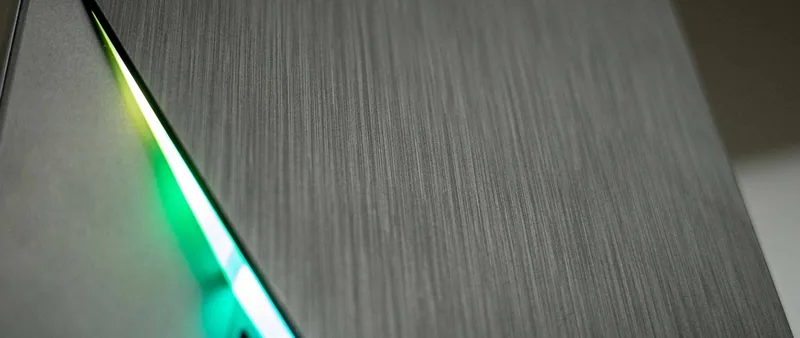
Built for versatility, the Zeno accommodates massive hardware requirements. It supports video cards up to 320mm in length and CPU coolers reaching heights of 165mm, ensuring compatibility with the most powerful components on the market. The interior features a sleek black-on-black theme that highlights the vibrant addressable RGB lighting strip located at the front. This lighting system offers dynamic effects that can be synchronized with motherboard software or controlled directly via the dedicated LED button on the control panel.
Cooling is paramount for any serious rig, and the Zeno delivers exceptional airflow options. Users can install up to three 120mm or 140mm fans at the front, with support for radiators up to 360mm for liquid cooling enthusiasts. Additional fan headers are available on the top and rear panels, providing flexibility for air or water cooling configurations. The case includes removable magnetic dust filters on the top and an iron net at the bottom to maintain clean internals without compromising performance.
Storage solutions are equally comprehensive, featuring a multifunctional hard disk cage and bracket capable of holding multiple 3.5-inch HDDs or 2.5-inch SSDs. The inclusion of a dedicated metal tray for SSDs ensures secure mounting and efficient cable management. With seven expansion slots and support for various motherboard form factors including EATX, Micro ATX, and ITX, this chassis adapts to diverse build needs.
Key Features and Benefits
The AZZA Zeno Glass Window is not just a container; it is a platform for creativity. The sliding tempered glass mechanism adds a premium touch to the assembly process, while the intuitive control panel provides easy access to power, reset, and audio functions. Whether you are a gamer seeking visual impact or a professional needing a reliable workstation, the Zeno offers the perfect balance of form and function.
Important Notes
- Ensure proper cable routing for optimal airflow.
- Check motherboard compatibility before purchasing ARGB devices.
- Regularly clean dust filters to maintain cooling efficiency.
Search for 67,706 Manuals online


Type-in Brand or Model