
AZZA Noir Manual
PDF manual · 12 Pages
English



Quick check
Incorrect answer, please try again.
Chat with your AZZA Noir manual using AI
Get instant AI answers from your AZZA Noir manual
Ask anything about the AZZA Noir. Answers come from this manual, with the pages they are based on.
Ask a Question
Do you recommend Noir?
Yes No
Patricia Ellis
6 months ago
Is the build quality worth the price given the glass side panel?
Frequently Asked Questions
The AZZA Noir Glass Window supports graphics cards up to 300mm in length, accommodating most high-performance models.
Is this answer helpful?
You can control RGB effects using motherboard software or by pressing the LED button on the front panel. Holding the button switches control modes.
Is this answer helpful?
Yes, it includes two 120mm ARGB fans: one pre-installed at the front and one at the rear.
Is this answer helpful?
Yes, the top dust filter is magnetic and removable, while the bottom uses an iron net that is also accessible for cleaning.
Is this answer helpful?
This case is designed specifically for Micro ATX motherboards, offering a compact form factor.
Is this answer helpful?
Yes, the front panel supports radiators up to 240mm for effective liquid cooling solutions.
Is this answer helpful?
Advantages and Disadvantages
Advantages

- High-quality tempered glass side panel provides clear visibility of internal components
- Supports large graphics cards up to 300mm and tall CPU coolers up to 165mm
- Includes two ARGB fans and offers extensive RGB customization via software or button
- Removable magnetic dust filters ensure easy cleaning and better airflow
- Bottom-mounted PSU design aids in cable management and overall aesthetics
Disadvantages

- Limited to Micro ATX motherboards which may restrict some expansion options
- No external 5.25-inch drive bays available for legacy optical drives
- Front panel removal requires specific steps that might be less intuitive for beginners
- Only one USB 3.0 port on the top I/O panel limits connectivity speed
- Fan installation instructions require moving the HDD cage which adds complexity
Product Specification
Extern
N/A
Intern
2x 2.5"/3.5" (horizontal, drive rails), 4x 2.5"
Connections
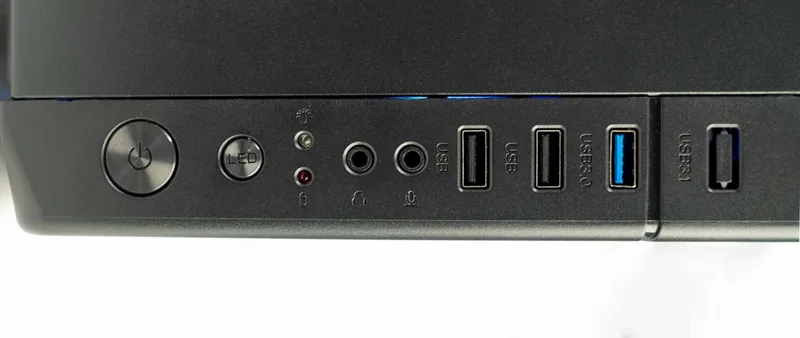
1x USB-A 3.0 (5Gb/s), 2x USB-A 2.0 (480Mb/s), 1x 3.5mm jack (Line-Out), 1x 3.5mm jack (Line-In)
PCI Slots
4
Fan (front)
1x 120mm (RGB lit) or 3x 120mm (optional)
Fan (rear)
1x 120mm (RGB lit)
Fan (left)
N/A
Fan (right)
N/A
Fan (top)
2x 120mm (optional)
Fan (bottom)
N/A
Fan (other)
N/A
Radiator sizes
120/240mm front, N/A top
Motherboard
up to µATX
Supported motherboards
µATX (9.6"x9.6")
Power supply
ATX
Power supply position
bottom
CPU cooler
max. 6.50in height
Graphics cards
max. 11.81in
Color
black, black interior
Lighting
RGB header 3-pin ARGB (+5V/DATA/GND), integrated LED controller, lit fans
Dimensions (WxDxH)
8.46x15.63x15.91in
Volume
2.11 cu ft
Weight
9.48 lbs
Case type
Mini-Tower
Front
partially closed, partially mesh
Top
partially closed, mostly fan grille, dust filter outside
Bottom
partially closed, fan grille rear, dust filter outside
Left
closed, glass
Right
closed
Rear
partially closed, fan grille right top, PCI slots (4x horizontal)
Front I/O Position
Case side: top, Height: Front, Position: center
Features
Cable management, dust filter, glass window
USB spelling
Link
Product Description
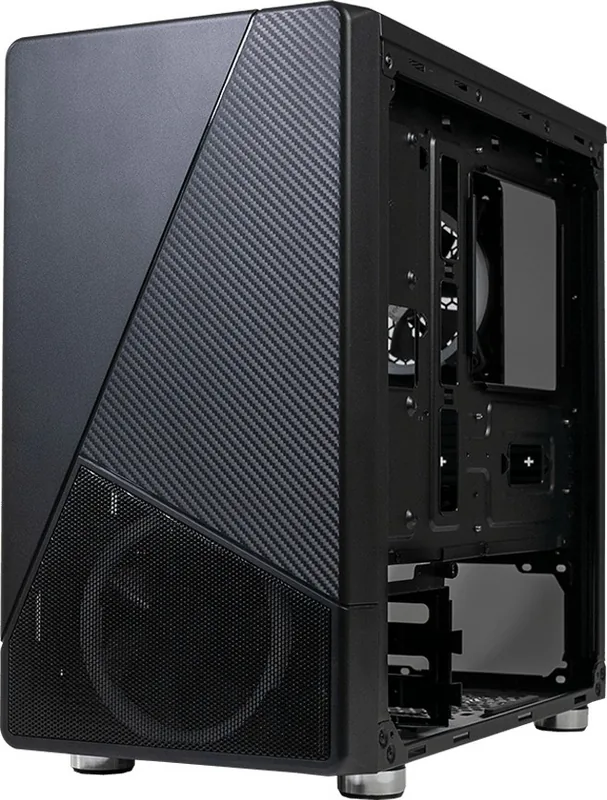
Experience the AZZA Noir Glass Window
The AZZA Noir Glass Window brings a sleek and modern aesthetic to your desktop setup. Designed for enthusiasts who value both style and performance, this Micro ATX mid-tower case features a striking black exterior paired with a high-quality tempered glass side panel. The left-side window offers an unobstructed view of your internal components, allowing you to showcase your custom build with clarity.
Superior Cooling and Expansion
Cooling is a top priority with the AZZA Noir. It supports up to six 2.5-inch SSDs and two 3.5-inch HDDs, ensuring ample storage without clutter. The chassis accommodates graphics cards up to 300mm in length and CPU coolers reaching 165mm in height. For advanced cooling needs, it supports radiators up to 240mm in the front. The fan configuration includes three 120mm ports at the front, two on the top, and one at the rear, providing excellent airflow options.
Customizable RGB Lighting
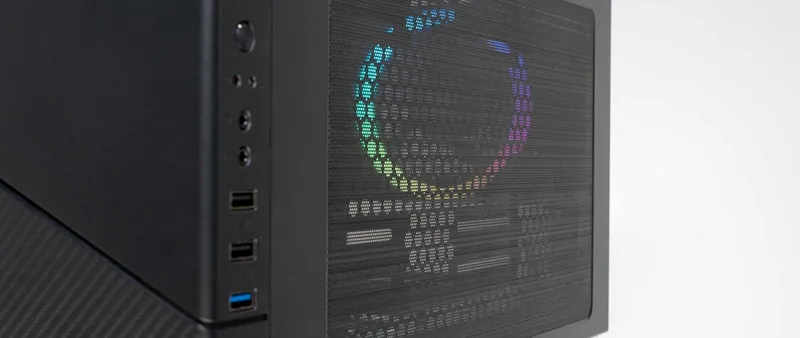
One of the standout features is the addressable RGB lighting system. The case comes with included ARGB fans that sync seamlessly with motherboard software from major brands like MSI, ASUS, ASRock, and Gigabyte. You can also control the lighting directly via the LED button on the front I/O panel. Simply press the button to cycle through various modes or hold it for three seconds to switch between software control and manual button control.
Practical Design Elements
Dust management is handled effectively with removable magnetic dust filters on the top and iron nets at the bottom. The front panel is easily removable for maintenance, and the bottom-mounted power supply support keeps cables organized. With dimensions of 397x215x404mm, this compact yet spacious tower fits perfectly in any room while delivering robust functionality.
Search for 67,706 Manuals online


Type-in Brand or Model
sit28
5 months ago
Does this case support M-ATX motherboards and can I add more fans for better airflow?
Manual.ly
5 months ago
Yes, the case is designed to accommodate Micro-ATX (M-ATX) motherboards. While it comes with pre-installed RGB fans that are quiet and controllable, the front panel design limits direct fan installation behind the glass. However, you can easily upgrade or add additional fans to improve airflow if needed.