
AZZA Eclipse 440 Manual
PDF manual · 12 Pages
English



Quick check
Incorrect answer, please try again.
Chat with your AZZA Eclipse 440 manual using AI
Get instant AI answers from your AZZA Eclipse 440 manual
Ask anything about the AZZA Eclipse 440. Answers come from this manual, with the pages they are based on.
Ask a Question
Do you recommend Eclipse 440?
Yes NoFrequently Asked Questions
The case supports video cards up to 390mm in length, ensuring compatibility with most high-end gaming GPUs available today.
Is this answer helpful?
No, the power supply is not included with the chassis. You must select an ATX power supply separately based on your wattage needs.
Is this answer helpful?
Yes, the case includes an ARGB control board that syncs with motherboard software or can be controlled directly via the LED button on the front I/O panel.
Is this answer helpful?
It features removable mesh dust filters on the top and a steel dust filter on the bottom to keep the interior clean and fans running efficiently.
Is this answer helpful?
This ATX mid tower case supports EATX, ATX, Micro ATX, and ITX motherboards for full flexibility in component selection.
Is this answer helpful?
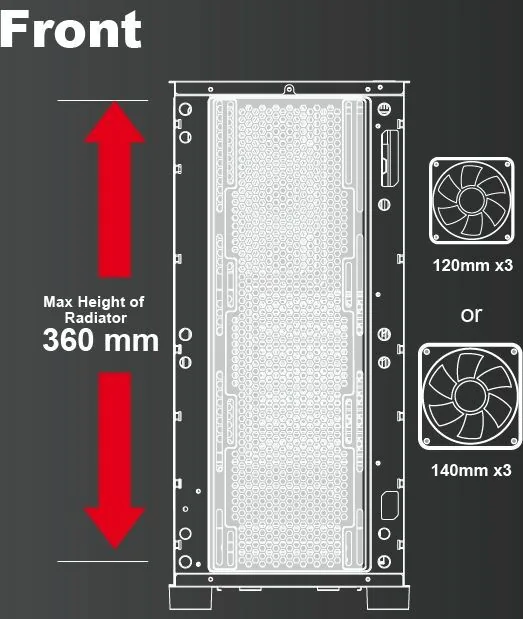
Yes, it supports radiators up to 360mm in the front and up to 280mm on the top panel for advanced liquid cooling setups.
Is this answer helpful?
One 120mm ARGB fan is included with the purchase of this chassis to assist with initial airflow and aesthetics immediately.
Is this answer helpful?
Advantages and Disadvantages
Advantages

- Supports multiple radiator sizes up to 360mm for excellent cooling options
- Tempered glass side panel provides clear visibility of internal components
- Dedicated ARGB control board allows software or button lighting control
- Removable magnetic dust filters make maintenance quick and easy
- Fits long graphics cards up to 390mm and large CPU coolers
Disadvantages

- Power supply is not included and must be purchased separately
- No built-in USB panel cable for motherboard connection included
- Limited color options are available with only black finishes
- Rubber mounts may add slight vibration if not secured properly
- Cable management can be tight in the rear section behind tray
Product Specification
External
N/A
Internal Drive Bays
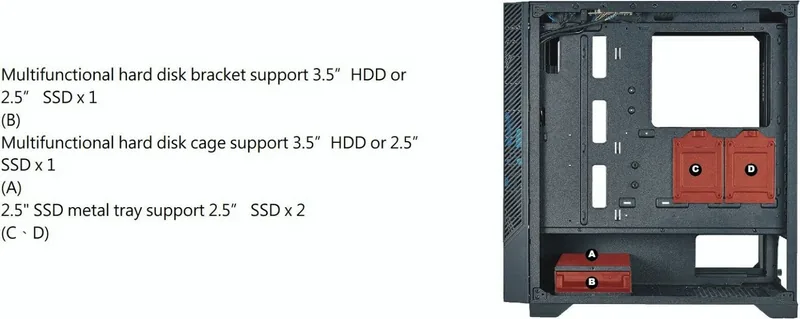
1x 2.5"/3.5" (bay, drive rails), 1x 2.5"/3.5" (bay), 2x 2.5"
Ports
1x USB-A 3.0 (5Gb/s), 2x USB-A 2.0 (480Mb/s), 1x 3.5mm jack (Line-Out), 1x 3.5mm jack (Line-In)
Expansion Slots
7
Fan (Front)
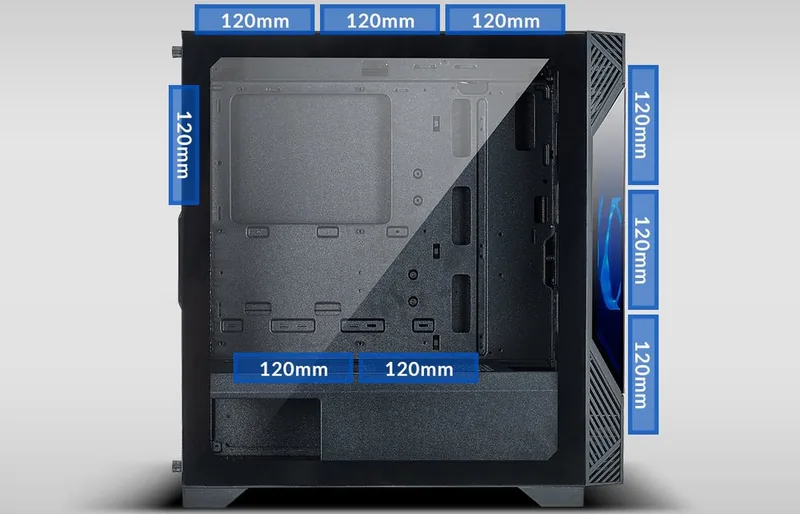
1x 4.72" (RGB lit) or 3x 5.51" (optional)
Fan (Rear)
1x 4.72" (optional)
Fan (Left)
N/A
Fan (Right)
N/A
Fan (Top)
3x 4.72" (optional) or 2x 5.51" (optional)
Fan (Bottom)
N/A
Additional Fans
2x 4.72" (optional)
Radiator Sizes
4.72/5.51/9.45/11.02/14.17" front, 4.72/5.51/9.45/11.02" top
Motherboard
up to ATX (10.51" wide)
Supported Motherboards
Mini-ITX (6.7"x6.7") / Micro-ATX (9.6"x9.6") / ATX (12"x9.6") / E-ATX (SSI CEB, 12"x10.5")
Power Supply
ATX
PSU Position
bottom
Max. CPU Cooler Height
6.50"
Max GPU Length
14.17"
Color
black, black interior
Lighting
RGB Header 3-Pin ARGB (+5V / DATA / GND), integrated LED controller, lit fans
Dimensions (WxHxD)
8.46x18.50x16.34"
Volume
1.48 cu ft
Weight
13.89 lbs
Chassis Type
Midi Tower
Front
solid
Top
partially solid, mostly fan grill, dust filter outside
Bottom
partially solid, fan grill rear, dust filter outside
Left
solid, glass
Right
solid
Rear
partially solid, fan grill right top, PCI Slots (7x horizontal)
Front I/O Position
Chassis side: top, Height: middle, Position: right
Features
Cable management, dust filter, glass window
Note on E-ATX
Motherboard and case manufacturers designate different dimensions as E-ATX. Motherboards with E-ATX / SSI EEB dimensions of 12"x13" may not be supported.
USB Labeling
Left
Product Description
The Ultimate Guide to the AZZA Eclipse 440 Glass Window Manual Setup
Building a custom PC requires the right chassis to ensure stability and professional style. The AZZA Eclipse 440 Glass Window Manual offers a robust solution for serious enthusiasts looking to maximize visual value and functional performance. This ATX mid tower case prioritizes airflow and visual aesthetics without compromising structural integrity during installation. The tempered glass side panel reveals your build components beautifully, showcasing the high quality of your internal parts with clarity for photos.
Performance and Cooling Capabilities
Cooling is key for maintaining high performance during intense gaming sessions or heavy rendering tasks. The case supports up to four 2.5 inch solid state drives and two 3.5 inch hard disk drives for ample storage expansion needs. You can install water cooling radiators up to 360mm in the front or 280mm on the top chassis section. Three 120mm fans fit the front of the unit with one included ARGB fan in the box. Dust filters are removable for easy cleaning without tools and save maintenance time.
Assembly and Internal Component Layout
Installing hardware is straightforward with the provided sliding glass panel design for access. The motherboard fits EATX through ITX standards depending on your specific build requirements and budget. A dedicated ARGB control board allows lighting adjustments via LED button or motherboard software integration seamlessly. Maximum CPU cooler height is 160mm which accommodates most tower coolers currently on the market. Long video cards up to 390mm fit easily inside without obstruction or interference with drives. The internal cable management helps keep the build tidy behind the motherboard tray.
Connectivity and Physical Design Specs
Top ports include USB 3.0 and USB 2.0 connections for fast data transfer speeds. Audio jacks and power buttons are accessible from the exterior panel conveniently for users. The design remains sleek with consistent black interior and exterior finishes for a unified look. Weighing 6.3kg, it provides stability on any desk without wobbling easily. This chassis combines functionality with visual appeal for modern gaming rigs and workstations. Dimensions are 470mm height, 215mm width, and 450mm depth for precise planning. Support covers 7 expansion slots for additional cards.
Installation Notes and Technical Considerations
Ensure you measure your components before building to avoid fitment issues within the frame size. The power supply must be purchased separately for your specific system configuration requirements effectively. Rubber mounts protect glass panels during transport to the final destination safely. Magnetic dust filters simplify maintenance routines significantly over the lifetime of the computer. The magnetic filters capture dust efficiently preventing overheating risks inside the system. Check the manual for detailed installation steps regarding the chassis parts and HDD cages for optimal results. You can switch RGB modes by pressing the LED button held for three seconds to toggle control sources. The bottom mounted ATX power supply support ensures clean cable management for a tidy build. Ensure you verify clearance for specific radiator sizes before purchasing water cooling blocks.
Search for 67,706 Manuals online


Type-in Brand or Model
Lukas Mueller
6 months ago
Is the included LED hub compatible with the H610M-HDVM.2 motherboard considering the connector shape mismatch, and is there a fix for reported rivet issues?
Manual.ly
6 months ago
Thank you for reaching out. Regarding the LED hub, compatibility depends on the specific connector type on your motherboard. If your H610M-HDVM.2 board has different pin shapes, a standard adapter might resolve the issue. We recommend verifying the header specifications in your manual. As for the build quality feedback regarding glass edges and rivets, we understand this is frustrating. Please inspect the case carefully upon unboxing. If defects are found, please contact our support team with photos to arrange a replacement. We value your feedback.