
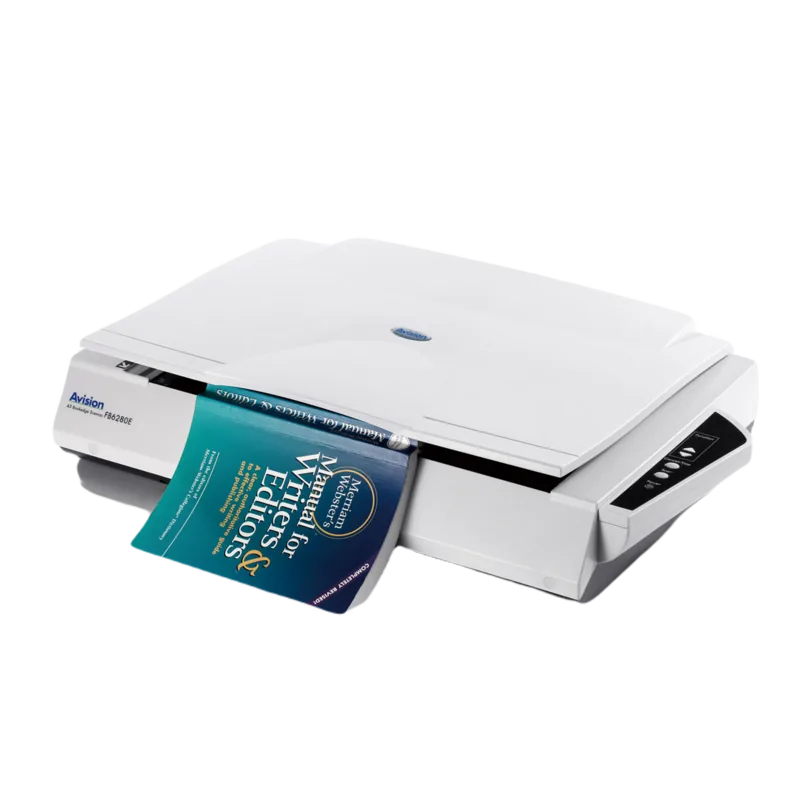
Avision FB6280E Manual
PDF manual · 125 Pages
English



Quick check
Incorrect answer, please try again.
Chat with your Avision FB6280E manual using AI
Get instant AI answers from your Avision FB6280E manual
Ask anything about the Avision FB6280E. Answers come from this manual, with the pages they are based on.
FB6280E Maintenance Schedule
After scanning approximately 50,000 pages with the ADF, replace the pad module to prevent feeding problems.
After scanning approximately 200,000 pages with the ADF, replace the rollers if they show signs of wear or cause feeding issues.
Ask a Question
Do you recommend FB6280E?
Yes NoFrequently Asked Questions
Move the lock switch located at the back of the unit down to the unlocked position.
Is this answer helpful?
Only use DA-48M24 adapter provided to prevent damage or void warranty.
Is this answer helpful?
The device supports up to 600 dpi for high detail captures.
Is this answer helpful?
Use isopropyl alcohol cloth on glass and rollers for debris removal.
Is this answer helpful?
Compatible with Windows XP through Windows 10 systems.
Is this answer helpful?
Check for staples or wet ink on paper causing jams.
Is this answer helpful?
Install Button Manager V2 to configure shortcuts for buttons.
Is this answer helpful?
Advantages and Disadvantages
Advantages

- High resolution up to 600 dpi for detailed imaging
- Automatic paper feeder option boosts productivity volume
- Energy saving modes reduce power consumption during idle times
- Multiple interface supports including TWAIN ISIS and WIA
- Color dropout features assist forms in recognition tasks
Disadvantages

- Requires specific DA-48M24 AC adapter to avoid warranty void
- Lamp replacement needed after extended usage hours
- Driver installation required before connecting hardware
- ADF is an optional extra cost addition
- Heavy construction makes portability less convenient
Product Specification
Type
Flatbed Scanner (CCD)
Resolution
600x600 dpi
Speed
13.3/13.3 S/min (B/W/Color)
Paper/Film Format
A3
Paper/Film Feed
Single Sheet
Connections
1x USB-B 2.0, 1x USB-A 2.0 (Host)
Power Consumption
40W (typical), 15W (standby), 5W (sleep)
Dimensions
25.39x5.31x16.85in
Weight
16.76lbs
Features
LED Lighting
Product Description
Discover the Avision FB6280E Scanner
Welcome to the future of high resolution imaging. The Avision FB6280E Manual provides essential guidance for owners seeking to maximize their hardware potential. This innovative A3 bookedge scanner delivers exceptional clarity for various media types. Whether you are archiving important records or digitizing artwork, this machine handles volume with ease. The LED light source ensures consistent performance without excessive heat generation. Compatibility spans across multiple operating systems ranging from older versions to the latest updates. This setup requires a stable surface for best results. Ensure power is stable before starting.
Performance and Versatility
Users appreciate the flexibility offered by the automatic paper feeder option. This accessory significantly boosts productivity when processing large stacks of material. Duplex scanning capabilities allow seamless two-sided capture. Images can be stored in diverse formats including JPEG, TIFF, or PDF. Compression settings grant control over content size versus quality ratios. Advanced color dropout features assist in cleaning up forms or invoices during recognition tasks.
User Friendly Interface
Configuration is straightforward through the software properties dialog. Brightness and contrast adjustments empower users to tune visuals precisely. Resolution options go up to 600 dpi for sharp results. Edge fill and cropping tools ensure margins are handled accurately. Multi-feed detection prevents jams caused by overlapping sheets. Maintenance is easy with cleaning protocols outlined for the glass and rollers. The unit features a secure lock switch to protect the scanning engine during transport. Unlocking is simple by moving the switch located at the back.
Connectivity and Support
Connecting via high speed USB 2.0 simplifies integration into existing workflows. Drivers for TWAIN, ISIS, and WIA interfaces are included on the supplied CD. Button Manager V2 allows customizable shortcuts for one touch operations. Energy saving modes help reduce power consumption during idle periods. The FCC compliance information ensures safe usage in commercial environments. For detailed operation steps, refer to the Avision FB6280E Manual provided with the unit.
Conclusion
Investing in this model supports efficient digital conversion projects. Robust construction and comprehensive feature sets make it a top choice for office settings. Regular cleaning ensures longevity and optimal scanning quality over time. Proper unpacking and installation follow specific precautions to avoid damage. Registering your product online unlocks additional service support capabilities. Enjoy streamlined digital management with reliable Avision technology today. This ensures that all digital assets are secure and accessible for future review. Warranty details are found in the support section. Contact support for specific inquiries regarding repairs. Technical service numbers are listed at the back.
Search for 67,706 Manuals online


Type-in Brand or Model