
Avision AV5200 Manual
PDF manual · 109 Pages
English



Quick check
Incorrect answer, please try again.
Chat with your Avision AV5200 manual using AI
Get instant AI answers from your Avision AV5200 manual
Ask anything about the Avision AV5200. Answers come from this manual, with the pages they are based on.
AV5200 Maintenance Schedule
Replace the feed pad when its spring may fail and paper-feeding problems can occur. Obtain a new module from the dealer.
Replace the ADF feed roller after about 200,000 ADF pages, as wear may cause document-feeding problems.
Ask a Question
Do you recommend AV5200?
Yes NoFrequently Asked Questions
The scanner is compatible with Microsoft Windows XP SP3, Vista, 7, 8.x, and 10 in both 32-bit and 64-bit versions. It utilizes TWAIN, ISIS, and WIA drivers to ensure smooth integration with these platforms.
Is this answer helpful?
Open the ADF cover fully and gently pull out the jammed paper. Ensure no torn pieces remain inside. Check that the paper guides are adjusted correctly and fan the documents before reloading them to prevent future jams.
Is this answer helpful?
Yes, the flatbed scanner allows you to scan books, photos, and fragile items safely. For oversized documents, you can use the optional carrier sheet mode to protect delicate materials during the scanning process.
Is this answer helpful?
The Avision AV5200 offers an optical resolution of up to 600 dpi. Higher resolutions can be set digitally, but 600 dpi is recommended for optimal balance between file size and image clarity.
Is this answer helpful?
It is recommended to replace the ADF feed rollers after approximately 200,000 pages have been scanned. Signs of wear include frequent paper jams or inconsistent feeding speeds.
Is this answer helpful?
Yes, the separation register enables barcode detection for various types including QR codes, DataMatrix, and standard linear barcodes. This feature helps automate document sorting and identification.
Is this answer helpful?
Advantages and Disadvantages
Advantages

- Supports multiple driver interfaces including TWAIN, ISIS, and WIA for broad software compatibility
- Features dual-sided scanning capability with advanced multi-feed detection to prevent errors
- Includes customizable one-touch buttons via Button Manager V2 for streamlined workflow
- Offers high optical resolution up to 600 dpi for crisp and detailed image capture
- Complies with ENERGY STAR guidelines for reduced energy consumption and environmental safety
Disadvantages

- Requires specific USB 2.0 ports which may limit connectivity on older computer systems
- High-resolution scans at 600 dpi may disable auto-crop and deskew functions due to memory usage
- Transport lock must be manually disengaged before operation, adding an extra step for new users
- Roller replacement requires careful handling and may need professional service assistance
- Large physical footprint may require significant desk space in compact office environments
Product Specification
Type
Document Scanner (CIS)
Resolution
600x600dpi
Speed
60/60 S/min (B/W/Color)
Paper/Film Format
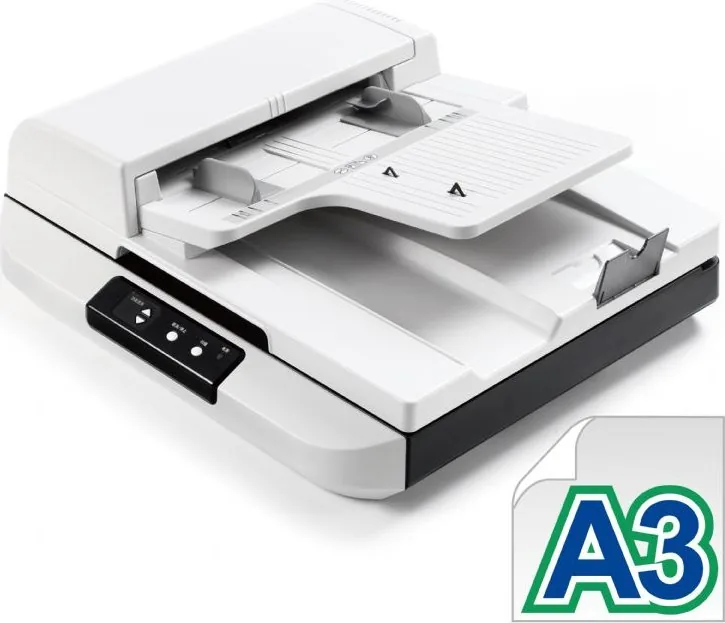
A3
Paper/Film Feeder
150 Sheets DADF, Duplex Unit
Memory
256MB (RAM)
Connections
1x USB 2.0
Software
OCR Software (PaperPort 14)
Features
LED Lighting
Product Description
Avision AV5200 Manual: Unlocking High-Speed Document Scanning
The Avision AV5200 stands as a robust solution for businesses and professionals requiring efficient document management. This high-performance color scanner is designed to handle large volumes of paperwork with precision and speed, making it an ideal companion for busy offices. Whether you are digitizing archives, processing invoices, or scanning legal documents, this device ensures that every detail is captured accurately. The unit features both flatbed and automatic document feeder capabilities, allowing users to scan single pages like photographs alongside stacks of standard paper without switching modes.
Operating seamlessly with modern operating systems including Windows XP through Windows 10, the Avision AV5200 integrates easily into existing workflows. Its interface supports multiple driver protocols such as TWAIN, ISIS, and WIA, providing flexibility for various software applications. Users can customize their scanning experience through a comprehensive control panel that adjusts brightness, contrast, resolution, and color settings on the fly. Advanced features like automatic color detection ensure that mixed documents containing both text and images are processed optimally without manual intervention.
Safety and reliability are paramount in the design of this equipment. The device includes built-in mechanisms to prevent paper jams and multi-feed errors, which are common issues in high-volume environments. It also adheres to strict regulatory standards for electromagnetic compatibility and energy efficiency, ensuring minimal interference with other office electronics while consuming less power during idle periods. The inclusion of a dedicated Button Manager allows for one-touch scanning to predefined destinations, streamlining repetitive tasks significantly.
Maintenance is straightforward with clear instructions provided for cleaning the glass surface and replacing worn rollers after extensive use. This proactive approach extends the lifespan of the hardware and maintains consistent image quality over time. By combining powerful scanning technology with user-friendly controls and durable construction, the Avision AV5200 delivers exceptional value for organizations looking to modernize their document handling processes.
Important Notes
- Always use the supplied power adapter to avoid voiding the warranty.
- Keep the transport lock engaged when moving the unit to prevent internal damage.
- Regularly clean the ADF rollers to maintain optimal feeding performance.
Search for 67,706 Manuals online


Type-in Brand or Model