
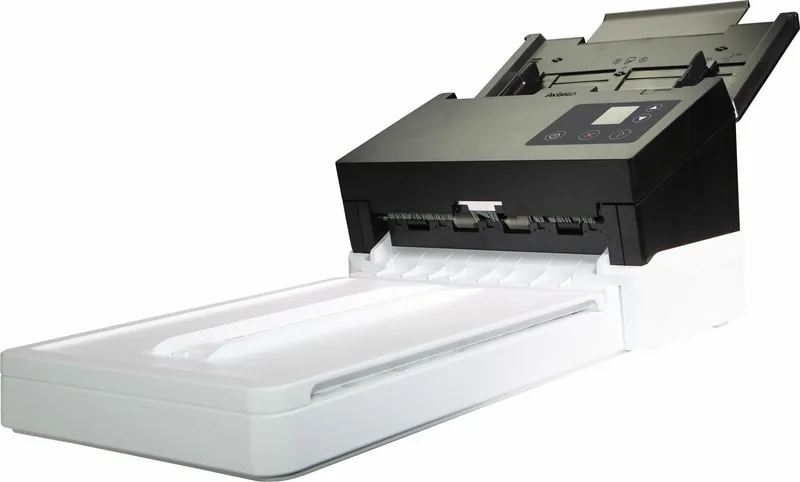
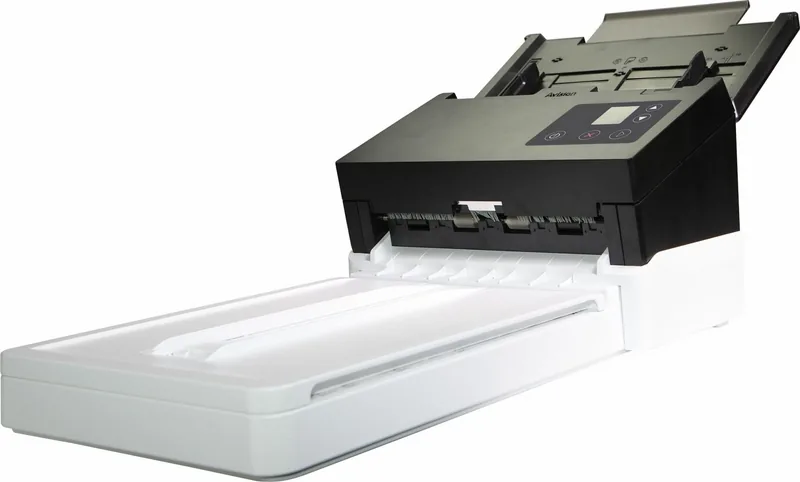
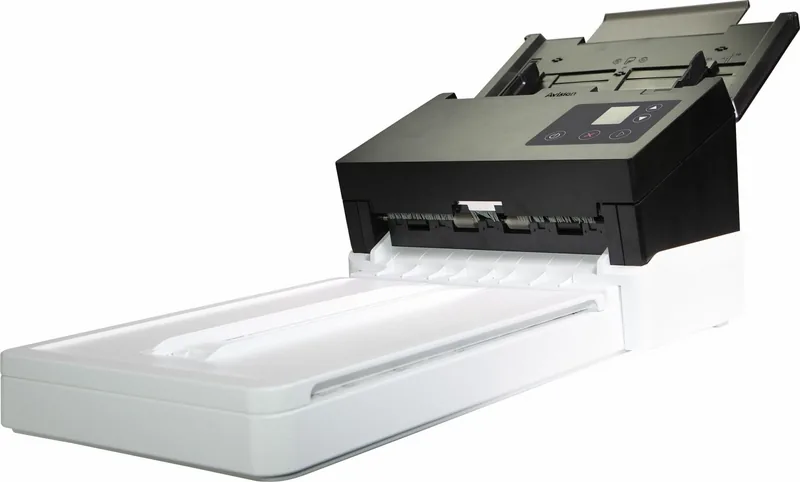
Avision AD370F Manual
PDF manual · 159 Pages
English



Quick check
Incorrect answer, please try again.
Chat with your Avision AD370F manual using AI
Get instant AI answers from your Avision AD370F manual
Ask anything about the Avision AD370F. Answers come from this manual, with the pages they are based on.
AD370F Maintenance Schedule
Soak a cotton swab in 95% isopropyl alcohol and wipe the flatbed and ADF glass surfaces.
Wipe and rotate friction and feed rollers with an alcohol-soaked cloth to remove dust or toner.
Ask a Question
Do you recommend AD370F?
Yes NoFrequently Asked Questions
Yes, the duplex model scans both sides automatically. This feature saves time by flipping pages internally or scanning the back side in a single pass.
Is this answer helpful?
Use a soft lint-free cloth with some isopropyl alcohol gently wipe the surface of the glass of flatbed to remove dust safely.
Is this answer helpful?
Yes, via Virtual Scanner Link tool for multiple users. You can connect to a LAN port on the scanner back panel for shared access.
Is this answer helpful?
Up to 600 dpi depending on the scan mode. Higher resolutions produce more detail but result in larger file sizes and longer scan times.
Is this answer helpful?
Contact the dealer for ordering specific parts. You can order them directly from your authorized local dealer for replacement services.
Is this answer helpful?
Yes, it supports Windows 7, 8, and 10. The drivers are compatible with both 32-bit and 64-bit versions of these operating systems.
Is this answer helpful?
The manual is included on the supplied CD-ROM. You can also view or print the detailed user manual via the software installation graphic.
Is this answer helpful?
Advantages and Disadvantages
Advantages

- High scanning speed supports bulk processing efficiently.
- Network connectivity allows shared usage across computers.
- Supports various document sizes and weights easily.
- Duplex scanning reduces manual handling of paper.
- Customizable profiles via Button Manager software.
Disadvantages

- Rollers wear out and must be replaced periodically.
- Calibration is required if image quality fades over time.
- Requires specific power adapter to avoid damage risks.
- Wireless features depend heavily on the specific model.
- Complex setup may confuse new users initially.
Product Specification
Type
Document Scanner (CIS)
Resolution
600x600 dpi
Speed
60/45 ppm (B/W/Color)
Paper/Film Format
A4
Paper/Film Input
100 Sheets DADF, Duplex Unit
Memory
512 MB (RAM)
Display
Monochrome
Software
OCR Software
Power Consumption
38W (typical), 7.5W (standby), 1.8W (sleep)
Dimensions
12.64x11.85x29.69 in
Weight
15.21 lbs
Features
LED Lighting, Flatbed Unit
Product Description
Discover the Avision AD370F High-Speed Scanner
Welcome to a new era of productivity with the Avision AD370F. This robust document scanner is designed for professionals who demand speed and precision. Whether you manage a busy office or handle personal archives, this device meets your needs effectively. It supports both automatic document feeding and flatbed scanning for various media types. The hardware is built to withstand daily heavy use while maintaining accurate image capture standards throughout the process.
Key Features and Connectivity
The scanner boasts versatile connectivity options including USB 3.0 and Ethernet support. Users can connect to local networks or utilize wireless settings where available depending on the specific model configuration. The system requirements are reasonable, needing a Core 2 Duo processor and 2 GB of RAM for 32-bit systems. Drivers fully support Windows 7, 8, and 10 environments seamlessly without requiring extra configuration steps. The included software, such as Button Manager V2, allows for custom one-touch scanning profiles. This ensures every user can save their preferred settings for quick access without navigating complex menus repeatedly.
Maintenance and Performance
Regular maintenance is crucial for longevity and sustained performance. The Avision AD370F requires cleaning of the flatbed glass and ADF rollers periodically to prevent feeding issues or streaks. Use only isopropyl alcohol for cleaning without damaging sensitive optical components like the glass platen. Calibration should be performed if image quality declines after extensive use or long periods of storage without power. The device includes a specific calibration sheet to assist in this vital process for color accuracy.
Important Safety Notes
Do not place heavy objects on the unit to prevent tipping hazards or damage to internal mechanisms. Keep the device away from direct sunlight and high humidity zones to protect electronics. Ensure the power adapter is the specific DA-48M24 model to avoid electrical damage or voiding warranty coverage. Always check for paper jams by opening the feeder gently when the unit signals an error via the LED.
Installation and Setup
Connecting the device is straightforward with bundled cables. You must install the driver before connecting USB physically to ensure detection. Power up the unit and wait for the LED indicator to show readiness status. Use the Capture Tool to verify connection success before starting daily tasks.
Product Highlights and Technical Benefits
- High-speed scanning capabilities for bulk document processing.
- Duplex scanning option available for double-sided efficiency.
- Network scanner support via Virtual Scanner Link tool.
- Multiple output formats like PDF, JPEG, and TIFF supported.
- Advanced image correction tools for optical character recognition accuracy.
- Compact design fits well on standard desk workspaces.
This scanner ensures your documents are digitized accurately and quickly for modern records. With proper care and routine maintenance, it remains a reliable partner for your daily document management workflow. Enjoy consistent results that meet compliance and archival standards for your organization.
Search for 67,706 Manuals online


Type-in Brand or Model