
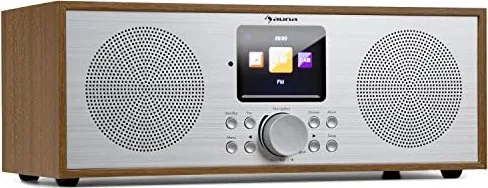
Auna Silver Star Stereo Manual
PDF manual · 136 Pages
English



Quick check
Incorrect answer, please try again.
Chat with your Auna Silver Star Stereo manual using AI
Get instant AI answers from your Auna Silver Star Stereo manual
Ask anything about the Auna Silver Star Stereo. Answers come from this manual, with the pages they are based on.
Ask a Question
Do you recommend Silver Star Stereo?
Yes NoFrequently Asked Questions
It can play Internet radio, DAB+, FM, Bluetooth audio, AUX input, USB media, and shared music via UPnP/DLNA. This makes it suitable for both online and local listening.
Is this answer helpful?
Yes. Bluetooth is included, so you can pair a smartphone or tablet and stream audio wirelessly. It also supports app-based control in the same network.
Is this answer helpful?
Yes. The system supports favorites for Internet radio, FM, and DAB+ stations. You can store presets and recall them quickly from the menu or remote control.
Is this answer helpful?
Yes, for FM, DAB+, AUX, USB, and Bluetooth use. Internet radio, weather updates, and online media features require a working network connection.
Is this answer helpful?
Yes. It includes multiple alarm options, a snooze feature, and alarm volume settings. You can also choose sources such as radio or melody for wake-up use.
Is this answer helpful?
Yes. USB is playback-only and does not support charging or PC data transfer. UPnP/DLNA playback may be limited by file names, supported formats, and network quality.
Is this answer helpful?
Advantages and Disadvantages
Advantages

- Supports Internet radio, DAB+, FM, Bluetooth, AUX, USB, and UPnP/DLNA in one unit.
- Offers alarms, sleep timer, dimmer control, weather display, and equalizer presets.
- Lets you store favorites and resume playback after powering on.
- Includes remote control and app-based control for easier operation.
Disadvantages

- Initial network setup may feel complex for beginners.
- Streaming features depend on a stable Wi-Fi or internet connection.
- USB is for playback only; it does not charge devices or transfer PC data.
- UPnP/DLNA playback has file-name and format limits that can require extra care.
Product Specification
Power
16W RMS
Audio Formats
MP3, WMA
Tuner
FM, DAB, DAB+, Internet Radio
Display
LCD
Audio Connections
AUX In (3.5mm jack), Headphone (3.5mm jack)
Other Connections
USB-A
Wireless
Bluetooth, Wi-Fi 4 (Wi-Fi 802.11b/g/n)
Power Supply
Mains powered
Special Features
Remote control, Sleep timer, Alarm function
Color
grey, brown
Dimensions
12.99x4.72x5.91in (WxHxD)
Weight
5.07 lb
Product Description
Auna Silver Star Stereo: smart listening in a classic stereo format
The Auna Silver Star Stereo blends traditional radio charm with modern streaming convenience. Built for everyday listening, it brings together Internet radio, DAB+, FM, Bluetooth, AUX, USB playback, and UPnP/DLNA streaming in a single compact system. The Auna Silver Star Stereo Manual makes one thing clear: this unit is designed to be flexible, whether you want morning news, a playlist from your phone, or background music from a USB drive.
One of its strongest points is the wide range of listening options. Internet radio opens the door to stations from around the world, while DAB+ and FM keep local broadcasting simple and reliable. Bluetooth pairing makes it easy to stream wirelessly from a smartphone or tablet, and the AUX input supports older audio sources. For home networking, UPnP and DLNA make it possible to access shared music from a PC or compatible device. This variety makes the stereo appealing to users who want one system to handle many routines.
The feature set goes beyond playback. The display can show useful information such as station details, time, weather forecasts, and system status. Alarm functions, sleep timer settings, dimmer controls, and equalizer presets add comfort and convenience. The device can also save favorites, organize stations, and resume playback after power-on, which gives it a practical feel in daily use. For many users, these small touches make the difference between a basic radio and a more complete bedside or living-room companion.
Its front-panel controls and remote make navigation straightforward, while presets help you return to favorite stations quickly. With stereo output, line-out connectivity, and support for common audio formats like MP3 and WMA, it also works well as a compact home audio center. The overall experience is built around ease of use once the initial network setup is complete.
Setup does ask for a little patience, especially if Wi-Fi credentials, WPS pairing, or media sharing are involved. Still, once connected, the system becomes a versatile music center that fits modern homes well. If you enjoy switching between radio, streaming, and local playback without needing several devices, the Silver Star Stereo offers a neat all-in-one approach.
Notes
- Best suited for users who want many sources in one device.
- Network features add value, but setup may take time.
- Ideal for kitchens, bedrooms, and living rooms.
Search for 67,706 Manuals online


Type-in Brand or Model