

Auna ScreenStar Manual
PDF manual · 66 Pages
English



Quick check
Incorrect answer, please try again.
Chat with your Auna ScreenStar manual using AI
Get instant AI answers from your Auna ScreenStar manual
Ask anything about the Auna ScreenStar. Answers come from this manual, with the pages they are based on.
ScreenStar Maintenance Schedule
Wipe the device only with a dry cloth. Do not use volatile liquids or detergents.
Remove the protective cap from the camera lens before recording video performances.
Ask a Question
Do you recommend ScreenStar?
Yes NoFrequently Asked Questions
It combines disc playback, microphone mixing, lyric display, and recording features in one unit. That makes it suitable for family singing, small parties, and users who want an easy all-in-one karaoke setup.
Is this answer helpful?
Yes. The system can be connected to a TV using the included video and audio cables. Depending on the selected mode, lyrics or camera output can be shown on the television screen.
Is this answer helpful?
Yes. Audio performances can be recorded to USB, and video performances with sound can be recorded to an SD card. This is useful for saving singing sessions or reviewing performances later.
Is this answer helpful?
It works with dynamic microphones that use a 6.3 mm jack plug. The unit includes two microphone inputs, so two singers can perform together.
Is this answer helpful?
AVC stands for Automatic Voice Control. It reduces the original vocal track when someone sings into the microphone, helping the singer’s voice stand out more clearly during multiplex karaoke playback.
Is this answer helpful?
Yes. You can connect an external audio device through the LINE IN input with a 3.5 mm cable. Then you can play music from the external device and sing along through the system.
Is this answer helpful?
Generally yes. The controls are straightforward, and the unit has clear playback, repeat, and recording functions. However, some features like file browsing and SD formatting may take a little practice.
Is this answer helpful?
Advantages and Disadvantages
Advantages

- Supports CD/CD+G playback with lyric display for classic karaoke sessions.
- Includes two microphone inputs, echo, and AVC for more engaging vocal control.
- Can record audio to USB and full performances to SD card.
- Connects to TV, stereo, or home theater through AV and line-in options.
Disadvantages

- Setup depends on using the correct TV input and cable connections.
- Built-in recording and browsing functions may take time to learn.
- Best performance depends on compatible discs, storage media, and microphones.
- Designed mainly for indoor home use, so it is not a portable party system.
Product Specification
Audio Connections
AUX In (3.5mm Jack), 2x Mic In (6.35mm Jack), Stereo Line Out (RCA)
Other Connections
USB-A, Card Reader (SD)
Power Supply
Mains Operation
Karaoke Features
Echo, Vocal Remover, Text Display
Special Features
integrated CD player, incl. 2x Microphone
Dimensions
9.84x16.54x10.04in (WxHxD)
Weight
5.29lb
Product Description
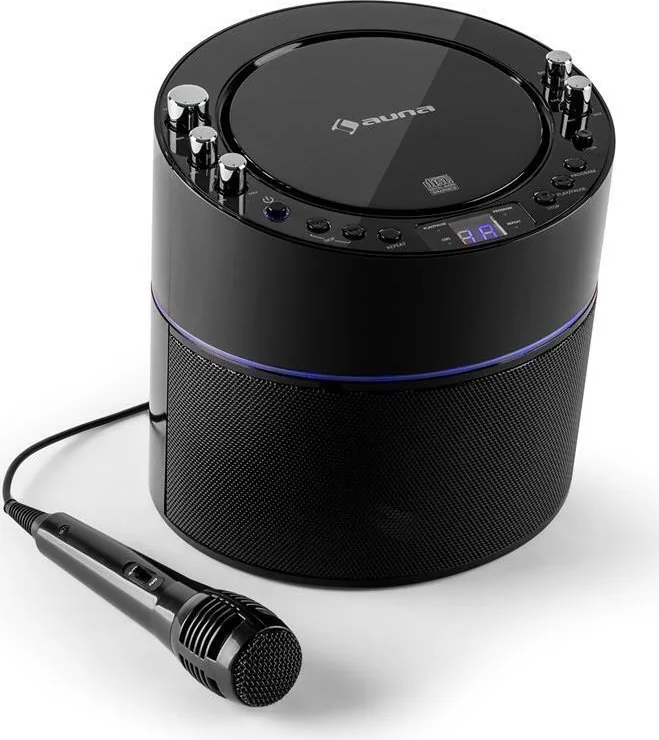
Auna ScreenStar Karaoke Black
The Auna ScreenStar Karaoke black is a compact home entertainment system built for singers, family nights, and casual performers who want more than just basic playback. According to the Auna ScreenStar Karaoke black Manual, this model combines karaoke, video output, audio mixing, and recording features in one unit, making it a practical centerpiece for a living room or party setup.
Built for singing and recording
What makes this karaoke system stand out is its flexibility. It supports CD and CD+G discs, so lyrics can be shown on a TV while the camera image appears on the built-in screen, or vice versa depending on the selected mode. With two microphone inputs, separate volume controls, echo, and AVC (Automatic Voice Control), it gives users a simple way to shape the vocal experience without needing extra equipment.
More than a karaoke player
The ScreenStar is also designed for media recording. Songs performed from CD+G can be recorded to USB, while full video-and-audio performances can be captured to SD card in AVI format using the integrated camera. That makes it appealing for users who enjoy reviewing performances, saving party moments, or building a personal archive of singing sessions. Its AUX line-in also lets you connect a smartphone or MP3 player and sing along with external music.
Easy connection and home use
Setup is straightforward: connect the unit to a TV, stereo, or home theater system using the included AV cables, then select the correct video and audio source. The system is made for indoor household use and includes clear guidance for playback, playlist programming, browsing recordings, deleting files, and formatting storage media. The overall approach is simple enough for beginners, yet still offers enough controls for regular karaoke fans.
Notes
- Works with dynamic microphones using a 6.3 mm plug.
- Offers dual recording options: USB for audio and SD for video.
- Best suited for indoor family entertainment and karaoke parties.
- Requires correct TV input selection for lyric display and sound output.
Overall, the Auna ScreenStar Karaoke black feels like a practical all-in-one karaoke station for users who want singing, mixing, and recording in a single device. It is especially attractive for households that value easy operation, flexible connections, and the fun of turning performances into saved memories.
Search for 67,732 Manuals online


Type-in Brand or Model