

Auna Scala VCD-IR Manual
PDF manual · 264 Pages
English



Quick check
Incorrect answer, please try again.
Chat with your Auna Scala VCD-IR manual using AI
Get instant AI answers from your Auna Scala VCD-IR manual
Ask anything about the Auna Scala VCD-IR. Answers come from this manual, with the pages they are based on.
Scala VCD-IR Maintenance Schedule
Periodically clean the transmitter on the remote control and the sensor on the unit with a soft cloth.
Replace the AAA battery if the operating distance is reduced or if the operation becomes erratic.
Check all wall mount screws for looseness to ensure the unit does not fall.
If a CD is dirty or does not play properly, clean it with a soft, dry cloth, wiping straight out from the centre along the radius.
Ask a Question
Do you recommend Scala VCD-IR?
Yes NoFrequently Asked Questions
It supports DAB/DAB+ radio, FM radio, internet radio, podcasts, Spotify Connect, Bluetooth streaming, audio CDs, USB playback, and AUX input.
Is this answer helpful?
Yes. You can stream music wirelessly through Bluetooth or use Spotify Connect on a compatible network. An external device can also be connected through the AUX input.
Is this answer helpful?
The system can store up to 20 DAB stations, 20 FM stations, and 20 internet radio stations. Presets 1 through 10 can be accessed directly with numbered controls.
Is this answer helpful?
USB playback supports MP3 and WMA audio formats. The unit supports USB 2.0 and USB 3.0 devices with up to 32 GB of storage, although compatibility may vary.
Is this answer helpful?
Yes. It provides two alarms with daily, weekday, weekend, once, or off schedules. Wake-up modes include buzzer, internet radio, DAB, FM, and CD. The sleep timer offers 15, 30, 45, and 60 minute settings.
Is this answer helpful?
Yes. It has wall-mounting keyholes. Suitable screws are required and are not included. The wall should be strong enough to support the unit securely.
Is this answer helpful?
Advantages and Disadvantages
Advantages

- Combines DAB/DAB+, FM, internet radio, podcasts, CD, USB, Bluetooth, AUX, and Spotify Connect.
- Stores up to 20 presets each for DAB, FM, and internet radio for fast access to favorite stations.
- Includes a color TFT display, equalizer presets, headphone output, remote control, alarms, and sleep timer.
- Wall-mountable design and adjustable multicolor LED lighting suit compact rooms and flexible placement.
Disadvantages

- Internet radio, podcasts, and Spotify Connect depend on a stable Wi-Fi connection.
- USB playback is limited to MP3 and WMA formats, with storage support up to 32 GB.
- Wall-mounting screws are not supplied, and secure installation requires an appropriate wall surface.
- The system may not be compatible with every USB storage device.
Product Specification
Power
20 W RMS
Audio formats
CD Audio, CD-R/RW, AAC, FLAC, MP3, WMA
Tuner
FM, DAB, DAB+, Internet radio, 30 station presets
Streaming clients
Spotify
Display
LCD
Audio connections
AUX In (3.5 mm jack), headphones (3.5 mm jack)
Other connections
USB-A
Wireless
Bluetooth 5.0, Wi-Fi 4 (WLAN 802.11b/g/n)
Power supply
Mains power
Special features
Remote control, sleep timer, alarm function
Dimensions
20.16 x 7.64 x 12.8 in (W x H x D)
Weight
7.54 lb
Product Description
Auna Scala VCD-IR - Read, Download & Print Free
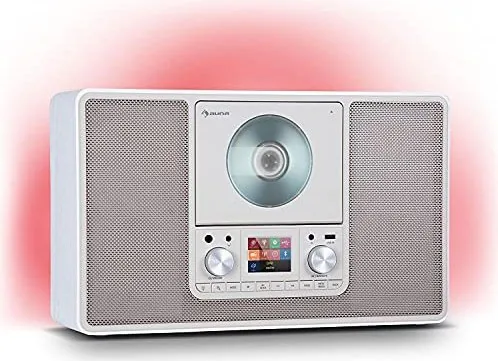
The Auna Scala VCD-IR is a versatile all-in-one audio system designed for listeners who want classic media playback alongside modern wireless entertainment. Its slim format, wall-mounting capability, and integrated ambient lighting make it a practical choice for kitchens, bedrooms, offices, or compact living spaces. With a color TFT display and an intuitive navigation dial, it brings music, radio, and connected audio together in one streamlined unit.
Broad Listening Options
At its core, the Scala VCD-IR combines DAB/DAB+ digital radio, FM radio with RDS, internet radio, podcasts, Bluetooth streaming, Spotify Connect, CD playback, USB playback, and AUX input. This broad source selection lets users move easily from local stations and physical CD collections to online broadcasts from around the world. Up to 20 presets can be saved for each DAB, FM, and internet radio mode, making favorite stations quick to access.
Wi-Fi connectivity supports 802.11b/g/n networks, WPA/WPA2 security, and WPS setup. Once connected, the system can browse internet stations by location, genre, popularity, language, or search term. Spotify Connect allows a phone, tablet, or computer to control compatible Spotify playback, while Bluetooth offers direct wireless streaming from a mobile device.
Sound, Display, and Everyday Controls
Two 10 W channels and 3-inch full-range drivers provide stereo output for everyday music, radio, and spoken-word listening. The equalizer includes Flat, Classic, Rock, Pop, and Jazz presets, so users can tailor the character of playback. A 3.5 mm headphone output is also included for private listening.
The 2.4-inch color display presents station details, track information, time, date, and playback status. During radio listening, available information can include scrolling text, signal strength, program type, bitrate, and frequency. The integrated LED lighting can be switched on or off, adjusted for brightness, and set to colors including white, green, blue, violet, red, and orange.
CD, USB, and Practical Features
The CD player supports normal, repeat, random, and programmed playback. Users can program up to 20 CD tracks or 99 MP3 tracks. USB playback supports MP3 and WMA audio from compatible USB 2.0 or 3.0 storage devices up to 32 GB. The AUX input provides another simple way to connect an external audio source.
Two alarms, selectable wake-up sources, a sleep timer, adjustable backlight settings, and automatic clock updates make the Scala VCD-IR useful beyond music playback. It can be operated from the front panel or the included remote control.
Notes
- Internet radio, podcasts, and Spotify Connect require a network connection.
- Wall mounting requires suitable screws and a secure installation surface.
- USB compatibility can vary between storage devices.
Search for 67,732 Manuals online


Type-in Brand or Model