
Auna NR-620 DAB Manual
PDF manual · 106 Pages
English



Quick check
Incorrect answer, please try again.
Chat with your Auna NR-620 DAB manual using AI
Get instant AI answers from your Auna NR-620 DAB manual
Ask anything about the Auna NR-620 DAB. Answers come from this manual, with the pages they are based on.
Ask a Question
Do you recommend NR-620 DAB?
Yes NoFrequently Asked Questions
Yes, the system can record audio from CDs directly to MP3 files on a USB stick. This allows conversion of physical media for digital storage.
Is this answer helpful?
Switch the unit to Bluetooth mode. Select NR-620 DAB on your phone. The display will show blinking BT text until connected.
Is this answer helpful?
The port supports MP3 formatted audio files stored on flash drives or memory cards for playback and recording purposes.
Is this answer helpful?
Yes, the device includes an integrated turntable for playing vinyl records with an auto-stop function.
Is this answer helpful?
No, an external DAB antenna is included and should be used for optimal digital signal reception.
Is this answer helpful?
All stored radio presets will be lost unless a backup battery is installed in the unit.
Is this answer helpful?
The recording quality is pre-set at 128 kbps bitrate with a sampling rate of 44.1 kHz.
Is this answer helpful?
Advantages and Disadvantages
Advantages

- Supports DAB plus, FM, CD, USB, Bluetooth, and Vinyl playback
- Converts audio from CD, Cassette, or Phono to MP3 files
- Includes remote control for easy operation and navigation
- LCD screen displays track info, time, and settings clearly
- Allows storage of 20 radio presets and track programming
Disadvantages

- Recording speed is limited to 1:1 relative to playback time
- Requires qualified personnel for internal repairs only
- Battery compartments pose explosion risk if handled incorrectly
- Cannot communicate directly with personal computers
- Specific folders needed for recorded MP3 files on USB
Product Specification
Consists of
CD Player, Cassette Deck, Turntable, Receiver, Tuner, Integrated Speakers, All-in-One Device
Tuner
FM, DAB, DAB+
Audio Formats
CD Audio, CD R/RW, Cassette, MP3
Audio Connections
Stereo Line In (RCA), Headphones (3.5mm Jack)
Additional Connections
USB-A 2.0, Antenna
Device Color
Brown
Device Dimensions
16.14x9.06x13.78in (WxHxD)
Weight
14.11 lbs
Product Description
The Auna NR-620 DAB Stereo Experience
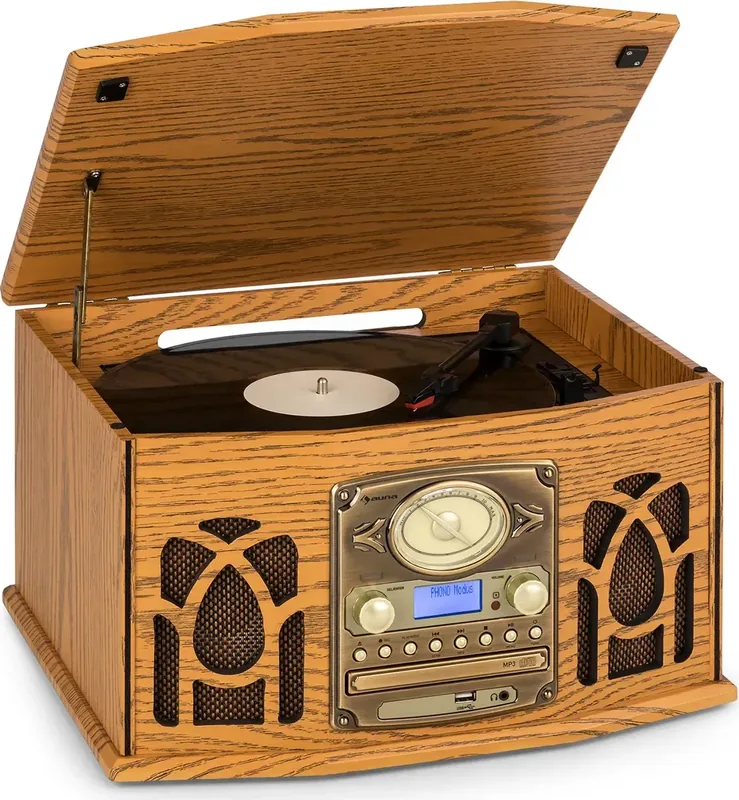
The Auna NR-620 DAB stereo system brings together classic audio formats with modern digital technology for an exceptional listening experience. Designed for versatility, this unit allows users to tune into DAB plus and FM radio broadcasts with ease. The included external antenna ensures optimal signal reception for clear sound quality. Music lovers can also revisit physical media collections with the built-in CD player for standard discs and an integrated turntable for vinyl records. This combination appeals to those who enjoy both digital streams and analog warmth. For digital convenience, a USB port supports direct MP3 playback from flash drives or memory cards seamlessly. Wireless streaming is available via Bluetooth connectivity, allowing phones and tablets to output audio wirelessly without cables. A unique feature enables recording audio from CDs, tapes, or radio directly to MP3 files on USB storage. This conversion process happens at a speed of one to one relative to playback time. It requires careful placement of the base speaker to ensure stability on a table surface.
Connectivity and Controls
Sound customization includes EQ options like Rock, Pop, and Jazz modes via the remote control. The LCD screen displays track info and settings clearly for easy monitoring. Remote control operation simplifies playback management from across the room. Track navigation includes skip and search functions for both forward and backward movement. Folder navigation allows browsing MP3 libraries on connected storage. Users can program up to twenty specific tracks for specific order playback sequences. Automatic scanning helps find the next available station quickly. Manual tuning provides precise frequency adjustments for older signals. Language selection exists between English and German within the menu settings for user preference. The Bluetooth search text blinks on the display until pairing is successful. Skip buttons allow fast forward and fast backward search modes without interrupting playback.
Safety and Maintenance
Safety instructions advise keeping the unit away from moisture and heat sources to prevent damage. Proper disposal following WEEE regulations is crucial for environmental protection. The system supports language selection between English and German within the menu settings. Users can store up to 20 radio presets for quick access to favorite channels. Line-out ports allow connection to larger Hi-Fi setups for enhanced sound output. Ventilation requirements mandate an eight centimeter gap around the device to ensure cooling. Battery compartments require careful handling to avoid explosion risks and must be disposed of correctly according to local laws. The device includes a stop function to halt playback automatically or manually. Users should not open the housing to avoid electric shock risks. The manufacturer recommends qualified personnel for repairs. Power supply must be disconnected if not used for long periods. Avoid placing liquids on the unit to maintain safety standards. Fire risk is minimized by not exposing the product to water. The system creates specific folders like RIP for CD content. Recording quality defaults to 128 kbps bitrate for MP3 files. Voltage warnings indicate dangerous internal components that require professional service.
Search for 67,732 Manuals online


Type-in Brand or Model