
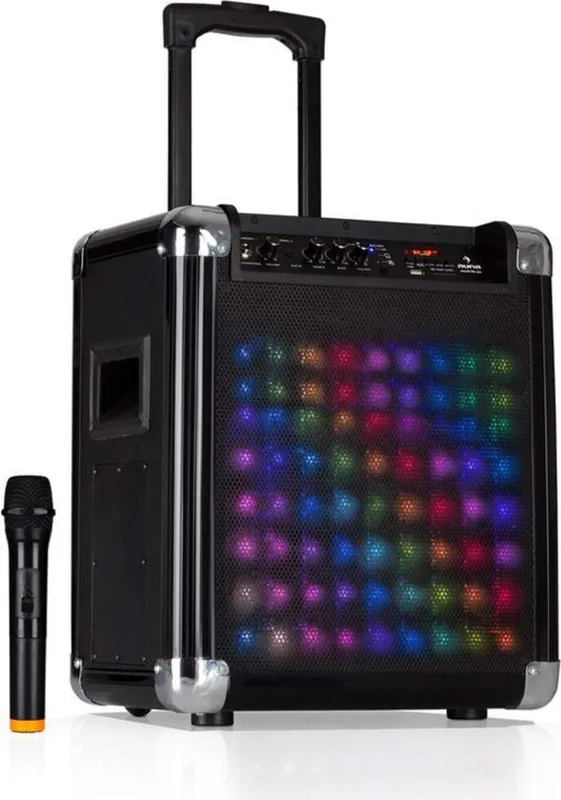
Auna Moving 80 Manual
PDF manual · 64 Pages
English



Quick check
Incorrect answer, please try again.
Chat with your Auna Moving 80 manual using AI
Get instant AI answers from your Auna Moving 80 manual
Ask anything about the Auna Moving 80. Answers come from this manual, with the pages they are based on.
Moving 80 Maintenance Schedule
Fully charge the battery at least every 2 to 3 months to maintain maximum capacity.
If the unit is not used for prolonged periods, fully charge the battery at least every 60 days as it gradually loses power.
Free maintenance reminders
Timed to your purchase date. Always free, unsubscribe anytime.
Ask a Question
Do you recommend Moving 80?
Yes NoFrequently Asked Questions
Turn on your Bluetooth device and switch on the speaker. It will enter pairing mode automatically and the BT indicator will flash. In your Bluetooth settings, select the device named "Moving80" (or "Moving120"). Once connected, the BT light stays on. To disconnect pairing, press and hold the PLAY/PAUSE key.
Is this answer helpful?
The speaker plays music files from USB/SD only in MP3 format. If your media is not MP3, it will not play. After inserting the USB or SD card, the unit automatically switches to the USB/SD mode and begins playback.
Is this answer helpful?
Yes. When the power switch is set to AC and the power cable is connected, the unit can operate and play music while charging. The manual also notes that the speaker can power on from external supply even if the battery is low.
Is this answer helpful?
Before switching on the microphone, set the MIC volume to zero. Turn it up slowly after the microphone is powered. If you hear echo or distortion, check that the mic cable is firmly connected and reduce the ECHO setting if it is too high.
Is this answer helpful?
There are two LINE/AUX inputs: an AUX 3.5 mm jack and an AUX RCA input. If both are connected, playback is automatically routed through the 3.5 mm jack. To use the RCA input, disconnect the 3.5 mm connection.
Is this answer helpful?
A full charge takes about 8 hours. Under standard use, the battery typically lasts around 4 to 5 hours. If you store the speaker for a long time, the manual recommends charging at least every 60 days to maintain maximum capacity.
Is this answer helpful?
Advantages and Disadvantages
Advantages

- Multi-source playback: Bluetooth, USB/SD (MP3), AUX (3.5 mm and RCA), and FM radio.
- Seven-band EQ plus Treble and Bass for detailed sound tuning.
- Live features: microphone input with MIC volume and ECHO, plus guitar input level control.
- Battery operation with approx. 8 hour charge time and about 4-5 hours standard playback.
Disadvantages

- USB/SD playback is limited to MP3 files.
- USB port is for data transfer; direct PC playback is not supported.
- Needs proper ventilation (min 30 cm clearance) to perform safely.
- If not used for long periods, battery gradually loses charge.
Product Specification
Speakers
2 (1x 3" tweeter, 1x 8" woofer)
Tuner
FM
Audio connections
Stereo Line In (RCA), AUX In (3.5mm jack), 2x Mic In (6.35mm jack)
Other connections
USB, Card reader (SD)
Power supply
Battery, Mains operation
Playback time
8h
Karaoke features
Echo
Special features
Remote control, Wheels, Audio effects (Bass Boost), incl. wireless microphone
Dimensions
14.96x16.93x12.60in (WxHxD)
Weight
23.15 lbs
Product Description
Auna Moving 80 Portable Speaker Trolley (Auna Moving 80 Manual)
The Auna Moving 80 is a mobile all-in-one loudspeaker designed for parties, events, and on-the-go music sessions. With its built-in trolley idea and performance-focused controls, it helps you set up quickly and keep the sound experience fun. If you are using the Auna Moving 80 Manual as your guide, you will find clear instructions for setup, audio sources, microphone handling, and charging so you can enjoy trouble-free playback from day one.
Sound, EQ, and live input features
Music playback is handled through multiple options: Bluetooth, USB and SD card for MP3 files, AUX inputs (3.5 mm and RCA), and an FM radio mode with a telescopic antenna. On the front panel, the seven-band equalizer and dedicated Treble and Bass controls let you shape the tone. For live events, the speaker includes a microphone input (6.3 mm) plus separate MIC volume and an ECHO effect knob to add space to your voice. There is also a guitar input (6.3 mm) with its own level control, making it easy to perform without extra mixing gear.
Charging and practical battery use
The Auna Moving 80 runs on a rechargeable battery. The manual specifies approximately 8 hours for a full charge, and typical playback time of about 4 to 5 hours under standard use. You can also power the unit via AC even when the battery is low. To maintain long-term battery health, it recommends charging regularly (about every 60 days if not used) and turning the device off when you are done.
Connections and controls at a glance
The device uses a MODE switch to select sources such as LINE, USB, SD, FM, and BT. A digital display indicates the current input, EQ mode, FM information, and track details. A remote control is included for quicker source changes, volume adjustment, and repeat modes like repeat all, repeat folder, repeat one, and random play.
Pros (quick highlights)
- Bluetooth pairing with clear pairing status via BT indicator LEDs.
- USB and SD playback supports MP3 files for simple media use.
- Built-in seven-band EQ plus Treble and Bass for flexible sound tuning.
- Microphone input with MIC volume and ECHO control for announcements.
- Works with AC power and battery, including during charging.
Cons (things to consider)
- USB/SD supports MP3 only, so other audio formats will not play.
- Battery runtime is about 4 to 5 hours under standard use.
- For USB input, it is intended for data transfer and not direct PC playback.
Notes
- Keep at least 30 cm clearance around the speaker for ventilation.
- When using microphones, start with MIC volume low and increase slowly to avoid distortion.
- For best FM reception, fully extend the telescopic antenna.
Key benefits (most important results)
- Multi-source audio: BT, USB/SD MP3, AUX (3.5 mm and RCA), and FM radio.
- Live-ready controls: MIC input with MIC volume and ECHO, plus guitar level control.
- Fast day-to-day operation: remote access for MODE, EQ, repeat, and playback.
- Battery-ready mobility: about 8 hours to charge, around 4 to 5 hours playback.
- Clear tuning: seven-band EQ plus Treble and Bass adjustments.
Watch-outs (most important results)
- USB/SD media must be MP3; other file types are not supported.
- The unit needs space for airflow, so avoid enclosing it during use.
- Remote pairing behavior depends on the correct Bluetooth device name (Moving80 or Moving120).
Search for 67,732 Manuals online


Type-in Brand or Model