

Auna Karaboom 100 Sing Manual
PDF manual · 56 Pages
English



Quick check
Incorrect answer, please try again.
Chat with your Auna Karaboom 100 Sing manual using AI
Get instant AI answers from your Auna Karaboom 100 Sing manual
Ask anything about the Auna Karaboom 100 Sing. Answers come from this manual, with the pages they are based on.
Ask a Question
Do you recommend Karaboom 100 Sing?
Yes NoFrequently Asked Questions
Press the SOURCE button to select BT mode. Then press the PAIR button on the remote until the LED turns blue. On your phone, enable Bluetooth and search for KARABOOM 100. Select it from the list and enter the passcode 0000 if prompted.
Is this answer helpful?
Yes. Set the current time first. Press the ALARM button to activate the alarm, select the time, and choose USB as the source so it plays music from a drive when the alarm goes off.
Is this answer helpful?
The wireless microphone requires two AA batteries. You must install them in the compartment on the bottom of the mic and slide the switch to ON before using the karaoke mode.
Is this answer helpful?
While the source button lists FM, the technical specifications and manual do not confirm a functional FM tuner. It primarily supports CD, Bluetooth, USB, and AUX inputs.
Is this answer helpful?
To cancel the sleep timer, hold the SLEEP button until the display blinks, then press it again until OFF appears. The value will blink three times to confirm cancellation.
Is this answer helpful?
No, the RCA cable required for connecting external audio devices to the AUX input is not included in the package and must be purchased separately.
Is this answer helpful?
Advantages and Disadvantages
Advantages

- Versatile connectivity options including CD, Bluetooth, USB, and AUX inputs.
- Dedicated karaoke mode with adjustable echo and microphone volume controls.
- Built-in sleep timer and alarm clock functionality for added convenience.
- USB charging port allows users to charge smartphones while listening to music.
- Clear LED display shows time, track info, and status indicators easily.
Disadvantages

- Microphone requires separate AA batteries which are not always included.
- RCA cable for AUX connection must be purchased separately.
- No FM radio tuner available despite source button listing FM option.
- Auto standby activates after 10 minutes of inactivity which may be too fast.
- Device cannot be serviced by the user and requires qualified personnel.
Product Specification
Power
60W RMS, 120W Peak
Audio Connections
Stereo Line In (RCA)
Other Connections
USB-A
Wireless
Bluetooth
Power Supply
Mains Power
Karaoke Features
Echo
Features
Remote Control, Built-in CD Player, Includes 2x Wireless Microphones
Dimensions
6.89x37.01x8.46in (WxHxD)
Weight
14.11lbs
Product Description
Experience the Ultimate Karaoke Night with Auna Karaboom 100 Sing
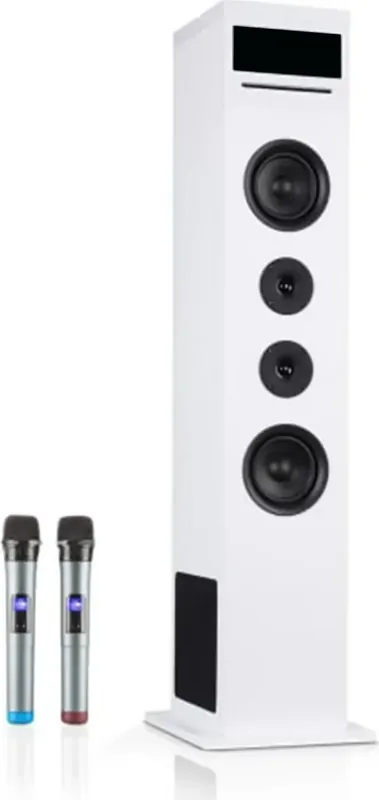
Transform your living room into a vibrant concert hall with the Auna Karaboom 100 Sing. This versatile karaoke tower is designed for those who love to sing and entertain guests with high-quality audio. Whether you are hosting a party or enjoying a quiet evening at home, this device offers multiple ways to play your favorite music.
The Auna Karaboom 100 Sing features a robust design that includes a built-in CD player, allowing you to enjoy classic discs alongside modern digital formats. With Bluetooth connectivity, you can wirelessly stream music from your smartphone or tablet directly to the tower. The device also supports USB drives for MP3 playback and an AUX input for connecting external audio sources like DVD players or gaming consoles.
One of the standout features is the dedicated Karaoke Mode. Simply insert two AA batteries into the included microphone, adjust the volume and echo effects using the remote control, and start singing. The tower provides clear sound output with a 60-watt RMS power rating and handles up to 8 ohms of impedance, ensuring deep bass and crisp highs. The LED display makes it easy to see your track information, time, and alarm settings at a glance.
Convenience is key with this unit. It includes a sleep timer to automatically turn off the device after 10 to 90 minutes, perfect for late-night sing-alongs. You can even set alarms to wake up to your favorite songs via USB playback. The tower also doubles as a charging station, featuring a USB port on the back to charge your mobile devices while you listen. Safety is prioritized with warnings against water exposure and overheating, ensuring long-lasting performance when used correctly.
Key Features
- Wireless Bluetooth streaming for seamless music playback.
- Built-in CD player for physical media enjoyment.
- Adjustable microphone volume and echo effects for professional-sounding vocals.
- Auto standby mode saves energy when no activity is detected.
- Dual USB ports for media playback and device charging.
Important Notes
Always ensure the voltage matches your local supply before plugging in. Do not expose the unit to rain or moisture. For disposal, follow local regulations regarding electronic waste and battery recycling.
Search for 67,732 Manuals online


Type-in Brand or Model