
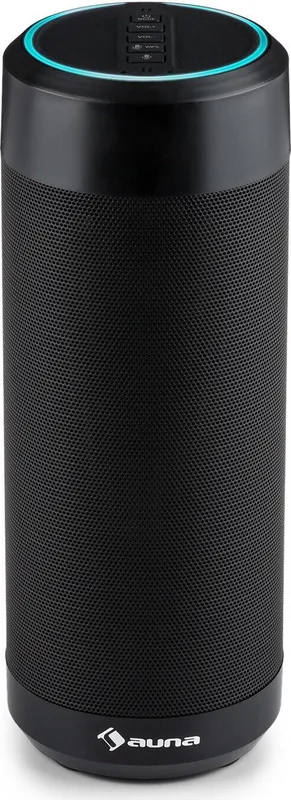


Auna Intelligence Tube Manual
PDF manual · 48 Pages
English



Quick check
Incorrect answer, please try again.
Chat with your Auna Intelligence Tube manual using AI
Get instant AI answers from your Auna Intelligence Tube manual
Ask anything about the Auna Intelligence Tube. Answers come from this manual, with the pages they are based on.
Intelligence Tube Maintenance Schedule
Charge the device for approximately 4 hours before first use to ensure optimal battery life.
Clean the appliance only with a dry cloth as recommended by the manufacturer. Do not use water or liquids.
Ask a Question
Do you recommend Intelligence Tube?
Yes NoFrequently Asked Questions
It combines wireless audio, Alexa voice control, app setup, and wired AUX input in one compact speaker. That mix makes it useful for both smart streaming and simple everyday playback.
Is this answer helpful?
Yes. You can pair it with phones, tablets, or other Bluetooth-capable devices. After the first pairing, it can reconnect automatically to the last device when both are in range.
Is this answer helpful?
Yes, basic playback is possible through Bluetooth or AUX-IN. However, Wi-Fi is needed for app-based setup, online music services, and Amazon Alexa features.
Is this answer helpful?
The speaker supports access to services such as Spotify, TuneIn, TIDAL, Napster, and iHeartRadio through the app interface, depending on account availability and service login requirements.
Is this answer helpful?
You can wake Alexa by speaking its name or using the Alexa button. After activation, you can ask questions, control music, check information, and use common voice commands.
Is this answer helpful?
Yes. The microphone can be muted with the WPS/microphone button. The light ring changes color to indicate the microphone status, giving you more control over privacy.
Is this answer helpful?
Advantages and Disadvantages
Advantages

- Supports Bluetooth, Wi-Fi, and AUX for flexible playback options.
- Works with Amazon Alexa for voice control and smart assistant features.
- Rechargeable battery makes it easy to move around the home.
- App setup enables multi-room use and access to streaming services.
Disadvantages

- Setup can feel complex for first-time users.
- Requires a 2.4 GHz Wi-Fi network, which limits some routers.
- Battery is not user-replaceable.
- Full smart features depend on app and account login steps.
Product Specification
Power
6W RMS
Tuner
Internet radio
Streaming Clients
Amazon Music, Spotify
Voice Assistants
Amazon Alexa
Audio Connections
AUX In (3.5mm jack)
Wireless
Bluetooth 4.1, Wi-Fi (WLAN)
Power Supply
Li-ion battery, USB
Playback Time
5h
Special Features
water resistant (IPX4)
Color
black
Dimensions
3.15x8.86x3.15in (WxHxD)
Weight
1.32lb
Product Description
Auna Intelligence Tube: Smart Sound in a Compact Form
The Auna Intelligence Tube brings together wireless audio, voice control, and app-based convenience in one stylish speaker. Inspired by modern connected living, it is designed for listeners who want more than basic playback. Whether you stream music over Bluetooth, connect through Wi-Fi, or plug in an external player via AUX, this speaker offers flexible listening for everyday use. The Auna Intelligence Tube Manual highlights how the device is built around easy switching between modes and a smooth setup process through the Auna Intelligence app.
A key strength of the speaker is its integration with Amazon Alexa. Once connected, it becomes a hands-free assistant for music playback, weather updates, news, timers, and other voice-driven tasks. The built-in microphone, LED light ring, and top-panel controls make it feel interactive and intuitive. It can respond to voice commands, and the microphone can be muted when privacy is needed. That balance of convenience and control makes it suitable for both casual listening and smart home use.
The Auna Intelligence Tube also focuses on multi-source flexibility. Bluetooth mode is ideal for quick pairing with a phone or tablet, while Wi-Fi mode unlocks app setup and online services such as Spotify, TuneIn, TIDAL, Napster, and iHeartRadio. For users who prefer a wired connection, the AUX-IN port supports playback from older devices and media players. This makes the speaker versatile enough for bedrooms, offices, kitchens, or shared spaces.
Another practical advantage is the rechargeable built-in lithium-ion battery, which allows the speaker to be moved around without being tied to a wall outlet. The manual recommends careful charging habits and a 2.4 GHz Wi-Fi network for stable setup and operation. The device also supports adding more units to the network, opening the door to a broader multi-room or stereo-style listening experience.
Overall, the Auna Intelligence Tube is best described as a compact smart speaker with broad connectivity and strong everyday usability. It is not just about playing music; it is about creating a connected audio hub that can adapt to different rooms, different devices, and different listening habits.
Notes
- Wi-Fi setup requires a 2.4 GHz network.
- Bluetooth reconnects automatically to the last paired device.
- Microphone mute is available for added privacy.
- Multi-device playback can be expanded through the app.
Search for 67,732 Manuals online


Type-in Brand or Model
Sylvester Weissnat
9 months ago
I bought this for a specific use case, but it turned out not to fit my needs. How can I tell in advance if it will work for my intended application?
Manual.ly
9 months ago
Thanks for sharing. Even if a product is generally high quality, it may not be the right match for every use case. To check compatibility, compare your requirements with the product specifications and limitations in the manual (e.g., connection type, power or performance needs, supported formats, and any required accessories). If anything in your setup differs from what the documentation states, results can be disappointing. If you tell us your exact intended application and what you plan to connect or power, our support team can help confirm whether it is suitable or suggest an alternative.