
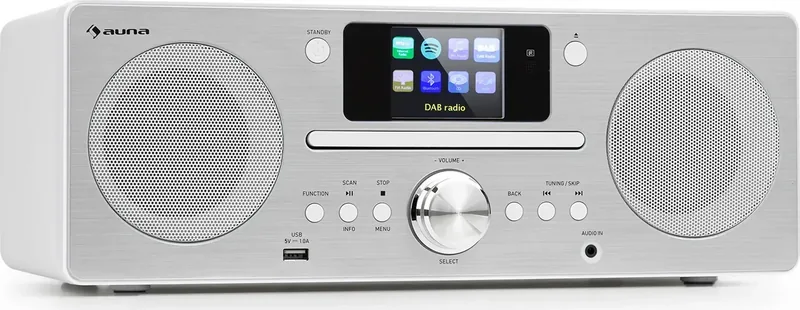
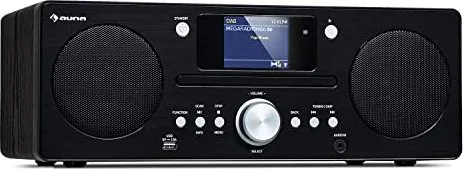
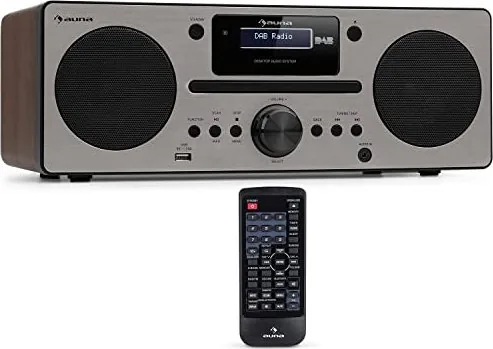
Auna Harvard IR Manual
PDF manual · 172 Pages
English



Quick check
Incorrect answer, please try again.
Chat with your Auna Harvard IR manual using AI
Get instant AI answers from your Auna Harvard IR manual
Ask anything about the Auna Harvard IR. Answers come from this manual, with the pages they are based on.
Ask a Question
Do you recommend Harvard IR?
Yes NoFrequently Asked Questions
Navigate to the main menu using the remote, select System Settings, then Network, and choose the Network Wizard. Follow the on-screen prompts to select your Wi-Fi name and enter the password carefully, noting that it is case-sensitive.
Is this answer helpful?
Yes, the Auna Harvard IR has built-in Spotify Connect. Simply ensure both your phone and the Harvard are on the same Wi-Fi network, open the Spotify app, select a song, tap Available Devices, and choose Harvard from the list.
Is this answer helpful?
The USB port supports MP3 and WMA file formats. It can handle storage devices with capacities up to 32GB. Please note that compatibility may vary with certain USB drives.
Is this answer helpful?
Press the Menu button on the remote, go to System Settings, select Factory Reset, and confirm by choosing Yes. This will erase all presets, saved stations, and alarms, returning the device to its original state.
Is this answer helpful?
While the device displays time and date and allows synchronization via radio or network, the provided text does not explicitly mention a programmable wake-up alarm function, focusing instead on timekeeping and display settings.
Is this answer helpful?
Advantages and Disadvantages
Advantages

- Versatile connectivity with DAB+, FM, Spotify Connect, and Bluetooth streaming.
- Compact design fits easily on shelves while delivering clear sound.
- Includes both CD and USB playback options for diverse media libraries.
- User-friendly interface with a clear TFT display and intuitive remote.
- Built-in X-Bass mode enhances audio depth for richer listening experiences.
Disadvantages

- Battery for the remote control is not included in the package.
- USB charging current is limited to 1A, which may be slow for some devices.
- No auxiliary input for video output, limiting multimedia usage beyond audio.
- Wi-Fi setup requires manual entry of passwords which can be tedious.
- CD mechanism may occasionally struggle with scratched or damaged discs.
Product Specification
Consists of
CD player, network receiver, tuner, integrated speakers, all-in-one device
Power
2x 10W RMS
Tuner
FM, DAB+, Internet radio
Audio formats
CD audio, CD-R/RW, MP3
Streaming clients
Spotify
Audio connections
AUX In (3.5mm jack), headphones (3.5mm jack)
Other connections
USB-A
Wireless
Bluetooth, Wi-Fi 4 (802.11a/b/g/n)
Features
App control (Undok)
Device dimensions
15.0 x 5.5 x 8.7 inches (WxDxH)
Weight
6.83 lbs
Product Description
Discover the Auna Harvard IR: The Ultimate Compact Music System
Welcome to the world of seamless audio entertainment with the Auna Harvard IR. This compact all-in-one music system is designed for the modern listener who demands versatility without compromising on space or style. Whether you are a die-hard radio enthusiast, a streaming aficionado, or simply someone who enjoys the tactile experience of physical media, this device caters to every musical preference.
The Auna Harvard IR serves as the centerpiece of your home audio setup. It effortlessly bridges the gap between traditional broadcasting and modern digital streaming. With built-in DAB+ and FM tuners, you can access thousands of local and international stations instantly. The inclusion of Spotify Connect transforms your smartphone into a remote control, allowing you to stream millions of tracks directly from your favorite playlist through the high-quality speakers of the Harvard unit. No more fumbling with cables; just tap and play.
Beyond wireless capabilities, the system remains faithful to classic formats. The integrated CD player ensures your physical collection is never left behind, offering clear playback with intuitive controls. For those who prefer digital files, the USB port supports MP3 and WMA formats up to 32GB, letting you carry your entire library in your pocket. The Aux-In jack provides a fallback option for older devices, ensuring total compatibility across generations of technology.
Sound quality is paramount, which is why the Harvard features an X-Bass mode to deepen low frequencies and a versatile equalizer with presets for Rock, Pop, Jazz, and Classic. The TFT display provides clear visual feedback, showing track titles, signal strength, and station information at a glance. Safety and ease of use are woven into the design, with clear instructions for setup and operation found within the comprehensive manual. The Auna Harvard Manual guides you through every step, from initial power connection to advanced network configuration. Experience the perfect blend of retro charm and futuristic connectivity with the Auna Harvard IR.
Key Features Summary
- Supports DAB+, FM, Internet Radio, and Spotify Connect.
- Includes CD Player and USB port for MP3/WMA files.
- Equipped with X-Bass enhancement and multiple EQ presets.
- Features a user-friendly TFT display and remote control.
Important Notes
- Ensure the device is placed in a well-ventilated area away from direct heat sources.
- Use only AA batteries for the remote control to avoid leakage damage.
- Keep the CD lens clean and never insert foreign objects into the drive.
Search for 67,732 Manuals online


Type-in Brand or Model