
Auna Berklee TT-Play Manual
PDF manual · 56 Pages
English



Quick check
Incorrect answer, please try again.
Chat with your Auna Berklee TT-Play manual using AI
Get instant AI answers from your Auna Berklee TT-Play manual
Ask anything about the Auna Berklee TT-Play. Answers come from this manual, with the pages they are based on.
Ask a Question
Do you recommend Berklee TT-Play?
Yes NoFrequently Asked Questions
Turn the mode knob to BT In, activate Bluetooth on your device, search for Berklee in the device list, and pair your phone with the turntable for audio streaming.
Is this answer helpful?
Yes, connect Active speakers to the Audio Out jacks. Passive speakers are not recommended for direct connection due to low volume levels.
Is this answer helpful?
The Auto Stop feature will halt the motor automatically if set to ON. If OFF, the turntable continues spinning until manually stopped.
Is this answer helpful?
Children over 8 years may use the device under supervision. They must understand the functions and risks before operation begins.
Is this answer helpful?
Check if power cables are secured, verify speaker connections, ensure the device is powered on, and confirm Bluetooth settings are active.
Is this answer helpful?
Yes, the manufacturer declares compliance with Directive 2014/53/EU regarding radio equipment safety and standards.
Is this answer helpful?
Take it to a local electronic recycling center. Do not throw it in household waste bags to comply with environmental protection laws.
Is this answer helpful?
Advantages and Disadvantages
Advantages

- Supports multiple playback speeds including 33, 45, and 78 RPM for versatile record formats.
- Includes Bluetooth In mode for wireless streaming from smartphones and tablets.
- Features an Auto Stop function to halt the turntable automatically upon disc completion.
- Provides Audio Out jacks for connecting to external stereo systems or amplifiers.
- Has built-in speakers for immediate standalone use without extra equipment.
Disadvantages

- Requires separate purchase of AUX audio cables not included in the box.
- Passive speakers cannot be connected directly to the audio output sockets.
- Stylus must be handled carefully to avoid damage from finger contact.
- Bluetooth transmission distance limited to approximately 1 meter for stable connection.
- Needs careful placement away from heat sources to prevent overheating risks.
Product Specification
Consists of
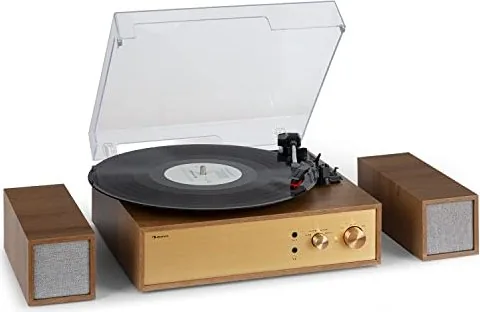
Receiver, Speaker
Power
2 x 2.5W RMS
Tuner
No
Audio Formats
Vinyl
Audio Connections
AUX In (3.5mm Jack), Stereo Line Out (RCA), Headphones (3.5mm Jack)
Wireless
Bluetooth
Device Color
Brown
Speaker Color
Brown
Device Dimensions
12.40 x 4.72 x 11.42 in (W x H x D)
Speaker Dimensions
3.15 x 3.35 x 8.46 in (W x H x D)
Weight
6.61 lbs
Product Description
Discover High-Fidelity Sound with the Auna Berklee TT Play
Transform your music listening experience with the Auna Berklee TT Play. This device combines vintage aesthetics with modern functionality for a seamless audio journey. Whether you collect rare vinyl records or enjoy streaming playlists, this turntable serves as a versatile hub for entertainment. Its design ensures stability on any surface while minimizing vibrations that could degrade sound quality during playback.
Connectivity and Versatility
Modern users expect wireless options alongside traditional inputs. This system supports Bluetooth connections allowing you to pair smartphones easily. Switch to BT In mode for direct streaming. Alternatively, utilize the AUX IN jack for wired devices. The Audio Out sockets enable connection to external amplifiers or powered speakers. This flexibility means the unit fits into various setups comfortably without requiring complex wiring.
Performance and Control
Select the correct speed for your records using the switch. Options include 33, 45, and 78 RPM to accommodate different formats. The auto stop feature halts the motor when a disc finishes, preventing wear. However, enthusiasts may disable this to listen to B-sides fully. Handling the tone arm requires gentle movement to protect the stylus. Consult the Auna Berklee TT Play Manual for detailed maintenance tips ensuring longevity.
Safety and Efficiency
Electrical safety is paramount for all appliances. Do not place this unit near heat sources like radiators. Avoid liquid spills as water damages internal circuits. Always unplug during storms to prevent surge damage. Keep the mains cord accessible for emergency disconnection. Proper disposal respects environmental regulations regarding electronic waste. Recycling components helps protect public health and reduces landfill burden significantly.
Final Thoughts
Owning this turntable adds a tactile dimension to digital lifestyles. Sound quality depends on proper setup and clean records. Follow guidelines for best results. Enjoy hours of relaxation with crisp audio output. The built-in amplifier capabilities simplify system requirements for casual listeners. Investing in quality gear pays off in sustained enjoyment years down the line.
Troubleshooting and Support
Issues like static or connection drops occur occasionally. Verify power supply stability if the unit fails to start. Check speaker connections to ensure no audio loss occurs. Bluetooth pairing takes time so wait for confirmation tones. Review error logs if persistent problems arise. Manufacturers offer support channels for specialized assistance regarding faults.
Environment and Durability
Sustainable practices matter to responsible consumers. Dispose of batteries separately from regular trash. Follow local laws for recycling electronics. Protect packaging materials from children to avoid choking hazards. Supervision ensures safe interaction for younger family members. Longevity relies on careful handling and storage conditions within homes.
Notes
- Ensure speakers are placed on flat surfaces.
- Disconnect during storms to prevent lightning damage.
- Recycle electronic waste responsibly according to local laws.
Search for 67,732 Manuals online


Type-in Brand or Model