
Auna AV2-CD708 Manual
PDF manual · 9 Pages
English



Quick check
Incorrect answer, please try again.
Chat with your Auna AV2-CD708 manual using AI
Get instant AI answers from your Auna AV2-CD708 manual
Ask anything about the Auna AV2-CD708. Answers come from this manual, with the pages they are based on.
Ask a Question
Do you recommend AV2-CD708?
Yes NoFrequently Asked Questions
It supports classic wired sources such as CD, DVD, AUX, PHONO, FM/tuner, and recording connections. This makes it a flexible hub for older and newer analog-style audio gear.
Is this answer helpful?
Use the front-panel speaker selector to choose Speaker A, Speaker B, or both at the same time. This is helpful if you want to switch rooms or run two speaker pairs together.
Is this answer helpful?
Loudness boosts the sound balance at lower volumes so music feels fuller and more natural. It can help restore bass and presence during quiet listening sessions.
Is this answer helpful?
Check the power cord, speaker wiring, source connection, and volume level. Many issues come from loose cables, incorrect input selection, or the volume being set too low.
Is this answer helpful?
Yes, the phono input and phono ground terminal are designed for turntables. Make sure the ground connection is secure to reduce hum and improve playback quality.
Is this answer helpful?
Use a dry microfiber cloth and avoid moisture, heat, and cleaning chemicals. Always turn the unit off before changing connections, and keep speaker wires safely separated.
Is this answer helpful?
Advantages and Disadvantages
Advantages

- Multiple analog inputs make it easy to connect CD, DVD, AUX, FM, and phono sources.
- Bass, treble, midrange, balance, and loudness controls let you shape the sound.
- Speaker A/B switching adds flexibility for one or two speaker pairs.
- Headphone jack and remote control improve everyday convenience.
Disadvantages

- Requires careful wiring and polarity checks to avoid weak or distorted sound.
- No built-in wireless or app-based streaming features.
- Setup can feel technical for users unfamiliar with analog audio gear.
- Remote labels and functions may feel dated compared with modern receivers.
Product Specification
Special Features
A/B Speaker Outputs
Dimensions
16.93x4.72x11.42in (WxHxD)
Weight
9.04lbs
Product Description
Auna AV2-CD708: Practical Hi-Fi Control for Everyday Listening
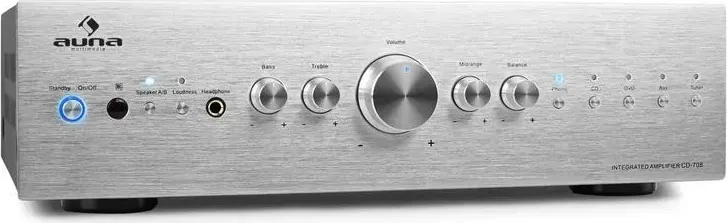
The Auna AV2-CD708 brings a straightforward, old-school approach to home audio. The Auna AV2-CD708 Manual style setup focuses on easy source switching, solid speaker connections, and intuitive sound shaping. It is designed for listeners who want simple control over a CD player, turntable, DVD unit, or tuner without digging through complicated menus.
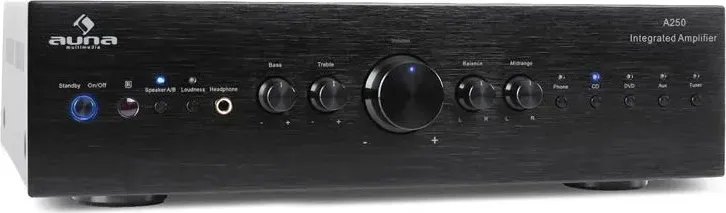
At the front, the amplifier keeps the essentials within reach. You get standby control, source selection, a headphone jack, loudness, and direct adjustment for bass, treble, midrange, volume, and balance. That combination makes it easy to tailor the sound to a room, a pair of speakers, or your personal taste. The A/B speaker selector also adds flexibility when you want to switch between two speaker pairs or run them together for a fuller sound.
The rear panel is built around classic wired connections. Inputs for CD, DVD, AUX, PHONO, FM, and recording equipment make the unit a versatile hub for traditional audio systems. The phono ground terminal is especially useful for turntable users, while the speaker terminals support proper impedance matching and secure cable placement. The instructions repeatedly stress correct polarity, which helps preserve stereo imaging and avoid distortion.
Using the amplifier is refreshingly direct. Power it on, select the source, choose the speaker set, and adjust the volume. If music sounds thin at lower levels, the loudness function can restore a more natural balance. For late-night listening, the mute function and headphone output provide additional convenience. It is a practical match for users who prefer physical controls over app-based features.
The included troubleshooting guidance also shows that this amplifier is meant to be maintained with common sense rather than complex service. Most issues relate to loose wiring, low volume, or a weak remote battery, which makes diagnosis approachable for beginners. Combined with the warranty and safety guidance, it suggests a product that rewards careful setup and regular attention. While it is not a modern streaming unit, it offers a stable foundation for vinyl, disc, and wired sources, which is exactly where many home audio fans still want the most control.
Notes
- Keep speaker wires separated to avoid short circuits.
- Match + to + and - to - for cleaner stereo sound.
- Turn the unit off before connecting or changing components.
- Clean with a dry microfiber cloth only.
- Store and use it away from moisture and heat.
This setup is best understood as a dependable analog companion: simple, flexible, and focused on core listening needs rather than modern extras. If you value hands-on control, the Auna AV2-CD708 feels like a well-structured home audio center built for everyday use.
Search for 67,732 Manuals online


Type-in Brand or Model