
Auna Areal 525 Manual
PDF manual · 56 Pages
English



Quick check
Incorrect answer, please try again.
Chat with your Auna Areal 525 manual using AI
Get instant AI answers from your Auna Areal 525 manual
Ask anything about the Auna Areal 525. Answers come from this manual, with the pages they are based on.
Ask a Question
Do you recommend Areal 525?
Yes NoFrequently Asked Questions
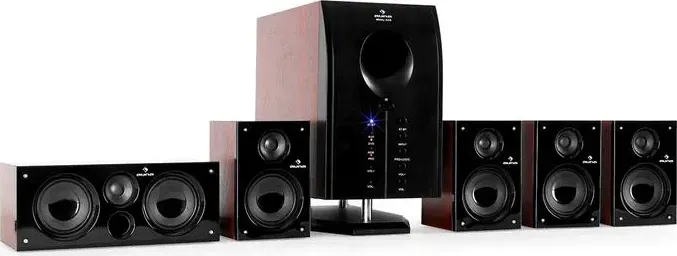
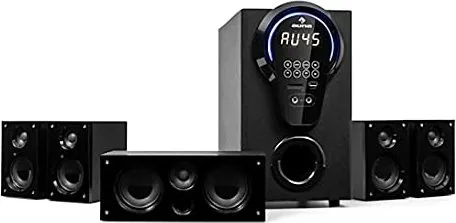
It uses a 5.1 surround sound setup with one subwoofer, a center speaker, and five satellite speakers. This layout is made to create a more immersive listening experience for home entertainment.
Is this answer helpful?
The system supports Bluetooth, USB, SD/MMC, AUX, and DVD input modes. This makes it suitable for both modern wireless playback and older wired or removable-media sources.
Is this answer helpful?
Select BT mode on the system, search for H5188 on your device, and connect. If the external device uses Bluetooth below version 2.0, enter 0000 as the pairing code.
Is this answer helpful?
Yes, the system includes a 5.1/2.1 function. That allows you to switch sound output depending on your setup or listening preference.
Is this answer helpful?
The remote lets you switch modes, play or pause media, adjust the main volume, fine-tune each speaker, set sleep timing, change EQ, and control brightness.
Is this answer helpful?
Place the subwoofer on the floor, the center speaker near the TV, and the surround speakers slightly behind and to the sides of the listening area, around ear height or a bit above.
Is this answer helpful?
Advantages and Disadvantages
Advantages

- 5.1 speaker layout creates a fuller surround effect for movies, shows, and games.
- Multiple inputs add flexibility, including Bluetooth, USB, SD/MMC, AUX, and DVD.
- Remote control and individual speaker level adjustment improve everyday convenience.
- Clear placement guidance helps users set up the system for better sound balance.
Disadvantages

- Wiring all speakers correctly can take time and attention during setup.
- Older Bluetooth devices may require the default pairing code 0000.
- SD playback needs the correct mode selected and a compatible card with enough storage.
- Best results depend on room layout and careful speaker positioning.
Product Specification
Type
Passive speaker set
Channels
5.1
Power
125W RMS
Frequency range
40Hz-20kHz
HDR
no
Audio connections
1x Stereo Line In (RCA), 5.1 Multi-Channel Line In (RCA)
Subwoofer dimensions
6.50x1.26x1.34in (WxHxD)
Weight
8.16lb
Subwoofer weight
12.13lb
Consists of
1x Subwoofer, 4x Compact speakers, 1x Center speaker
Product Description
Auna Areal 525 5.1: Everyday Surround Sound with Flexible Connections
The Auna Areal 525 5.1 is designed for listeners who want a simple route into cinematic sound without overcomplicating the setup. With one subwoofer and five satellite speakers, it delivers a classic 5.1 layout that can bring more depth to movies, games, and music. The system is built to fit living rooms and media corners where balanced audio and straightforward controls matter most.
One of its biggest strengths is versatility. The system supports Bluetooth, USB, SD/MMC, AUX, and DVD playback, so it can connect with a wide mix of sources. That makes it practical for users who still keep older media players alongside modern wireless devices. The Bluetooth feature works at 2.4 GHz, and pairing is simple once the system is set to BT mode. The Auna Areal 525 5.1 Manual is especially useful here, since it helps explain the correct input modes and the basic connection steps in a clear order.
The front control panel and remote control add convenience to the experience. You can switch between sources, adjust the main volume, fine-tune individual speaker levels, and even manage EQ and brightness settings. This kind of control is helpful when a room needs different sound balance depending on what is being played. The ability to change between 5.1 and 2.1 operation also gives the system a more adaptable character.
Placement plays a major role in getting the best result, and this system provides guidance for that too. The subwoofer can be positioned on the floor almost anywhere, while the surround speakers should sit slightly behind the listening area. The center speaker is meant to stay near the TV, helping dialogue stay anchored and easy to follow. Once everything is wired correctly, the result is a more immersive home audio setup than a standard stereo pair.
Notes
- Best suited for users who want a practical home theater upgrade.
- Sound performance depends heavily on correct speaker placement.
- Read the setup guidance carefully before powering on.
- Keep magnetic objects away from the speakers for safe operation.
- Dispose of batteries and electronics according to local rules.
Overall, the Auna Areal 525 5.1 combines familiar surround sound design with broad media support and useful controls. It is a solid choice for anyone looking to build a more engaging entertainment space without a complicated installation process.
Search for 67,732 Manuals online


Type-in Brand or Model