Building P09, South China City Electronics Trading Center,
Longgang District, Shenzhen, Guangdong, 518111, China
Made in China
Webcam LED-Anzeige
Mikrofon
Kamera
Mikrofon
Faltbare/er Klammer/Ständer
Indicateur LED de Webcam
Microphone
Caméra
Microphone
Clip / Support Pliable
Indicatore LED del Webcam
Microfono
Telecamera
Microfono
Fermaglio / Supporto
Pieghevole
English
Deutsch
Français
Español
Italiano
01 - 04
05 - 08
09 - 12
13 - 16
17 - 20
21 - 24
Contents
日本語
1080p Webcam
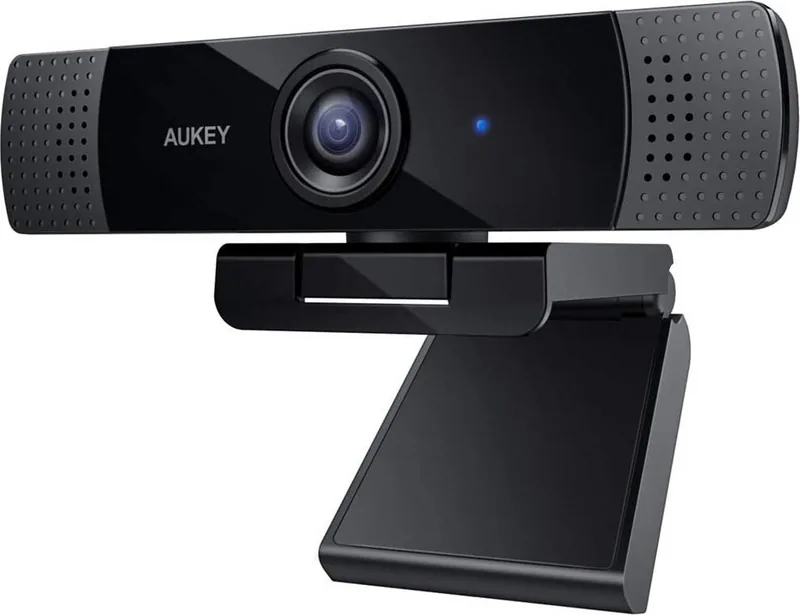
Webcam LED Indicator
Microphone
Camera
Microphone
Foldable Clip/Stand
1/4” Tripod Mounting Point
1/4" Stativaufsatz
Point de montage
du trépied 1/4"
Punto de montaje en
trípode de 1/4”
Punto di fissaggio per
treppiede da 1/4''
/1
%
Quick check
I'm not a robot
Incorrect answer, please try again.
Chat with your Aukey PC-LM1E manual using AI
Get instant AI answers from your Aukey PC-LM1E manual
Ask anything about the Aukey PC-LM1E. Answers come from this manual, with the pages they are based on.
Ask a Question
0/1000
Do you recommend PC-LM1E?
YesNo
0
Julian Meier
8 months ago
I read some complaints about the microphone quality. Is the built-in audio clear enough for work calls or do I need a separate headset?
0
Manual.ly
8 months ago
Thank you for your interest. While the built-in microphone works for basic needs, consistent feedback suggests using a headset or external microphone for clearer audio during meetings. The camera excels in video quality and easy plug-and-play setup at this price point. We recommend checking if your setup includes audio accessories for the best experience.
M: qwen/qwen3.5-flash-20260224
M: qwen/qwen3.5-flash-20260224
Frequently Asked
Questions
A
It records at 1080p 30fps, 720p 30fps, 480p 30fps, and 240p 30fps.
Is this answer helpful?
A
Connect the USB cable to your PC and the device will be detected automatically.
Is this answer helpful?
A
Yes, it has a built-in stereo microphone for audio capture.
Is this answer helpful?
A
It works with Windows XP, Mac OS 10.6, and Android 5.0 or above.
Is this answer helpful?
A
Use a cotton swab or lens-cleaning cloth without abrasive solutions.
Is this answer helpful?
A
Contact the regional support email with your order number and model.
Is this answer helpful?
A
Yes, it can be clipped onto laptop screens or placed on other flat surfaces.
Is this answer helpful?
M: qwen/qwen3.5-flash-20260224
Advantagesand
Disadvantages
Advantages
High definition 1080p video quality
Built-in stereo microphone
Plug and play USB connection
Adjustable clip for monitors and desks
Compatible with multiple operating systems
VS
Disadvantages
No wireless connectivity option available
USB cable length is fixed at 1.8m
Requires direct purchase for warranty coverage
Not suitable for extreme cold temperature
Lens requires manual cleaning carefully
M: qwen/qwen3.5-flash-20260224
Product
Specification
Type
Webcam
Image Sensor
1x 1/2.9" CMOS 2.0 MP
Resolution
1920x1080 Pixels (30fps), 1280x720 Pixels (30fps)
Viewing Angle
85 deg
Compression/Codecs
YUV
Ports
1x USB-A 2.0 (480 Mb/s)
Wireless
N/A
Camera Cover
N/A
Microphone
Built-in (stereo)
Speakers
N/A
Lighting
N/A
Cable Length
70.87 in
Power Supply
via USB
Mount
Clip
Dimensions
4.45 x 2.76 x 1.18 in
Features
Status-LED
M: qwen/qwen3.5-flash-20260224
Product
Description
Aukey PC-LM1E 1080p Webcam Manual Review and Guide
Finding the right tool for clear video communication is essential today in a busy digital world. The Aukey PC-LM1E stands out as a reliable choice for remote work and social calls. Users often seek clarity without expensive setups or technical headaches. This guide explores the device features, installation steps, and maintenance tips without needing complex drivers or extra software downloads. It serves as a comprehensive resource for anyone owning this hardware setup in their home office or workspace.
Performance and Design Specifications
Users receive a sleek unit with a powerful internal stereo microphone included. The sensor captures high definition 1080p video at 30 frames per second consistently. This ensures smooth motion during broadcasts and important professional meetings. The viewing angle measures 85 degrees which covers most desktop setups comfortably. The flexible clip attaches securely to monitors or rests on flat desks easily. Rubber padding protects screens from scratches during installation processes. The effective pixel count reaches 2.0 megapixels for detailed images. Focus distance spans from 0.3 to 5 meters effectively for various distances.
Package Contents and Installation Process
Inside the box you will find the camera itself plus a user manual. Connecting the unit is straightforward for beginners or tech experts alike. Just link the included USB cable to your computer port safely. The operating system detects the device automatically within seconds of plugging in. Windows XP through Android 5.0 versions work well for connection requirements. No extra software downloads are required for standard video chat apps. Open your favorite chat program and select the camera input clearly. A blue LED light confirms activation instantly when the unit is active. You can find the device in the control panel section easily.
Care and Maintenance Tips
Keep the lens clean for optimal image quality at all times. Use a soft cloth or cotton swab for gentle dust removal. Do not use harsh chemicals near the durable plastic casing. Operating temperatures range from zero to 45 degrees Celsius safely. Protect from liquids and extreme heat sources consistently. This simple care routine extends the lifespan of your gear significantly. Avoid touching the lens surface directly to prevent smudges affecting clarity.
Warranty and Support Information
This device offers solid value for casual streamers and office workers globally. The manual helps users navigate settings effectively during initial setup. Whether you are calling from home or a public cafe, stability remains key. Secure your mount before adjusting angles carefully to prevent falls. Contact support teams with order numbers for specific regional assistance requests. AUKEY provides service for direct purchases only from authorized sellers. Amazon US, EU, CA, and JP regions have dedicated email contacts available. Enjoy enhanced connectivity with this compact solution ready to meet modern video demands today.




Julian Meier
8 months ago
I read some complaints about the microphone quality. Is the built-in audio clear enough for work calls or do I need a separate headset?
Manual.ly
8 months ago
Thank you for your interest. While the built-in microphone works for basic needs, consistent feedback suggests using a headset or external microphone for clearer audio during meetings. The camera excels in video quality and easy plug-and-play setup at this price point. We recommend checking if your setup includes audio accessories for the best experience.