Manual.ly Logo

Audison SR5.600 Manual

0.0 · 0 Ratings

PDF manual · 68 Pages

English

M: gpt-5.6-terra
page

/ 68

Loading...
3c66a935f8648f7e9be836c62cefc52d0af9 page 10
User’s Manual
16
English / English
Beforeinstallingthecomponents,pleasecarefullyreadalloftheinstructionscontainedinthismanual.Itisadvisableto
carefullyfollowthehighlightedinstructions.Failuretorespecttheseinstructionsmaycauseunintentionalharmordamage
to the components.
SAFETY CONSIDERATIONS
1. Makesureyourcarhas12VDCvoltagenegativegroundelectricsystem.
2. Checkyouralternatorandbatteryconditiontoensuretheycanhandletheincreasedconsumption.
3. Donotcarryoutanyinstallationinsidetheenginecompartmentorexposedtowater,excessivehumidity,dustordirt.
4. Neverruncablesoutsidethevehicleorinstalltheamplifiernexttoelectronicgearcases.
5. Installtheamplifierinthevehiclepartswheretemperatureisbetween0°C(32°F)and55°C(131°F).Lettheamplifierouterprofilebeatleast5cm(2”)far
frompossiblewalls.Theremustbegoodaircirculationwheretheamplifierisinstalled.Ifyoucovertheheatsink,theamplifiergoesinprotection.
6. Theamplifiercanreachtemperaturesofaround80°C(176°F).Makesureitisnotdangerouslyhotbeforetouchingit.
7. Periodicallycleantheamplifierwithoutusingaggressivesolventsthatmightdamageit.Don’tusecompressedair,sinceitwouldpushsolidparts
intheamplifiers.Dampenapieceofclothwithwaterandsoap,wringitandcleantheamplifier.Thenuseapieceofclothdampenedwithwateronly;
eventuallycleantheamplifierwithadrypieceofcloth.
8. Makesurethelocationyouchoseforthecomponentsdoesnotaffectthecorrectfunctioningofthevehiclemechanicalandelectricaldevices.
9. Makesurepowercableisnotshortcircuitedduringinstallationandconnectionwiththebattery.
10. Useextremecautionwhencuttingordrillingthecarplate,checkingtherearenoelectricalwiringorstructuralelementunderneath.
11.Whenpositioningthepowersupplycable,avoidtorunthewireoverorthroughsharpedgesorclosetomovingmechanicaldevices.Userubber
grommetstoprotectthewireifitrunsinaholeoftheplateorpropermaterialsifitisclosetoheat-generatingparts.
12.Makesureallthecablesareproperlysecuredallalongtheirlength.Also,makesuretheirouterprotectivejacketisflameresistantandself
extinguishing.Useaclampingscrewtosecurepositiveandnegativecablesjustclosetotheamplifierrespectivepowersupplyterminalblocks.
13. Choosethecablegaugeaccordingtotheamplifierpowerandtothesuggestionsyoucanfindhere.Usehighqualitycables,connectorsand
accessories,asyoucanfindintheConnectioncatalogue.
14. Pre-plantheconfigurationofyournewamplifierandthebestwiringroutestoeaseinstallation.
15.Inordertoavoidincidentaldamage,keeptheproductintheoriginalpackaginguntilyouarereadyforthefinalinstallation.
16.Alwayswearprotectiveeyewearwhenusingtools,assplintsorproductresiduemaybecomeairborne.
TYPICAL INSTALLATION SEQUENCE
IfyouhaveanyquestionspleaserefertotheAdvancedManualyoucanfindavailableonwww.audison.comorcontactyourAUDISONdealeror
AUDISONauthorizedserviceforassistance.
1. Beforeinstallingtheamplifierturnoffthesourceandallotherelectronicdevicesintheaudiosystemtopreventanydamages.
2. UsingacablewithadequateAWG(seechart:PowerSupplyCable),runthepowerwirefromthebatterylocationtotheamplifiermountinglocation.
3. Connectthepowersupplywiththecorrectpolarity.connect(+)terminaltothecablecomingfromthebatteryand(-)terminaltothecarchassis.
4. Putaninsulatedfuseholder40cmmaxfarfromthebatterypositiveterminal;connectoneendofthepowercabletoitaftertheotherendtothe
amplifier.Donotmountthefuse.
5. Togroundthedevice(-)intherightway,useascrewinthevehiclechassis;scrapeallpaintorgreasefromthemetalifnecessary,checkingwith
atesterthatthereiscontinuitybetweenthebatterynegativeterminal(-)andthefixingpoint.Ifpossible,connectallcomponentstothesame
groundpoint;thissolutionrejectsmostnoisewhichcanbegeneratedduringtheaudioreproduction.
6. Routeallsignalcablesclosetogetherandawayfrompowercables.
7. ConnecttheRCAinputcables,theappliedsignalmustbebetween0.2VRMSand5VRMS.
8. Connectthehighlevelinputsusingtheproperplug.Appliedsignalmustbebetween0.8VRMSand20VRMS.Don’tuseitifyouarealreadyusing
PreInpreamplifiedconnection.
9. Connectthespeakeroutputusing10AWGmaxspeakercable.
10.Don’tconnect(-)Land(-)Rspeakeroutputstogether.Ifyouuseanexternalstereocrossover,makesurethatitsnegativepolesarenotconnectedtogether.
11.Theamplifierturnsonbyconnectingtheremoteturnonterminal(REMOTEIN)tothesourcespecificoutput.Theamplifierturnsonautomatically,
withoutremotesignal,alsoifusinghighlevelinputs(SpeakerIN)bysettingthe“AUTOTURNON”switchtopositionON.
12. TheLEDonthetoppanellightsupblueindicatingthattheproductison.TheLEDlightsuprediftheoutputsgoonoverload,ifthethermalprotection
istriggered,ifthespeakercablesshortcircuitwiththevehiclechassisandiftheamplifierismalfunctioning.
13.Thefuse/sis/arelocatednearthepowersupplyandspeakerterminals.Toreplace,removethefuse/sfromthehousing.Alwaysreplacethefuse
ofthesamerating.
14.Secureallauxiliarydevicesyoubuilttoinstallthecomponentstothevehiclestructure;thisinsuresstabilityandsafetywhiledriving.Theamplifier
detachmentwhiledrivingcanseriouslydamagethepeopleinthevehicleandothercars.
15.Wheninstallationisover,checkthesystem’swiringandmakesureallconnectionsweredoneintherightway.
16.Putthefuseintothefuseholder.Thefusevaluewillhavetobe30%higherthantheamplifierbuilt-inone.Incasethecablesuppliesseveral
amplifiers,thefusevaluewillhavetobe30%higherthanthesumofthevaluesofallotherfusesintheamplifiers.
17.Listeninglevelcalibrationismadebyadjustingthesourcevolumeupto3/4ofitsmaximumlevel;then,adjusttheamplifierlevelsuntilyouheardistortion.
18. WarrantyCertificate:pleasecheckouttheAUDISONwebsiteforfurtherinformation.
SAFE SOUND
USECOMMONSENSE ANDPRACTICE SAFESOUND.PLEASE REMEMBERTHATLONGEXPOSURETO EXCESSIVELYHIGHSOUND PRESSURE
LEVELSMAYDAMAGEYOURHEARING.SAFETYMUSTBEATTHEFOREFRONTWHILEDRIVING
Information on electrical and electronic equipment waste (for those European countries which organize the separate collection of waste)
ProductswhicharemarkedwithawheeledbinwithanXthroughitcannotbedisposedoftogetherwithordinarydomesticwaste.Theseelectricalandelectronicproducts
mustberecycledinproperfacilities,capableofmanagingthedisposaloftheseproductsandcomponents.Inordertoknowwhereandhowtodelivertheseproductstothe
nearestrecycling/disposalsitepleasecontactyourlocalmunicipaloffice.Recyclinganddisposingofwasteinaproperwaycontributestotheprotectionoftheenvironment
andtopreventharmfuleffectsonhealth.
1
PRECAUTIONS

Chat with your Audison SR5.600 manual using AI

Get instant AI answers from your Audison SR5.600 manual

Ask anything about the Audison SR5.600. Answers come from this manual, with the pages they are based on.

Ask a Question

0/1000

Do you recommend SR5.600?

Yes No

Frequently Asked Questions

A

It is a five-channel car audio amplifier intended for multi-speaker systems. The available installation examples include front plus rear plus subwoofer, tweeter plus woofer plus subwoofer, and front plus subwoofer arrangements.

Is this answer helpful?

A

Yes. Its Speaker In connection is intended for high-level speaker signals, which can help integrate the amplifier with compatible factory audio systems. Do not use Speaker In and Pre In for the same input connection.

Is this answer helpful?

A

Not always. When Speaker In is used, the Auto Turn On function can allow the amplifier to switch on without a separate Remote In signal. A conventional Remote In connection remains an option for compatible source units.

Is this answer helpful?

A

Install it inside the vehicle in a dry, clean, well-ventilated area. Keep it away from the engine compartment, water, excessive humidity, dust, moving mechanisms, and electronic control units. Leave at least 5 cm of clearance from surrounding surfaces.

Is this answer helpful?

A

A blue LED indicates that the amplifier is powered on. A red LED can indicate output overload, thermal protection, a speaker cable short to the chassis, or an operating problem that should be checked before continued use.

Is this answer helpful?

A

Use an insulated fuse holder no more than 40 cm from the battery positive terminal. Install the fuse after wiring is complete, and use the specified rating. The text also advises an external fuse value 30 percent higher than the amplifier's built-in fuse total.

Is this answer helpful?

M: gpt-5.6-terra

Advantages and Disadvantages

Advantages

  • Five-channel architecture supports front, rear, and subwoofer systems from one amplifier.
  • Pre In and Speaker In connections allow compatibility with aftermarket and many factory source systems.
  • Auto turn-on via Speaker In can reduce the need for a separate remote turn-on lead.
  • Pre Out connectivity supports flexible signal routing and possible future system expansion.
  • Compatible remote subwoofer level control adds convenient bass adjustment from the cabin.
VS

Disadvantages

  • Correct installation requires careful power, ground, fuse, and cable-gauge planning.
  • Adequate ventilation is essential; blocked heat dissipation can trigger protection mode.
  • The text does not provide output-power figures, dimensions, or detailed filter settings.
  • Speaker output negatives must not be tied together, limiting unsuitable wiring approaches.
M: gpt-5.6-terra

Product Specification

Type

Multichannel amplifier

Channels

5

Power at 4 ohms

4 x 75 W, 1 x 330 W (subwoofer)

Power at 2 ohms

4 x 115 W, 1 x 550 W (subwoofer)

Dimensions

11.57 x 6.1 x 1.87 in

Weight

5.34 lb

M: gpt-5.6-terra

Product Description

Audison SR5.600 - Read, Download & Print Free

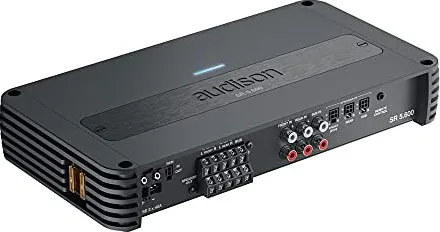
The Audison SR5.600 is a multi-channel car audio amplifier designed for drivers who want to build a complete, neatly integrated sound system. Its five-channel layout supports practical system arrangements such as front and rear speakers plus a subwoofer, tweeter and woofer combinations with a subwoofer, or a simplified front-stage-and-subwoofer setup. This flexibility makes it a useful option for upgrading a factory system or planning a more tailored installation.

The amplifier supports both pre-amplified and speaker-level signal connections. RCA Pre In inputs can be used with compatible aftermarket sources, while Speaker In connections help integrate the amplifier with systems that retain a factory head unit. The Speaker In feature can also support automatic turn-on when a separate remote turn-on signal is unavailable, helping reduce wiring complexity in compatible installations.

Designed for organized installation

A successful installation depends on careful placement, correct cable selection, and reliable connections. The SR5.600 should be mounted in a dry, ventilated location inside the vehicle, away from engine-bay heat, water, dust, moving parts, and sensitive electronic modules. Allowing airflow around the heat sink is important because restricted ventilation can cause the protection system to activate.

Power wiring requires particular attention. The vehicle should have a 12 V DC negative-ground electrical system, and the battery and alternator should be able to support the additional load. Use appropriately sized power and speaker cables, protect the positive power cable with an insulated fuse holder near the battery, and connect the ground terminal to a clean, solid chassis point. Signal cables should be routed separately from power wiring where possible to minimize unwanted noise.

Connection and control highlights

The Audison SR5.600 provides multiple input and output options for adaptable system design. Pre In, Speaker In, and Pre Out connectivity can help installers match the amplifier to different source units and system expansion plans. A compatible subwoofer remote volume control can be added for convenient bass-level adjustment from the driving position.

Status lighting assists with basic troubleshooting. A blue LED indicates normal operation, while a red LED can indicate overload, thermal protection, a speaker-wire short to the vehicle chassis, or another operating fault. If protection occurs, inspect ventilation, speaker wiring, connections, and fuse ratings before returning the system to use.

Notes

  • Do not connect left and right negative speaker outputs together.
  • Replace fuses only with the same specified rating.
  • Set gains carefully: begin with source volume around three-quarters, then adjust until distortion is first heard and reduce slightly.
  • Keep listening levels safe, especially while driving.

The Audison SR5.600 is best suited to installers who value flexible channel allocation, factory-system integration options, and disciplined wiring practices for a dependable car audio upgrade.

M: gpt-5.6-terra

© Copyright 2026 Manual.ly