
Audison bit Nove Manual
PDF manual · 45 Pages
English



Quick check
Incorrect answer, please try again.
Chat with your Audison bit Nove manual using AI
Get instant AI answers from your Audison bit Nove manual
Ask anything about the Audison bit Nove. Answers come from this manual, with the pages they are based on.
Ask a Question
Do you recommend bit Nove?
Yes NoVideo Manual
Audison B-CON - Mobile Hi-Res Bluetooth receiver
Frequently Asked Questions
Bit Nove accepts six hi-level speaker or pre inputs (configurable), one AUX stereo low-level input, and two optical S/PDIF inputs supporting PCM up to 192 kHz/24-bit. Inputs can be reassigned via the PC software to match system configurations.
Is this answer helpful?
Yes. The Bit Nove offers a de-equalization routine during configuration that analyzes the OEM head unit response and applies an inverse EQ to restore a linear signal, improving system integration and suitability for high-quality amplification.
Is this answer helpful?
There are nine low-level PRE OUT channels. Each channel supports filter type selection (Full/HP/LP/BP), Linkwitz-Riley or Butterworth models, slopes from 6 to 24 dB/oct, phase inversion, parametric equalization, and time-alignment (distance/delay).
Is this answer helpful?
A Windows PC (Vista, 7, 8, 10) is required; minimum recommended specs include a 2 GHz CPU, 1 GB RAM, 1024×600 display resolution, and USB connection. The bit Nove software and drivers install on Windows; the PC manages Target/Offline modes, calibration, and firmware updates.
Is this answer helpful?
During firmware updates keep the bit Nove powered, connected by USB, and prevent PC sleep, antivirus interference, or accidental disconnection. Interruptions during update can corrupt firmware and may require rescue-mode recovery or service intervention.
Is this answer helpful?
Time alignment can be set by speaker distance (0–510 cm) or delay (0–15 ms) with fine-set adjustments. The software converts distances to milliseconds based on sound speed; fine-set compensates phase and acoustic variances for precise alignment.
Is this answer helpful?
No. The optical inputs accept stereo PCM only (up to 192 kHz/24-bit). Multichannel AC3/DTS sources must be configured to output stereo to be processed by the Bit Nove.
Is this answer helpful?
Advantages and Disadvantages
Advantages

- Powerful 32-bit DSP with 24-bit A/D-D/A and nine configurable pre-outs for complex multi-amplified systems.
- Extensive filter and EQ control: Linkwitz-Riley/Butterworth, slopes 6–24 dB/oct, 9 parametric EQs and 68-step crossover.
- De-equalization feature enables integration with OEM head units to restore a linear signal.
- Flexible inputs: six hi-level/speaker or pre inputs, AUX, and two optical S/PDIF up to 192 kHz/24 bit.
- PC software with guided Configuration Wizard, Target/Offline modes, memories, and firmware update support.
Disadvantages

- Firmware update process is sensitive; interruptions can require service and rescue-mode recovery.
- Complex setup requires PC, software familiarity, and careful input calibration to avoid noise or speaker damage.
- Expert filter modes can permit unsafe crossover choices if user ignores speaker mechanical limits.
- Some features depend on optional DRC remote and additional mounting/accessories.
- Requires Windows PC with minimum specs; macOS/Linux unsupported for configuration.
Product Specification
Type
Sound Processor
Product Description
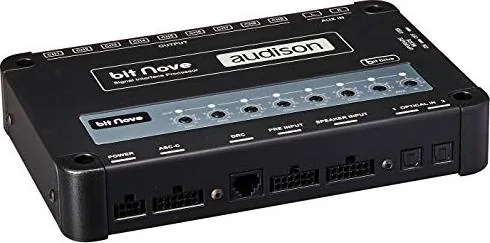
Audison Bit Nove — Advanced Car Audio Signal Processor
The Audison Bit Nove is a high-performance digital signal processor (DSP) engineered to maximize the acoustic fidelity of car audio systems. Built around a 32-bit DSP with 24-bit A/D and D/A converters, it accepts a wide range of analog and digital inputs and provides nine configurable pre-out channels to feed amplifiers or active speaker stages. With de-equalization for OEM head units, multi-format inputs including two optical S/PDIF ports (PCM up to 192 kHz/24 bit), six high-level speaker or pre inputs, and a dedicated AUX input, it integrates seamlessly with factory and aftermarket systems.
Key Features and Workflow
The Bit Nove supports flexible input mapping and rich channel processing: each of the nine outputs includes a parametric equalizer, a 68-step crossover (20 Hz–20 kHz) with selectable Linkwitz-Riley or Butterworth responses and slopes from 6 to 24 dB/oct, phase inversion, and time-alignment (distance/delay). Users configure the unit via PC software over USB and optionally control presets and functions with the DRC remote. The software offers Offline and Target modes, a guided Configuration Wizard, de-equalization routine for factory headunits, input-level calibration, filter/equalizer editing, time alignment, memories, and firmware updates.
Installation and setup procedures cover power and remote turn-on wiring, speaker- and pre-input assignment, optical wiring cautions, and recommendations for calibrating input sensitivity with test tracks. The device can auto-turn-on via amplified inputs (ART) or by remote trigger; remote outputs provide 12 V control for downstream amplifiers. Firmware updates and rescue-mode recovery are supported through the PC application; precautions are emphasized to avoid interruptions during updates.
Practical Use and Tuning
Installers and enthusiasts will appreciate the guided setup for reconstructing multichannel signals from OEM sources, de-equalization to neutralize factory EQ, and flexible output assignments for multi-amplified or passive systems. The software lets you fine-tune crossover slopes, filter types, parametric EQ curves (10 graphic control points adapted into parametric poles), and precise time alignment using distance or fine-delay adjustments. Memory slots (A–D) allow quick recall of tuned setups for different listeners or driving conditions.
Notes
- Optical inputs accept PCM up to 192 kHz/24 bit; multichannel AC3/DTS streams must be set to stereo for compatibility.
- Use recommended PC specs (Windows Vista/7/8/10, min 2 GHz CPU, 1 GB RAM, 1024×600) and follow firmware update precautions (no interruptions, disable sleep/AV, keep power stable).
- During input calibration and de-eq procedures, exercise caution to avoid speaker damage and ensure high head-unit output for good S/N performance.
Search for 67,706 Manuals online


Type-in Brand or Model