
Audibax Party 12 Manual
PDF manual · 8 Pages
English


Quick check
Incorrect answer, please try again.
Chat with your Audibax Party 12 manual using AI
Get instant AI answers from your Audibax Party 12 manual
Ask anything about the Audibax Party 12. Answers come from this manual, with the pages they are based on.
Party 12 Maintenance Schedule
Qualified personnel should regularly clean and service the equipment depending on ambient conditions like dust, nicotine, and fog to prevent damage and overheating.
Replace the fuse with one of the same type and rating if it blows. If a fuse repeatedly blows, contact an authorized service center.
Ask a Question
Do you recommend Party 12?
Yes NoDo you recommend Party 12?
Yes NoFrequently Asked Questions
Use the provided XLR or 1/4-inch jack cable. Plug it into the Mic In port. Adjust the Mic Vol knob on the panel to set the volume level. Ensure the power is on before plugging in.
Is this answer helpful?
The instructions state the equipment is designed for indoor use only. Do not expose it to water or fluids. Ensure it is not placed near rain or moisture to prevent electrical shock or damage.
Is this answer helpful?
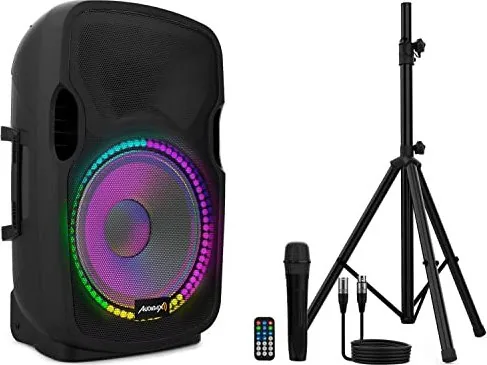
The package contains one active speaker, one microphone, one microphone cable, one speaker stand, and the user guidance material. Ensure all parts are present before discarding the packaging.
Is this answer helpful?
The limit indicator signals that the power output is too high. You should turn down the volume immediately to prevent distortion or damage to the speaker components during operation.
Is this answer helpful?
Press the LED switch button on the control panel to toggle the lighting on or off. You can control the brightness to match the mood of your event effectively.
Is this answer helpful?
The Party 12 measures 57 cm in height, 36 cm in width, and 31 cm in depth. The weight is approximately 10.50kg. Ensure your stand can support this load safely.
Is this answer helpful?
Unplug the device from the main power supply. Wait for room temperature to stabilize if exposed to heat. Check voltage compatibility. Plug in using the correct fuse specification.
Is this answer helpful?
Advantages and Disadvantages
Advantages

- Bluetooth connectivity allows wireless music streaming from phones
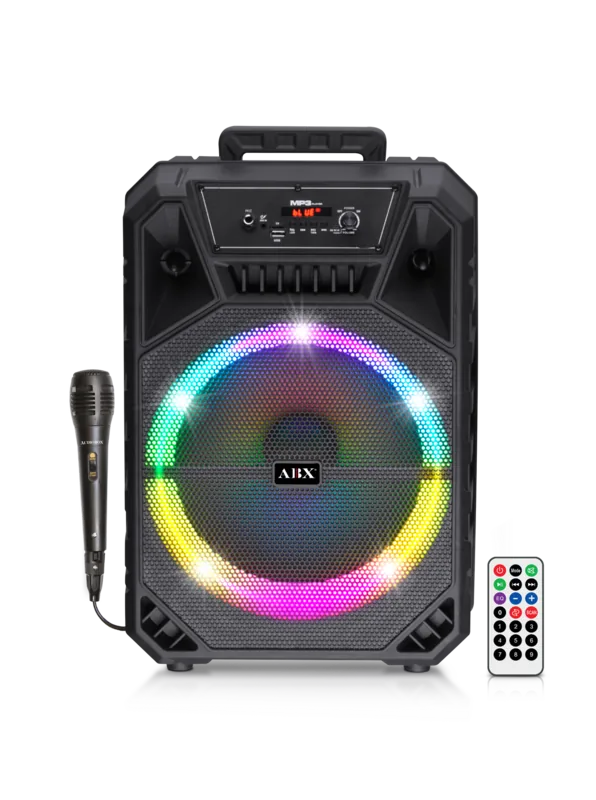
- Integrated RGB LED effects enhance party atmosphere visually
- Comes with microphone and stand in the package
- Multiple input options including USB, SD, and FM radio
- Robust build quality designed for professional long lasting use
Disadvantages

- Heavy weight makes it difficult to move for some users
- Indoor use only per safety instructions regarding water exposure
- Complex control panel may require study to operate correctly
- Requires specific voltage to prevent damage during setup
- Fuses must be replaced carefully by qualified personnel
Product Specification
Power
200W RMS
Frequency Range
50Hz-20kHz
Speakers
2 (1x 1" Tweeter, 1x 12" Woofer)
Tuner
FM
Audio Connections
Stereo Line In (RCA), Mic In (1/4" Jack), Mic In (XLR), Line In (XLR), Line Out (1/4" Jack)
Additional Ports
USB-A, SD Card Reader
Wireless
Bluetooth
Power Supply
AC Power
Karaoke Features
No
Features
Remote Control, Wheels, Light Effects, with Microphone, Speaker Stand
Dimensions
14.17x22.44x12.20in (WxHxD)
Weight
23.15 lbs
Product Description
Discover the Power of Audibax Party 12 Audio Speaker System
When searching for high quality active speakers for events, the Audibax Party 12 offers a robust solution. This unit is designed to deliver powerful audio output suitable for dynamic party environments. It integrates advanced technology to ensure clear sound reproduction across a wide range of musical genres. Users often consult the Audibax Party 12 Manual to understand the full potential of the complex control panel features available on the device.
Technical Specifications and Design
The unit features a large 12-inch woofer paired with a 1-inch titanium tweeter. This configuration supports a frequency response suitable for most vocal and music applications found in live settings. The amplifier delivers significant power to ensure the sound carries well over crowds without distortion. Impedance settings are designed for compatibility with standard audio systems found in professional venues. Power requirements must match local electrical standards to prevent damage during operation.
Connectivity Options for Modern Events
Versatility is a hallmark of this design allowing for various input sources. It includes Bluetooth capability for wireless streaming from modern mobile devices seamlessly. Additionally, USB and SD slots allow direct playback of digital files without requiring a computer to function. An FM tuner provides access to local radio broadcasts for reliable background music. Inputs accept microphones via XLR or quarter-inch jacks for live vocals. Line inputs also support RCA connectors for connecting external CD players or mixers.
Visual and Control Features Overview
Visual ambiance is significantly enhanced by RGB LED effects located on the front panel of the equipment. These lights can be toggled or adjusted to change the atmosphere of the entire party effectively. The control panel includes distinct potentiometers for managing microphone volume and line input levels. A two-band equalizer allows adjustment of bass and treble frequencies to match the room acoustics. This ensures the tone matches the acoustic environment perfectly for listening.
Safety and Maintenance Procedures
Proper handling is essential for longevity and personal safety during use. Warning labels regarding high volume exposure are visible on the unit casing. Prolonged exposure above 90 dB can cause permanent hearing damage to users. Operators should ensure ventilation slits remain unobstructed during extended use periods. Heat sources like radiators should be avoided during installation near the equipment. Cables must be secured to prevent tripping hazards in crowded areas. Maintenance should only be performed by qualified personnel to avoid voiding protections.
Regulatory Compliance and Packaging
The device adheres to strict European standards for electrical safety and environmental protection. It complies with the Waste Electrical and Electronic Equipment directive regarding disposal. Packaging materials are recyclable and should be separated according to local laws. This ensures that the environmental impact is minimized at the end of the product lifecycle effectively.
Installation Advice for Users
Placement affects performance significantly within any room. Ensure the speaker does not fall from unstable mounts. Stable stands are recommended for ceiling or wall mounts to prevent accidents. Do not plug into outlets that do not match the voltage specification listed. Use only the recommended power cord to prevent overheating the internal components. Regular cleaning with a dry cloth keeps the unit looking professional and functioning correctly.
Search for 67,732 Manuals online


Type-in Brand or Model