

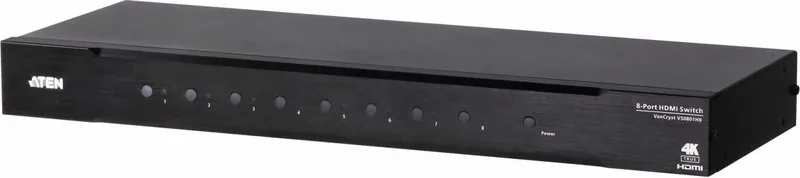

ATEN VS0801HB Manual
PDF manual · 31 Pages
English



Quick check
Incorrect answer, please try again.
Chat with your ATEN VS0801HB manual using AI
Get instant AI answers from your ATEN VS0801HB manual
Ask anything about the ATEN VS0801HB. Answers come from this manual, with the pages they are based on.
Ask a Question
Do you recommend VS0801HB?
Yes NoFrequently Asked Questions
The VS0801HB supports true 4K resolutions up to 4096 x 2160 or 3840 x 2160 at 60Hz with 4:4:4 chroma sampling, HDMI 2.0 features, 3D, and Deep Color up to 12-bit. It handles data rates up to 18 Gbps.
Is this answer helpful?
You can connect up to eight HDMI Type-A source devices to the VS0801HB, which routes one selected source to a single HDMI output/display. Use high-quality HDMI cables and keep cable lengths at or below 3 meters for reliable signal transmission.
Is this answer helpful?
The unit supports front-panel port selection pushbuttons, the included IR remote (and IR extension), and RS-232 serial control. RS-232 commands allow switching, mode changes, and reading device settings for system integration.
Is this answer helpful?
Available modes are: Off (no auto switching), Next (default—automatically switches to newly connected sources), Priority (locks to a user-defined port when active), and POD (Power-on Detection—auto-switches to next powered source if current one turns off). Choose based on whether you want automatic or manual source selection.
Is this answer helpful?
Yes, it is rack-mountable and includes a rack mount kit. Operating temperature is 0–40°C with non-condensing humidity; ensure proper ventilation and grounding when installing in AV racks.
Is this answer helpful?
To restart safely: power off connected devices, unplug the VS0801HB power adapter, wait 10 seconds, replug, then power on attached devices. On restart the unit selects the first detected powered-on source. Verify HDMI cable lengths and connections if issues persist.
Is this answer helpful?
ATEN provides online technical support, documentation, and software updates via their support site (http://support.aten.com) and regional support contacts. For North America, email [email protected] or call 1-888-999-ATEN ext 4988.
Is this answer helpful?
Advantages and Disadvantages
Advantages

- True 4K (4096x2160@60Hz 4:4:4) support with HDMI 2.0 and 18 Gbps bandwidth
- Multiple control options: front-panel, IR remote, IR extension, and RS-232 integration
- Flexible switch modes (next, priority, POD, off) plus instant switching for smooth transitions
- Rack-mountable metal housing suitable for professional AV racks and installations
- Clear LED indicators, plug-and-play setup, and included rack kit and IR receiver
Disadvantages

- Maximum HDMI cable length limited to 3 m for guaranteed performance
- Class A FCC device may require mitigation if used in residential environments
- No built-in advanced EDID management detailed—may need external configuration for complex displays
- Power consumption requires correct voltage selection; improper setting risks damage
- Warranty excludes cables and some accessories; regional variations in warranty length
Product Specification
Video Inputs
8x HDMI 2.0 In
Video Outputs
1x HDMI Out
Other Connections
1x RS-232
Resolutions up to
4096x2160@60Hz
Dimensions
17.20x1.73x6.22in (WxHxD)
Weight
4.72lbs
Product Description
ATEN VS0801HB 8-port HDMI Switch — Powerful True 4K Routing
The ATEN VS0801HB 8-port HDMI switch is a robust solution for routing up to eight HDMI sources to a single display with true 4K support. Designed for environments such as home theaters, meeting rooms, trade shows, and retail displays, the VS0801HB supports video resolutions up to 4096 x 2160 @ 60Hz (4:4:4), HDMI 2.0 features including 3D and Deep Color up to 12-bit, HDCP 2.2 compliance, and an 18 Gbps data rate for uncompromised image fidelity.
Key Capabilities and Design
This switch offers instant switching between inputs, multiple switch modes (next, priority, POD, and off), and clear LED indicators for fast status checks. It includes an IR remote and IR extension support, front-panel pushbuttons, and a bi-directional RS-232 serial port for integration with control systems. Its rack-mountable metal housing, plug-and-play operation, and recommended cable management for up to 3 m HDMI leads make it practical for professional AV installations.
Installation and Operation Highlights
Setting up the VS0801HB is straightforward: connect up to eight HDMI sources and one HDMI display, attach the provided power adapter, and optionally connect the IR receiver or an RS-232 controller. The device supports multiple control methods—panel buttons, IR remote, or RS-232 commands—allowing source switching, mode selection, standby control, and system reads. For automated behavior, use the Next mode to cycle to newly detected sources, Priority mode to lock to a chosen input, or POD (Power-on Detection) to auto-switch to active sources when others power off.
Reliability and Safety
ATEN supplies a rack mount kit and guidance for proper rack-loading, grounding, and ventilation. The VS0801HB meets regulatory and environmental standards (FCC Class A, CE warnings, RoHS compliant) and includes safety, restart, and troubleshooting instructions. Technical support and firmware/documentation updates are available through ATEN’s support channels.
Notes
- Use high-quality HDMI cables no longer than 3 m for guaranteed performance.
- Standby mode disables front controls and IR; the power LED indicates standby.
- On restart, the unit selects the first detected powered-on source.
Short Technical Snapshot
- 8 HDMI inputs, 1 HDMI output
- HDMI 2.0, HDCP 2.2, up to 18 Gbps
- True 4K @60Hz (4:4:4), 3D, Deep Color up to 12-bit
- RS-232, IR, front-panel, and remote control
- Rack-mountable, metal housing
Search for 67,706 Manuals online


Type-in Brand or Model