


ATEN VanCryst CE820L Manual
PDF manual · 34 Pages
English



Quick check
Incorrect answer, please try again.
Chat with your ATEN VanCryst CE820L manual using AI
Get instant AI answers from your ATEN VanCryst CE820L manual
Ask anything about the ATEN VanCryst CE820L. Answers come from this manual, with the pages they are based on.
Ask a Question
Do you recommend VanCryst CE820L?
Yes NoFrequently Asked Questions
Paired with the matching remote unit, the CE820L is built to extend HDMI video (CE820), audio, USB 2.0 for keyboard and mouse peripherals, Ethernet, and RS-232 serial (optional). This helps create a single-cable KVM installation.
Is this answer helpful?
The extender supports up to 100 m for standard operation using Cat 5e/6/6a or ATEN 2L-2910 cabling. It also includes a Long Reach Mode switch for extending HDMI up to 150 m at 1080p.
Is this answer helpful?
Yes. The CE820L/C E920 family is specified for HDMI video performance up to 4K capability, including 4096 x 2160 support depending on timing and mode. For long distances, the Long Reach Mode is specified for 1080p up to 150 m.
Is this answer helpful?
Long Reach Mode is a rear switch on the units. Put the switch to ON on either the local or remote side to enable long-reach connectivity up to 150 m at 1080p. Use standard mode when you need the shortest, highest-bandwidth path.
Is this answer helpful?
Yes. The remote unit provides a Wake-up PC pushbutton, and the setup uses an RS-232 connection from the local side to enable the wake function. This is useful in security or control-room scenarios.
Is this answer helpful?
The setup supports LAN/WAN access by connecting Ethernet ports on both local and remote units to the appropriate network devices. This enables network connectivity alongside KVM and media over the same overall link.
Is this answer helpful?
Advantages and Disadvantages
Advantages

- Extends HDMI video (CE820) plus KVM functionality using a single Cat 5e/6/6a or ATEN 2L-2910 link
- Supports USB 2.0 full speed for peripherals, touch control, and file transfer workflows
- HDBaseT 2.0 with enhanced bit error detection and correction helps resist interference
- Long Reach Mode extends video up to 150 m at 1080p for flexible deployments
- EDID buffer supports smoother display power-up and reliable signal negotiation
Disadvantages

- Long Reach Mode is specified for 1080p, not for maintaining 4K over 150 m
- Firmware upgrade capability is reserved for ATEN technical support and typically requires a dealer
- Installation requires correct grounding and carefully matched cabling to achieve target performance
Product Specification
Type
KVM Extender (328.08 ft)
Ports
1
Monitor
HDMI (max. 4096x2160@60Hz)
Keyboard/Mouse
USB
Audio
Speaker, Microphone
LAN
1x HDBaseT
Special Features
Transmitter only
Product Description
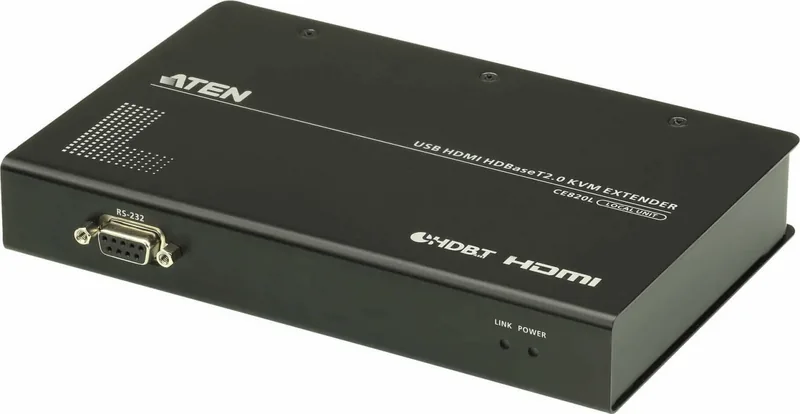
ATEN VanCryst CE820L HDMI HDBaseT 2.0 KVM Extender Local Transmitter
The ATEN VanCryst CE820L HDMI HDBaseT 2.0 KVM Extender Local Transmitter is designed to move a complete workstation experience over distance using HDBaseT 2.0 technology. Pair it with its remote unit to extend HDMI video (CE820), USB connectivity, audio, Ethernet, and RS-232 signals through a single Cat 5e/6/6a (or ATEN 2L-2910) cable. This makes it ideal when you want the computer hardware in a safer or more controlled area, while keeping the monitor, keyboard, mouse, and peripherals closer to users.
With support for high resolution up to 4096 x 2160 (4K) and reliable long-distance video delivery, the CE820L helps preserve detail for boardrooms, retail environments, industrial kiosks, and medical or transportation sites. HDBaseT 2.0 includes enhanced bit error detection and correction to resist signal interference, supporting a stable KVM link even in demanding installation locations.
Distance flexibility is a major benefit. In standard mode, video extension is supported up to 100 meters (1080p at that range with typical cabling). For longer reach, the unit provides a Long Reach Mode switch that enables video transmission up to 150 meters at 1080p. A quick mode switch makes it easier to adapt the installation to different site requirements.
The CE820L also focuses on day-to-day usability. USB 2.0 full speed ports allow peripheral sharing, touch panel control, and file transfers. For management and security, the extender supports remote access to a computer via a remote console (USB keyboard, monitor, and mouse). Optional RS-232 serial support and Ethernet connectivity help integrate control systems and network access.
Key results (what stands out most)
- Extend HDMI KVM, USB, audio, Ethernet, and RS-232 using a single Cat 5e/6/6a link with HDBaseT 2.0.
- Deliver crisp 4K up to 4096 x 2160, and maintain stable video through enhanced error detection.
- Reach up to 100 m, or up to 150 m for 1080p using Long Reach Mode.
- Simplify deployments by placing noisy or sensitive computers remotely while keeping user access local.
- Support peripheral sharing and management workflows through USB 2.0, optional serial, and Ethernet.
Pros and cons summary
Pros
- Multi-signal extension over one cable (video, USB, audio, Ethernet, RS-232)
- HDBaseT 2.0 stability with bit error detection and correction
- Long Reach Mode up to 150 m at 1080p
- USB support for peripheral sharing and touch/control use cases
- 4K-capable video performance with EDID buffer for smooth power-up
Cons
- Long Reach Mode targets 1080p rather than full 4K at extended distances
- Firmware upgrades require manufacturer or dealer support (reserved upgrade switch)
- Requires careful grounding and approved cabling for best reliability
Notes
- Use proper Cat 5e/6/6a or ATEN 2L-2910 cabling to meet the stated distances.
- Verify voltage and follow grounding and ventilation guidance during installation.
Search for 67,706 Manuals online


Type-in Brand or Model