
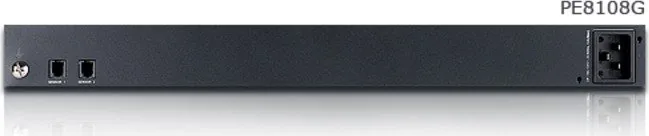
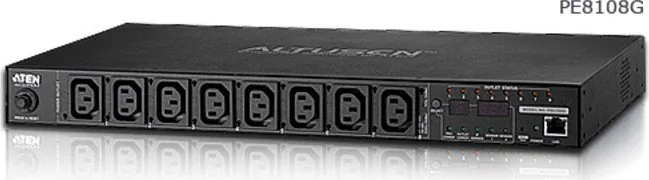
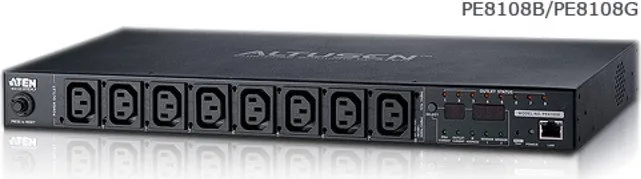
ATEN PE8108G-AX-G Manual
PDF manual · 90 Pages
English



Quick check
Incorrect answer, please try again.
Chat with your ATEN PE8108G-AX-G manual using AI
Get instant AI answers from your ATEN PE8108G-AX-G manual
Ask anything about the ATEN PE8108G-AX-G. Answers come from this manual, with the pages they are based on.
Ask a Question
Do you recommend PE8108G-AX-G?
Yes NoFrequently Asked Questions
It distributes power to rack equipment while providing remote control, monitoring, and protection features. It is designed for IT environments that need dependable outlet management in a compact 1U form factor.
Is this answer helpful?
The PE8108G-AX-G includes eight IEC C13 outlets, allowing multiple devices to be connected and managed from a single rack-mounted unit.
Is this answer helpful?
Yes. The unit supports browser-based access, SNMP, and ATEN eco Sensors software, making it easy to review power status and manage outlets from a remote location.
Is this answer helpful?
Yes, optional sensors can be connected for temperature, humidity, and related environmental readings. These add more context to power monitoring and improve rack visibility.
Is this answer helpful?
Yes. It includes security-related features such as password protection, encrypted browser access, user permissions, and support for authentication options like RADIUS.
Is this answer helpful?
It is ideal for small to medium rack environments, network closets, and data center setups where compact size, remote control, and reliable outlet distribution are important.
Is this answer helpful?
Advantages and Disadvantages
Advantages

- 1U rack-mount design saves valuable space in dense cabinet layouts.
- Eight IEC C13 outlets support organized distribution for multiple devices.
- Browser, SNMP, and eco Sensors support flexible remote management.
- Threshold alerts and breaker protection help improve operational safety.
Disadvantages

- 10A capacity may be too limited for higher-power rack deployments.
- Some advanced monitoring features depend on optional sensors.
- Safe shutdown functions require compatible software and supported systems.
Product Specification
Outputs
8x C13
Input
1x IEC C14 (10A)
Input Voltage
230V
Power
2300W (max.)
Additional Ports
1x RJ-45, 2x RJ-11
Cable Length
9.84ft
Dimensions (WxHxD)
17.01x1.77x8.66in
Weight
6.06lb
Special Features
rack-mountable, Display, Surge Protection
Product Description
ATEN PE8108G-AX-G PDU, 1U, 10A: Compact Power Control for Modern Racks
The ATEN PE8108G-AX-G PDU, 1U, 10A is built for administrators who want cleaner power distribution without sacrificing control. Designed for rack environments where space is limited and uptime matters, this intelligent PDU combines a slim 1U form factor with reliable 10A capacity and eight IEC C13 outlets. It is a practical fit for servers, network gear, storage devices, and other equipment that needs organized power delivery in a compact footprint.
What makes this unit stand out is its balance of simplicity and visibility. It supports local readouts for current and IP-related status, while also offering remote monitoring through a browser, SNMP tools, or ATEN’s eco Sensors software. That means teams can track power conditions, react to overloads, and manage connected devices from almost anywhere. For IT spaces that need both convenience and oversight, this kind of access can save time and reduce risk.
The PE8108G also emphasizes safe operation. It includes a circuit breaker, grounding terminal, and support for threshold alerts, helping users respond before minor issues become major interruptions. Features like power cycling, outlet naming, and outlet-by-outlet access control make it especially useful in shared environments where different devices may need different handling. The device is also compatible with secure browser access and strong authentication options, reinforcing its place in a professional rack.
Another advantage is its readiness for growth. The unit supports optional sensors for temperature, humidity, and pressure monitoring, adding context to power data and giving a fuller view of the rack environment. Combined with firmware upgrades, logging, and alerting, the PE8108G is more than a basic power strip—it is a management tool designed for smarter infrastructure.
For anyone researching the ATEN PE8108G-AX-G PDU, 1U, 10A Manual, the key takeaway is straightforward: this model is meant to simplify rack power while improving control, monitoring, and operational safety. It is compact, practical, and geared toward dependable day-to-day use in busy technical spaces.
Notes
- Best suited for rack setups that need remote power control.
- Optional sensors add deeper environmental insight.
- Safe shutdown support depends on the connected system and software setup.
Search for 67,706 Manuals online


Type-in Brand or Model