

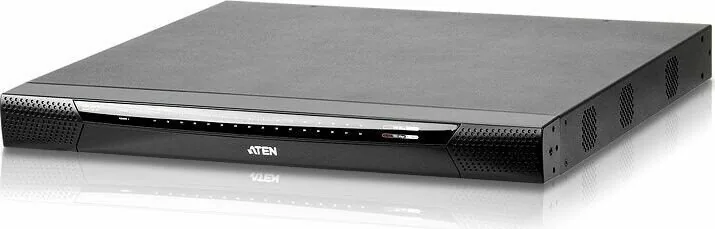
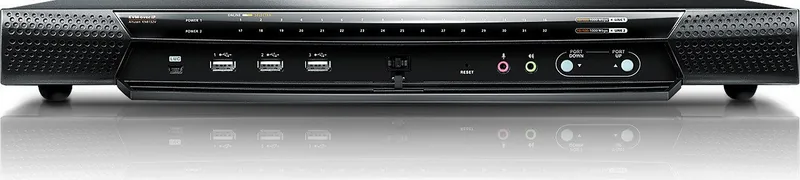
ATEN KN8132V Manual
PDF manual · 315 Pages
English



Quick check
Incorrect answer, please try again.
Chat with your ATEN KN8132V manual using AI
Get instant AI answers from your ATEN KN8132V manual
Ask anything about the ATEN KN8132V. Answers come from this manual, with the pages they are based on.
KN8132V Maintenance Schedule
Check the ATEN website regularly for the latest firmware versions and packages to download for the main switch and adapter cables.
Perform an adapter upgrade anytime you add a new Adapter to the installation to ensure it works with the latest firmware version.
Free maintenance reminders
Timed to your purchase date. Always free, unsubscribe anytime.
Ask a Question
Do you recommend KN8132V?
Yes NoFrequently Asked Questions
The ATEN KN8132V is an IP-based KVM control unit that lets you monitor and access multiple servers from a single local console or remotely over TCP/IP. It supports browser access plus stand-alone Windows and Java client options for remote administration.
Is this answer helpful?
Remote users can connect by using the switch IP address from a web browser, or by using stand-alone Windows or Java GUI applications. The switch requires valid usernames and passwords, and administrators may also set a login string for added security.
Is this answer helpful?
Yes. Virtual Media allows remote mounting of USB and optical storage like DVD/CD drives and ISO images, enabling file transfers, OS patching, software installation, and diagnostic testing from the remote session. Auto Mounting with drag-and-drop storage mapping is supported.
Is this answer helpful?
Security includes TLS 1.2 encryption with RSA 2048-bit certificates for browser logins, plus flexible encryption options for keyboard and mouse, video, and virtual media traffic. The unit also supports IP/MAC filtering and permission controls for users and groups, with FIPS 140-2 level 1 aligned protection.
Is this answer helpful?
Yes. The KN8132V includes dual power supplies for automatic failover and dual NICs for redundant LAN connectivity. If one LAN path or power source fails, the switch is designed to continue operating using the secondary resources.
Is this answer helpful?
The Adapter ID function stores port-related adapter information (such as adapter identity and related configuration). When you relocate the server along with its adapter cable, the switch recognizes the adapter at the new port and restores the stored settings, reducing or avoiding reconfiguration work.
Is this answer helpful?
Advantages and Disadvantages
Advantages

- IP-based KVM lets local and remote operators control multiple servers from one console.
- High video performance up to 1920 x 1200 at 60 Hz supports practical day-to-day administration.
- Virtual Media supports remote USB and optical mounting for transfers, patching, and diagnostics.
- Advanced security with TLS 1.2, RSA 2048-bit certificates, and FIPS 140-2 level 1 aligned standards.
- Dual NICs and dual power supplies provide redundancy for improved uptime.
Disadvantages

- Browser-based access depends on modern, TLS 1.2-capable browser support.
- Remote client options can require additional runtime components and minimum memory availability.
- Virtual Media operations and overall performance can be affected by network bandwidth and client settings.
- Hot plugging depends on server operating system support to behave as expected.
- Deployment requires Cat 5e or higher cabling and specific KVM adapter cables per server.
Product Specification
Type
IP-Switch
Ports
32
Monitor
DVI, VGA
Keyboard/Mouse
PS/2 & USB
Audio
2x Jack
LAN
1000Base-T
Resolution
1920x1200
Product Description
ATEN KN8132V: Remote KVM Control for Distributed Servers
Centralize access, keep teams productive
The ATEN KN8132V is an IP-based KVM control unit designed to let local and remote operators monitor and access multiple servers from a single console. In this KN series, the KN8132V focuses on 32-server management while supporting simultaneous independent sessions through its dedicated bus structure.
With TCP/IP connectivity, you can reach the switch via an IP address from anywhere on a LAN, WAN, or the internet. Access is available through a standard web browser plus stand-alone Windows and Java GUI applications, helping IT teams support different user environments without forcing a single client platform.
Crisp video and smooth remote workflows
Remote performance is built around high video quality, including resolutions up to 1920 x 1200 at 60 Hz with 24-bit color depth (depending on local vs. remote session usage). For day-to-day operations, features like hotkey switching, Auto Scan, and Panel Array Mode streamline navigation across connected systems.
When you need more than just control, Virtual Media expands what remote users can do. You can mount USB and optical media (such as DVD/CD, ISO images, and other storage devices) to enable file transfers, OS patching, software installation, and remote diagnostics. Virtual Remote Desktop options also allow multiple sessions and optimized viewing behavior for different bandwidth conditions.
Security and resilience for enterprise deployments
Operational safety matters, and the KN8132V is designed with layered protection. It supports TLS 1.2 encryption with RSA 2048-bit certificates and flexible encryption options for keyboard and mouse, video, and virtual media streams. It also aligns with FIPS 140-2 level 1 security standards.
For reliability, dual LAN ports support redundant connectivity, and dual power supplies enable automatic failover if one power source is lost. Temperature sensors help manage internal fan operation based on server room conditions, improving energy efficiency and helping extend component life. Adapter ID technology keeps port-specific information together with the adapter, reducing reconfiguration effort when moving servers or adapter cables.
Key results (quick takeaways)
- Remote access from browser, Windows app, or Java app, using TCP/IP connectivity from LAN to internet.
- Manage up to 32 servers with high video resolution up to 1920 x 1200.
- Virtual Media enables remote mounting for file transfer, patching, and diagnostics.
- Security includes TLS 1.2 and FIPS 140-2 level 1 aligned protection.
- Dual LAN and dual power improve uptime during network or power disruptions.
Notes
- Expect a setup that includes KVM adapter cables for each server connection.
- System requirements include TLS 1.2-capable browsers and appropriate client runtime support for viewer options.
- Hot plugging is supported, but server OS support may affect behavior.
Search for 67,706 Manuals online


Type-in Brand or Model