
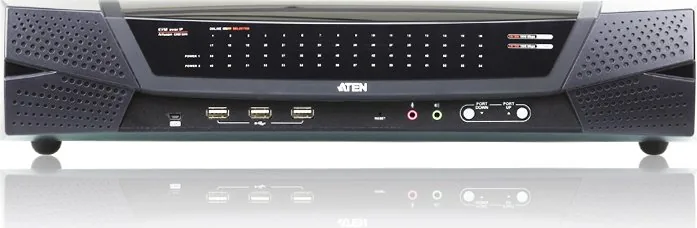
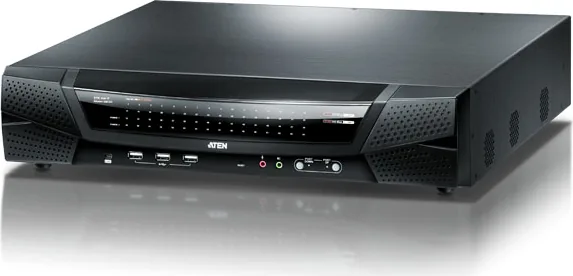
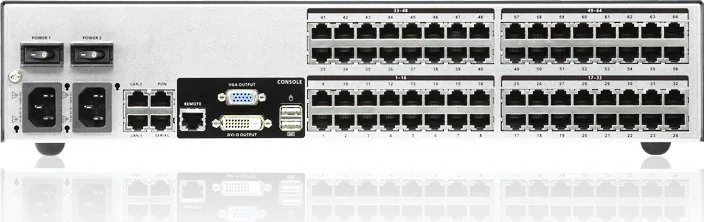
ATEN KN4164V Manual
PDF manual · 315 Pages
English



Quick check
Incorrect answer, please try again.
Chat with your ATEN KN4164V manual using AI
Get instant AI answers from your ATEN KN4164V manual
Ask anything about the ATEN KN4164V. Answers come from this manual, with the pages they are based on.
KN4164V Maintenance Schedule
Check the website regularly to find the latest firmware packages and upgrade the main firmware or adapter firmware as needed.
Perform the adapter upgrade procedure anytime you add an Adapter to the installation to ensure it works with the latest firmware version.
Free maintenance reminders
Timed to your purchase date. Always free, unsubscribe anytime.
Ask a Question
Do you recommend KN4164V?
Yes NoFrequently Asked Questions
You can connect by its IP address using a web browser, or via stand-alone Windows or Java client applications. Authentication requires a valid username and password, and the web login may prompt you to accept security certificates.
Is this answer helpful?
The KN4164V model provides 1 local session and up to 4 remote sessions through separate buses. This allows multiple operators to access different server channels concurrently.
Is this answer helpful?
Yes. It supports virtual media to map USB drives, DVD/CD media, hard drives, and ISO images to connected servers. This supports tasks like file transfers, application installation, OS patching, and remote diagnostics during a KVM session.
Is this answer helpful?
It supports remote authentication with RADIUS, LDAP, LDAPS, and Microsoft Active Directory. For data protection, it supports TLS 1.2 with RSA 2048-bit certificates and provides selectable encryption approaches for keyboard/mouse, video, and virtual media traffic, plus IP/MAC filtering and permission controls.
Is this answer helpful?
Use Cat 5e or higher for connections between the switch and KVM adapter cables. The unit uses RJ-45 ports for the KVM adapter links, and it provides LAN ports (primary and secondary) to support redundant network operation.
Is this answer helpful?
Yes. Using cascading with compatible ATEN KVM switches, a complete two-stage installation can scale up to 512 servers, depending on which KN series model is used as the first stage and which second-stage switches are selected.
Is this answer helpful?
The hardware reset procedure supports recovery by returning the unit to its factory default firmware level. The reset switch behavior includes system reset and a longer hold during power-on to recover from an inoperable upgrade. Follow the procedure carefully.
Is this answer helpful?
Advantages and Disadvantages
Advantages

- Supports up to 64 servers with centralized local and remote KVM access
- Browser-based and client-based viewing options for flexible remote operation
- Virtual media enables remote file transfers, OS patching, and diagnostics
- Redundant 10/100/1000 Mbps NICs and dual power supplies improve uptime
- Advanced security options: TLS 1.2, RSA 2048, directory services, and encryption controls
Disadvantages

- Client and browser requirements exist, including TLS 1.2 support and sufficient system memory
- Virtual media and advanced features depend on compatible adapter cables and server support
- Hot plugging may not work if the server operating system does not support it
- Initial setup requires careful network configuration, grounding, and correct power/voltage handling
- Firmware and maintenance workflows may require remote access tools rather than local console only
Product Specification
Type
IP Switch
Ports
64
Monitor
VGA, DVI-D
Keyboard/Mouse
USB
Audio
2x Jack
LAN
2x 1000Base-T
Resolution
1920x1200@60Hz
Product Description
ATEN KN4164V Manual: Reliable KVM over IP Control for 64 Servers
The ATEN KN4164V is an IP-based KVM control unit designed for teams that need dependable, remote access to many computers from a single console. In a 2U form factor, it supports up to 64 connected servers and enables both local operation and concurrent remote sessions, helping administrators manage distributed environments without constantly traveling to the equipment.
With TCP/IP connectivity, the KN4164V can be reached by IP address across a LAN, WAN, or even the internet. Remote users can work through a standard web browser or through dedicated Windows or Java client applications, while the local console provides direct keyboard, mouse, and monitor control. To improve day-to-day usability, the interface supports multi-language navigation and tools such as Auto Scan for port-to-port monitoring and Panel Array Mode to view multiple server outputs at the same time.
A standout strength is virtual media support. The KN4164V can map USB drives, DVD/CD media, hard drives, and ISO images to remote servers for actions like file transfers, application installation, OS patching, and remote diagnostics. This reduces reliance on on-site updates and streamlines maintenance workflows.
Security and availability are built into the design. The unit includes redundant 10/100/1000 Mbps NICs and dual power supplies, so one component can fail without taking the whole system down. For security, it supports advanced authentication options such as RADIUS, LDAP, LDAPS, and Microsoft Active Directory, alongside TLS 1.2 encryption and RSA 2048-bit certificates. Encryption choices can be selected to protect keyboard/mouse, video, and virtual media traffic, and the platform also supports IP/MAC filtering and granular user or group permissions.
Key results:
- Centralized remote KVM access to up to 64 servers from a browser or client apps
- Virtual media mapping for remote storage, installations, patches, and diagnostics
- Redundant NIC and dual power support for improved uptime
- Strong security features including TLS 1.2, RSA 2048, directory authentication, and encryption controls
Notes
- Plan cabling carefully: Cat 5e (or higher) is required for KVM adapter connections.
- Change default credentials for the super administrator after setup.
- For EMC compliance, use shielded twisted pair (STP) cabling where required.
- If you use power management accessories, connect and configure PDU associations through the switch interface for remote outlet control.
Search for 67,706 Manuals online


Type-in Brand or Model