
ATEN KN4116VA Manual
PDF manual · 315 Pages
English



Quick check
Incorrect answer, please try again.
Chat with your ATEN KN4116VA manual using AI
Get instant AI answers from your ATEN KN4116VA manual
Ask anything about the ATEN KN4116VA. Answers come from this manual, with the pages they are based on.
KN4116VA Maintenance Schedule
Check the website regularly for new firmware versions and compare adapter firmware versions stored in main firmware with those on adapters.
Perform the upgrade procedure anytime you add an Adapter to the installation to make sure it is working with the latest firmware version.
Free maintenance reminders
Timed to your purchase date. Always free, unsubscribe anytime.
Ask a Question
Do you recommend KN4116VA?
Yes NoFrequently Asked Questions
The KN4116VA provides 16 KVM ports and is designed for both local and remote operation. Its bus architecture supports up to 1 local session plus up to 4 remote sessions concurrently, each working independently.
Is this answer helpful?
You can access the KN4116VA using its IP address via a standard web browser, or through standalone Windows and Java client applications. This lets teams choose browser-based convenience or dedicated client performance depending on their workflow.
Is this answer helpful?
Yes. The unit includes advanced virtual media features to map USB or optical media to connected servers. This supports remote file transfers, application installation, and OS patching, and helps reduce the need to physically access servers.
Is this answer helpful?
The KN4116VA supports authentication via RADIUS, LDAP/LDAPS, and Active Directory. It supports TLS 1.2 with RSA 2048-bit certificates for secure browser logins, and allows configurable encryption for keyboard/mouse, video, and virtual media traffic.
Is this answer helpful?
The KN4116VA includes dual power supplies for automatic failover and supports dual NIC operation for redundant network connectivity. If one LAN path fails, the other can maintain access, helping keep remote administration available.
Is this answer helpful?
Yes, the system supports hot plugging, where components can be removed and reconnected without shutting down the switch. However, the connected server operating system must support hot plugging behavior for it to work reliably.
Is this answer helpful?
The Adapter ID function stores adapter and port-related information such as adapter identity and operation settings. When you move the adapter cable to another port, the KN4116VA can recognize it and restore the associated configuration, reducing manual reconfiguration effort.
Is this answer helpful?
Advantages and Disadvantages
Advantages

- Supports IP-based remote KVM access over LAN, WAN, or Internet with browser, Windows client, and Java client options
- High video quality up to 1920 x 1200 at 60Hz with 24-bit color depth for effective remote troubleshooting
- Virtual media support enables remote file transfers, OS patching, and application installation
- Dual power supplies and dual 10/100/1000 NICs improve redundancy and reduce downtime risk
- Advanced security features including TLS 1.2 with RSA 2048-bit certificates and multiple authentication methods
Disadvantages

- Remote video and virtual media performance depends on available bandwidth and client configuration
- Virtual media and client connectivity may require specific software/runtime capabilities (for example JRE and TLS support)
- Hot plugging depends on the server operating system supporting the behavior
Product Specification
Type
IP-Switch
Ports
16
Monitor
VGA, DVI-D
Keyboard/Mouse
USB
Audio
2x Jack
LAN
2x 1000Base-T
Resolution
1920x1200@60Hz
Product Description
ATEN KN4116VA Manual - Reliable KVM over IP for Centralized Remote Server Access
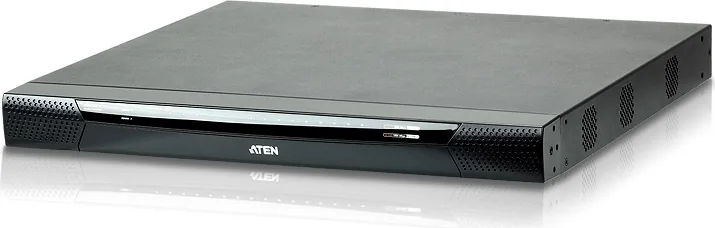
Managing servers across a busy data center is easier when you can see, control, and troubleshoot from one place. The ATEN KN4116VA is an IP-based KVM control unit designed to let local and remote operators access multiple servers through a single console. It is built for organizations that need fast, dependable remote operations without sacrificing security or usability.
With up to 16 server ports in a 1U form factor, the KN4116VA supports both local and concurrent remote sessions. Its bus architecture enables 1 local session plus up to 4 remote sessions working independently, making it well suited for IT teams that share responsibilities across different machines. For display performance, it supports high video resolutions up to 1920 x 1200 at 60Hz with 24-bit color depth, helping preserve detail during remote administration.
Remote access is powered by standard TCP/IP connectivity, so operators can connect over a LAN, WAN, or the Internet using an IP address. The interface can be reached through a web browser, and the system also supports standalone Windows and Java client applications for flexibility across environments. For users who need to move beyond basic control, the KN4116VA includes virtual media capabilities, enabling remote file transfers, software installations, and OS patching via mapped USB or optical media.
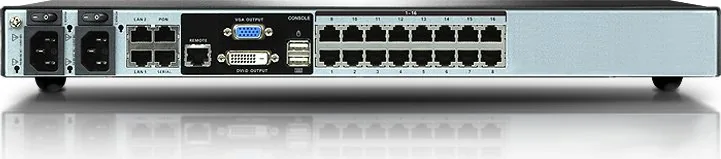
Security and reliability are major focus areas. The unit supports multiple authentication options such as RADIUS, LDAP/LDAPS, and Active Directory. It supports TLS 1.2 with RSA 2048-bit certificates for browser login security, along with configurable encryption choices for keyboard/mouse, video, and virtual media data. To further reduce downtime risk, the switch includes dual power supplies and dual 10/100/1000 Mbps NICs for redundant network operation.
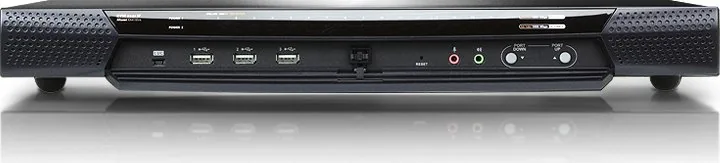
Operational convenience is supported by features like the Adapter ID function, which preserves port-related settings when an adapter cable is moved, reducing reconfiguration effort. Hot plugging is also supported, allowing components to be removed and added back without shutting down the switch. For environmental resilience, supported models in this KN range include temperature sensors that regulate internal fan speed based on room conditions, helping optimize energy use and component longevity.
Key takeaways
- Centralized control of up to 16 servers from a single console using IP connectivity
- Up to 1 local plus 4 remote independent sessions for shared administration
- High-resolution video and performance-focused virtual media for remote maintenance
- Strong security options including TLS 1.2, certificate-based login protection, and configurable encryption
Notes
- Proper grounding and approved cabling (Cat 5e or higher) matter for safe, stable operation.
- When using virtual media and remote access, ensure client and browser requirements align with your environment.
Search for 67,706 Manuals online


Type-in Brand or Model